PSD2 Strong Customer Authentication
Within the guidelines of Open Banking PSD2 standardization, Ebury, as a Core Banking System (CBS) has to provide a Strong Customer Authentication (SCA) service.
PSD2 SCA is an authentication workflow making sure that financial transactions initiated via a Third Party (TPP) would still directly authenticate the Payment Service User (PSU) against the login system of the financial institution that is involved in performing the actual payment.
Ebury is using Equens Worldline (eWL) Digital Banking Platform (DBP) as a Third Party Provider (TPP). Therefore we need to implement a service that complies to eWL specifications.
Problem Description
According to Open Banking Standards, as a Core Banking System (CBS), Ebury has to provide a Strong Customer Authentication (SCA) solution, aligned to the workflows of Equens Worldline (eWL), the Digital Banking Platform (DBP) of Ebury's choice.
Ebury's SCA implementation has to precisely correspond to API contracts defined by eWL, performing all mandatory steps of the the Authentication Workflow.
The outcome of the authentication session is an Access Token, generated for the PSU, providing access to requested CBS (Ebury) services. The access token is created by the CBS, it is re-usable and has a limited lifetime.
eWL is responsible for archiving SCA related information for audit reasons. Thus data only has to be stored for the (short) time of validity on Ebury side.
Background
Ebury is strongly focusing on complying to Open Banking Standards defined by the European Union. The integration of necessary services is in progress, with a high priority. PSD2 SCA is part of this effort.
The Authentication Workflow
This workflow diagram (from eWL Documentation) describes the basic screenplay of the PSD2 SCA authentication flow.
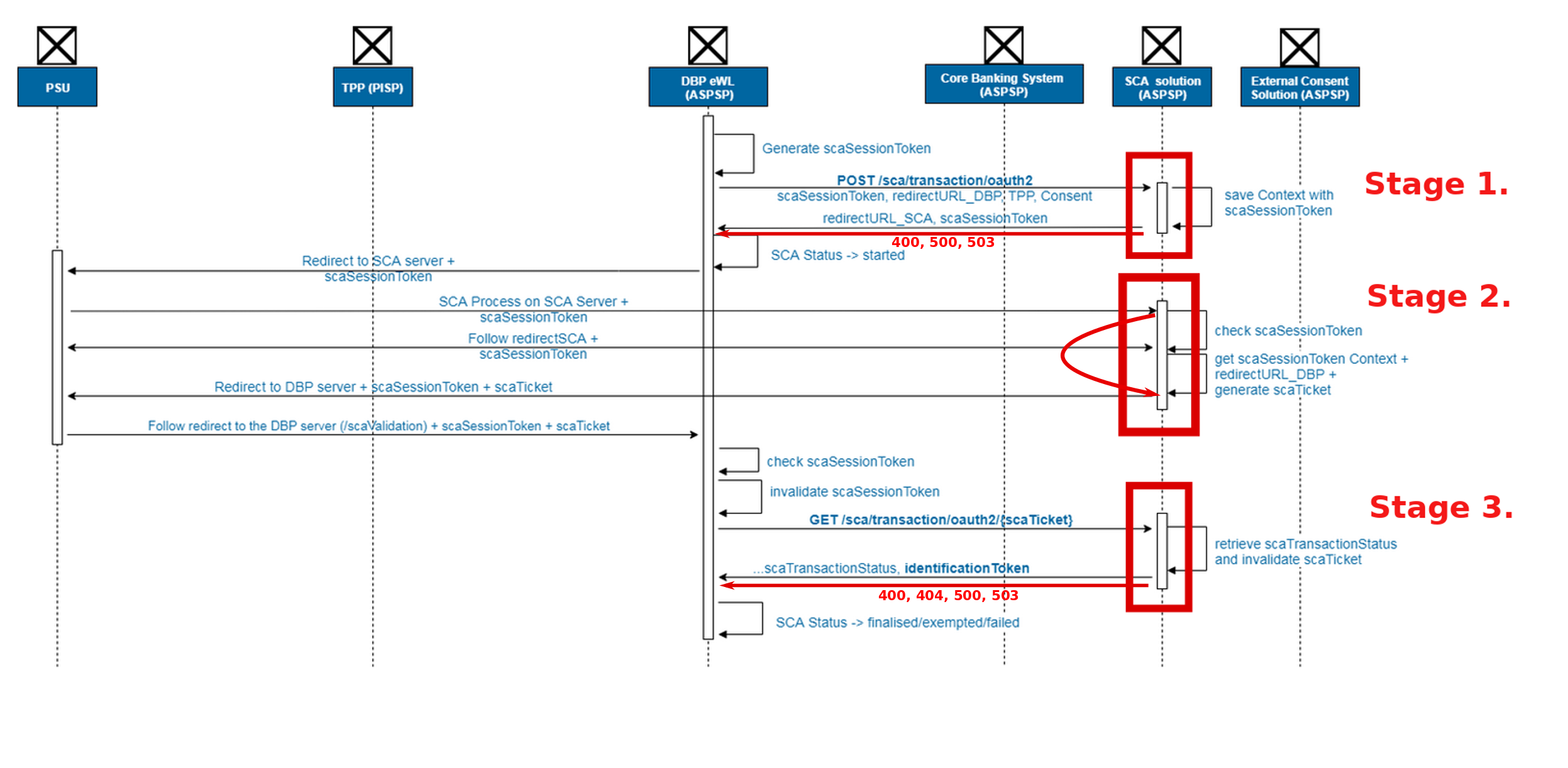
NOTE: The labels on the workflow diagram may, or may not precisely describe payload fields or query parameters. Please refer to each individual endpoint for the correct naming.
The workflow has to be respected in all use-cases, including errors and failures.
No matter what, we have to make sure that the full chain can be carried out, without being blocked
at any stage. The only exception is the absence of session data on CBS-side.
(A 401 response is allowed in this case.)
The validity time of all session-related information is a fixed, configurable time-period (5 minutes). Similarly a retention period (1 hour) has to be preserved, before erasing all session data.
At the end of the authentication workflow, all session-related data is removed on CBS-side, regardless of the outcome of the process.
The scaTicket
The lifetime of the PSD2 SCA authentication process (so called "transaction") is traced via session tokens.
The DBP defines a session identifier (scaSessionToken) and communicates it to the CBS
and controls the validity.
On CBS-side a related session identifier has to be created (scaTicket),
directly linked to the DBP-side identifier (scaSessionToken) in a one-to-one relation.
It does not express authentication status and has no secure content.
This CBS-side session identifier is crucial to be available until the final
stage of the authentication flow. It remains valid after the validity
of the DBP-side identifier, and it is being used in the final stage of the workflow
(see Stage 3. URL /sca/transactions/oauth/{scaTicket}).
Stage 1.
In the initial stage of the authentication process, the following information is communicated by the DBP to the CBS:
- the
scaSessionToken - details of the financial transaction (
consent) - redirection URL back to the DBP (this will be used at end of Stage 2.)
In response the CBS has to send the URL where CBS SCA login pages can be accessed by the PSU.
Security of the communication is assured by mutual TLS at this stage.
Stage 2.
In Stage 2. user authentication happens between CBS and the PSU. It is up to the CBS to handle the authentication flow according to their convenience.
There's a direct interaction between the CBS and the PSU, no action is performed by the DBP.
The outcome --whether the PSU is successfully authenticated or not-- is not (yet) communicated to the DBP, but has to be stored internally on CBS side.
At the end of Stage 2., initiative is handed back to the DBP, using the redirection URL received in Stage 1., with both session IDs as parameters.
Stage 3.
By the final stage of the authentication flow, scaSessionToken is already invalidated on DBP side.
Therefore the scaTicket is used in the contact URL, so that the session data could be retrieved on CBS side.
CBS has to check the status of the authentication flow, stored internally in Stage 2..
In case the user authenticated successfully, the CBS Access Token object (identificationToken)
is created providing access to Ebury services.
The validity time of the token depends on the type of the transaction (PIS/AIS).
The overall result of the authentication workflow is expressed by the scaTransactionStatus field.
Any errors that may have occurred during the process could be expressed here.
Concerning potential status labels, here are examples of usages:
SCA_OK: successful authenticationSCA_CANCEL: authentication cancelled by the userSCA_TIMEOUT: authentication process took too longSCA_EXEMPTED: no authentication is requiredSCA_NOK: incorrect credentialsREQUEST_REJECTED: bad requestSCA_OTHER_ERROR: all possible other errors
The message displayed to the user will be transformed to messages based on the scaTransactionStatus, according to
eWL documentation, Errors Displayed to PSU.
In general, either the authentication is validated (SCA_OK, SCA_EXEMPTED), or not.
The status of the SCA workflow remains available on DBP-side. Being able to distinguish between various outcomes is useful for analysis purposes.
At the end, CBS has to return:
- the outcome of the SCA authentication session (
scaTransactionStatus) - the CBS Access Token, if any (
identificationToken)
Communication is securized again via mutual TLS authentication.
Solution
Here we present our solution for the problem in detail, according to the three main stages described above.
Overview
Given that the requirements, workflows and expected visual interfaces are very similar to functionalities of the Ebury API Auth Service, we chose not to implement a new service, but to extend API Auth with SCA functionality.
DyanmoDB seemed well-suited to the requirements (short-term, temporary session data), as it has a native clean-up mechanism on data expiry -- greatly simplifying processes for us. Extending the API Auth service also allows us to re-use the API Auth DynamoDB database.
Yet, despite the similarity of workflows, we define new endpoints for all new functionalities, that reside in a namespace dedicated to SCA within API Auth.
Only the HTML templates are re-used, preserving unified looks for API Auth login pages.
Currently there are two limitations of the SCA workflows:
- there is only one brand allowed (configurable, current value:
EBP)
Stage 1: Initializing the session
When the user (PSU) contacts eWL (DBP) in attempt to make a payment, a authentication transaction session is started.
In Stage 1. the CBS receives:
- the
scaSessionToken(DBP-side session identifier) - the
consentfield describing the financial transaction details - the
dbpRedirectURLthat is to be used in the final step of Stage 2.
The consent field highlights what kind of financial transaction we are dealing with.
Validity time is based on configurable settings. Currently it goes as below,
depending on contents of the consent data:
aisconsent:aisconsent.validUntilfield is not specified: 90 daysaisconsent.validUntilfield is specified: maximum of 90 days or the value of the field
pisconsent: 1 hour
Session data to be saved internally on CBS-side for later usage:
sca_session_token: also used as a unique reference to the internal data structureaccess_token_ttl: lifetime of the Access Tokenredierct_url: value of thedbpRedirectURLscaTransactionId: a unique ID (UUID) is to be generated and saved for each transaction.authorized: authentication status (default:FALSE)
Furthermore the reverse relation has to be created, allowing to retrieve session data
based on the CBS-side identifier (scaTicket) in preparation to Stage 3..
Validity and lifetime for both datastructures is configurable (see current values in The Workflow).
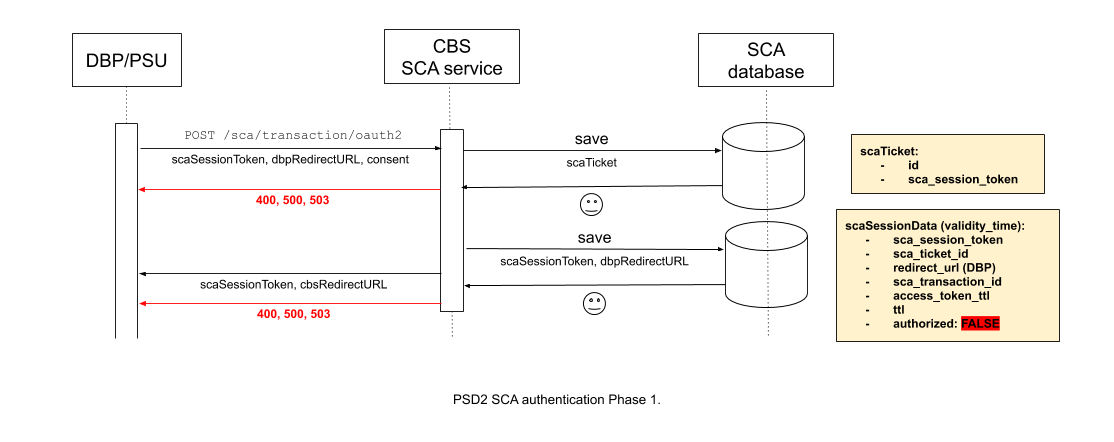
Based on all the above, the specification of the corresponding endpoint goes as below. This contract is strictly regulated by eWL.
POST /sca/transaction/oauth2
Initial status:
- DBP-side session ID, consent information and DBP redirection URL (for Stage 2.) were received
Actions:
- Calculating and setting
access_token_ttlvalue - Creating
scaTicketandscaSessionDataobjects - Linking them together as a mutual reference
- Saving session information internally
Header:
NOTE: Most of these values won't be used in Ebury SCA authentication
{
   Request-ID: string *,            # ID of the request, unique to every call from a TPP or PSU
   PSU-Accept-Language: string,     # Accept Language header between PSU and TPP, if available.
   PSU-IP-Address: string,          # IP Address field between PSU and TPP (if request was initiated by PSU). Format ipv4.
   PSU-IP-Port: string,             # IP Port field between PSU and TPP, if available.
   PSU-Accept: string,              # Accept header fields between PSU and TPP, if available.
   PSU-Accept-Charset: string  ,    # Accept header fields between PSU and TPP, if available
   PSU-Accept-Encoding: string,     # Accept header fields between PSU and TPP, if available.
   PSU-User-Agent: string,          # Agent header field of the HTTP request between PSU and TPP, if available.
   PSU-Device-ID: string,           # UUID for a device (or device dependant application), which is used by the PSU, if available.
   PSU-Geo-Location: string,        # The forwarded Geo Location of the corresponding http request between PSU and TPP if available.
   tppId: string *,                 # Id of the Third Party Provider
   tppName: string *,               # Name of the Third Party Provider
}
Payload
NOTE: The consent field contains full details of the payment (i.e. a big chunk of data). We don't
need to worry about the actual details, thus the snippet above is simplified. Yet we distinguish
between AIS and PIS type of requests.
PIS Consent
{
    scaSessionToken: string *,   # DBP session identifier
    dbpRedirectURL: string *,    # URL used once the login session is successfully completed
    consent:
        scope: string *,         # "PAYMENT_INITIATION" or "PAYMENT_CANCELLATION"
        pisconsent: PISConsent   # PIS consent details
}
AIS Consent
{
    scaSessionToken: string *,   # DBP session identifier
    dbpRedirectURL: string *,    # URL used once the login session is successfully completed
    consent:
        scope: string *,         # "ACCOUNT_ACCESS"
        aisconsent:
            validUntil: string   # optional validity limit
            [..]
}
Response (200 OK)
{
    scaSessionToken: string *   # DBP session identifier
    cbsRedirectURL: string *    # Ebury (CBS) login pages
}
Errors
{
    code: string *,
    description: string *
}
Where code and description go such as:
| Code | Description |
|---|---|
| 400 | Bad request error, generic message sent to the PSU |
| 500 | Internal server error, generic message sent to the PSU |
| 503 | CBS IS down, generic message sent to the TPP |
Stage 2: Ebury Authentication
At Stage 2. the DBP is handing over the initiative to the CBS, so that custom authentication could be performed.
The underlying workflow is very similar to Ebury API Auth, supporting both Simple and Two-factor Authentication.
Process structure
Before we would describe the exact workflows, let us introduce the logic they've been built around. Keeping the sketch in mind simplifies the understanding of the upcoming detailed diagrams.
We aim to have organizational units (endpoints) with well-defined functionalities, suited to sub-tasks of the workflow, re-usable both in the Simple and the Two-factor authentication flow.
Therefore we did our best to decouple common behaviors and split specific ones. Which may seem complex at the level of details. Yet, considered as an implementation of the basic idea below, complexity gets slightly reduced.
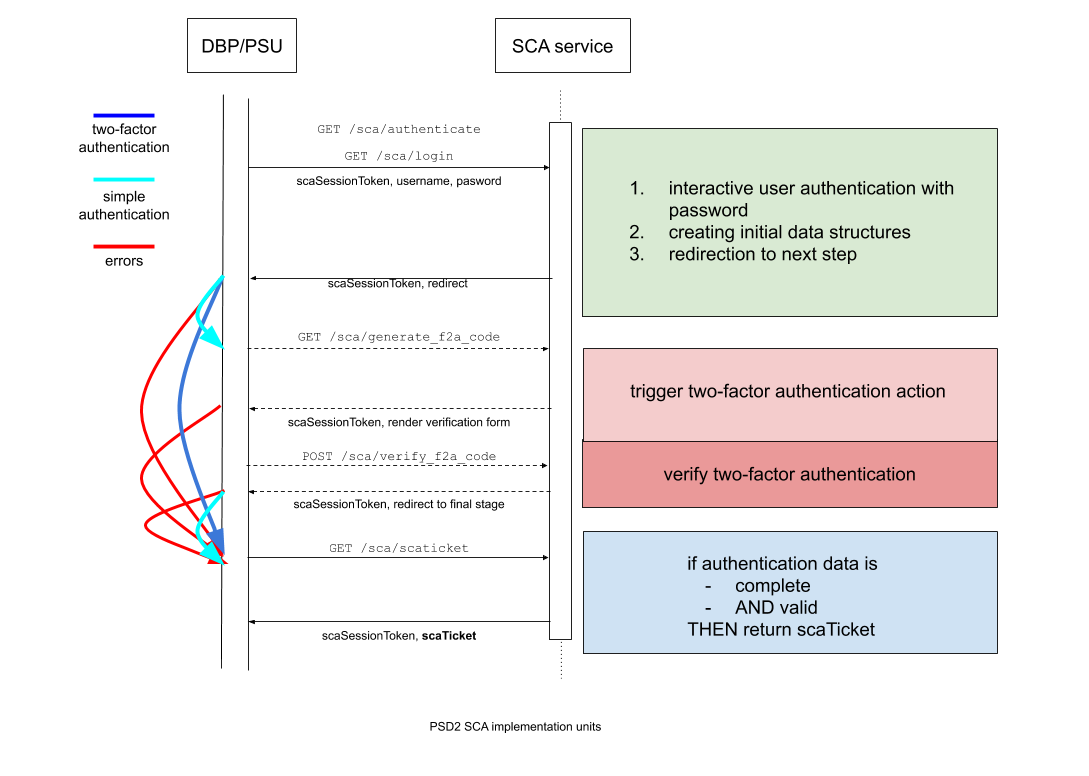
Simple Authentication only contains
- the interactive, password-based authentication part of the workflow (green)
- redirecting to the final stage (blue) where both the initiative and the session identifiers are returned to the DBP.
Two-factor Authentication starts the same way, but after the password-based authentication (green), the redirection doesn't occur to the final stage (blue). Instead
- it goes to the endpoint that is triggering the second stage of Two-factor Authentication (pink)
- where the verification code is sent to the PSU
- a form is rendered, where the user has to submit the verification code received
- the next endpoint (dark pink) is performing code verification
- afterwards redirection goes towards the final stage (blue)
On any errors the flow is interrupted, jumping directly at the final stage (blue).
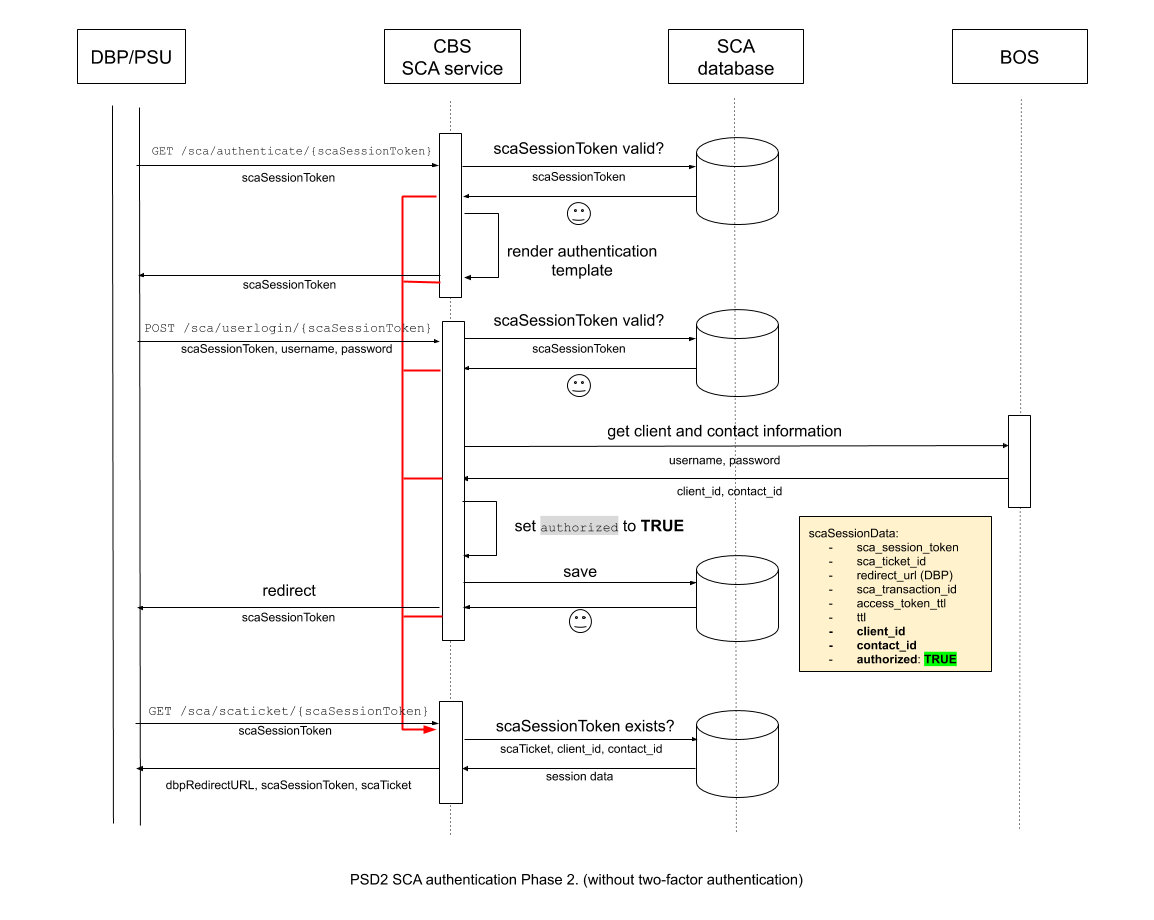
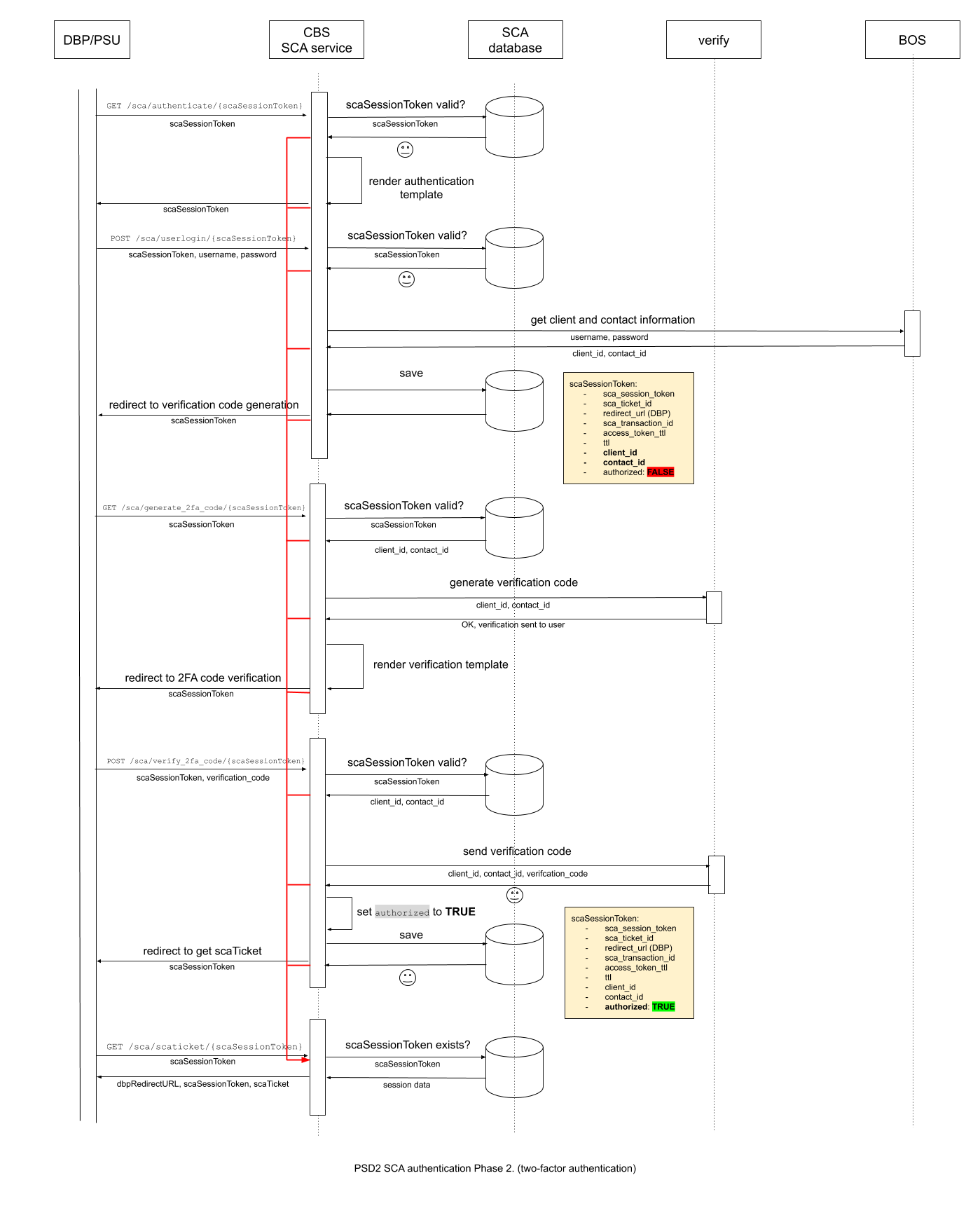
2.a Simple authentication
DBP redirects the PSU to the CBS authentication URL (cbsRedirectURL) received in Stage 1.
GET /sca/authenticate/{scaSessionToken}- Supposing that the session is valid
- an interactive authentication form is rendered,
- where the PSU has to submit credentials to the CBS.
POST /sca/userlogin/{scaSessionToken}- On form submission, again, the validity of the session is confirmed,
- then user credentials are checked against the BOS registry,
- user data is retrieved and saved on success,
- internal session data is updated recording to the status of the authentication
- and a redirecion occurs to the final step.
GET /sca/scaticket/{scaSessionToken}- After checking session validity
- redirection to the DBP occurs, with both session identifiers (
scaSessionToken,scaTicket).
On any errors redirection occurs to the final endpoint (3).
If session data reached the end of time-to-live, and session identifiers (scaSessionToken, scaTicket)
are not available anymore, an 401 error can be returned to the PSU.
2b. Ebury Authentication, two-factor authentication
The two-factor authentication is slightly more complex.
- The beginning of the workflow is identical to
Simple Authentication, up to
the point that user data is retrieved from BOS in response to valid user
credentials,
- yet internal authentication status is not updated (default value still applies).
GET /sca/generate_2fa_code/{scaSessionToken}- Ebury Verify service is contacted, requesting a validation code to be sent to the user.
- Having obtained the code, a second form is rendered, where the user can enter the verification code.
POST /sca/verify_2fa_code/{scaSessionToken}- On reception of the code submitted by the user, session validity is checked again.
- Ebury Verify service is contacted again, asking for code verification.
- On a successful response from Ebury Verify service, finally internal authentication status is updated.
- The final step is identical to the one in Simple Authentication
Error handling is also identical to Simple Authentication
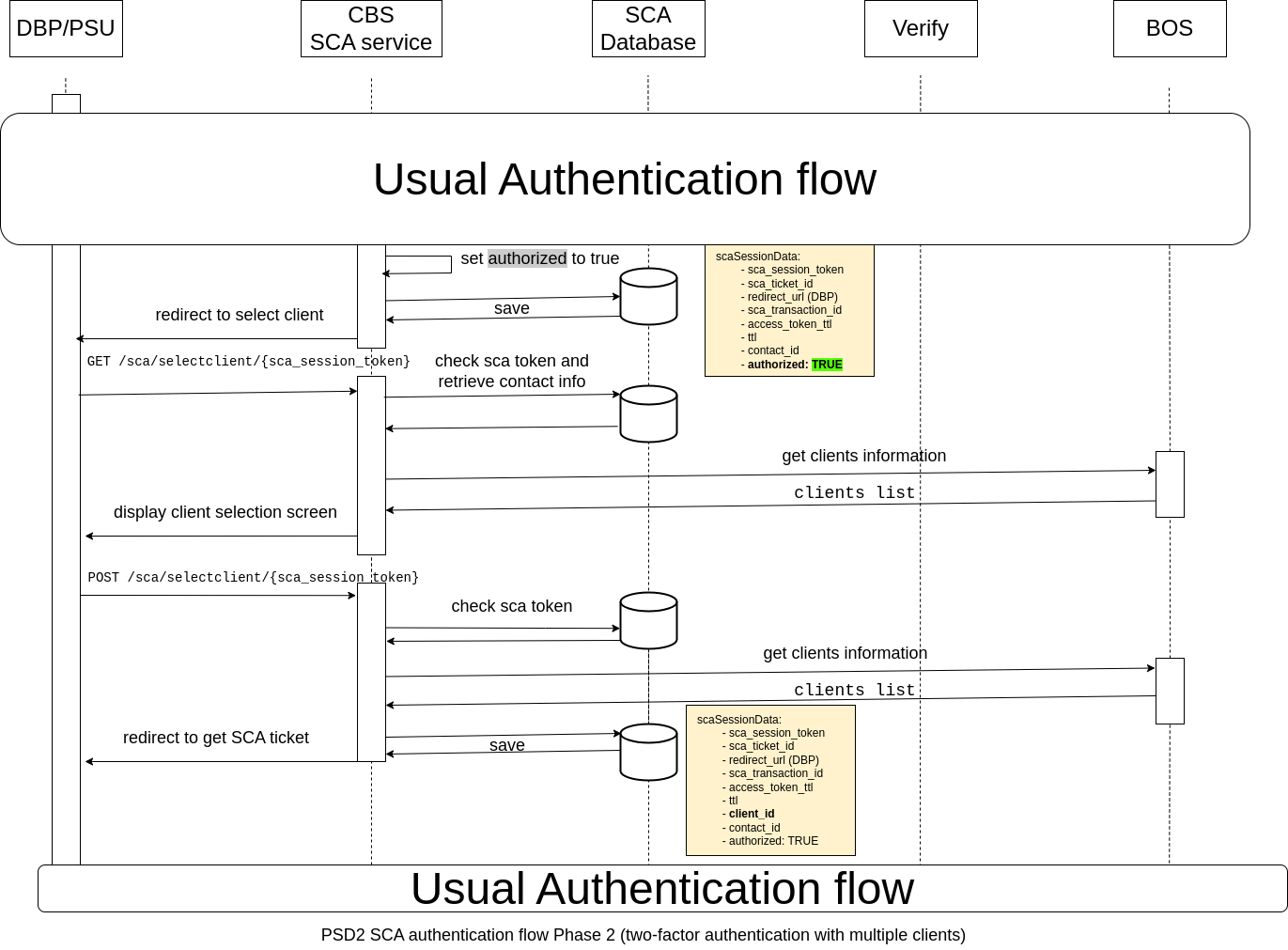
2.c Authenticated user has different clients
This applies to both simple and two-factor-authentication cases.
In the case of Simple Authentication, the workflow goes as explained until POST /sca/userlogin/{scaSessionToken}:
POST /sca/userlogin/{scaSessionToken}- Validation is done as previously.
- When the information is retrieved from BOS, multi-client account is detected.
- Internal session data is updated recording to the status of the authentication and the user is redirected to
GET /sca/selectclient/{scaSessionToken}.
GET /sca/selectclient/{scaSessionToken}- The system checks the available clients from the account linked to the SCA session and creates a small HTML page.
- The user is displayed a selection screen. The user can select the client to use between the available clients from their account.
- When the user selects a client and presses the confirm button, a request to
POST /sca/selectclient/{scaSessionToken}is sent to the CBS.
POST /sca/selectclient/{scaSessionToken}- The request contains the specific client the user has selected.
- The system checks that the received client is one of the available clients for the account logged in.
- If the client is available, it is stored with the rest of the session data, as it would normally already have been stored if the account was not multi-client. The usual redirect to the DBP occurs,
GET /sca/scaticket/{scaSessionToken}- Flow continues as the normal Simple Authentication process.
In the case of Two Factor Authentication, the workflow goes as explained until POST /sca/verify_2fa_code/{scaSessionToken}:
POST /sca/verify_2fa_code/{scaSessionToken}- Validation is done as previously.
- When the successful response from Ebury Verify service is received, internal authentication status is updated, and multi-client account is detected.
- The user is redirected to
GET /sca/selectclient/{scaSessionToken}.
- The rest of the steps are identical to the previous case with Simple Authentication for multi-client accounts.
The reason to use the GET /sca/selectclient/{scaSessionToken} request is to avoid having to create two separate flows for each case. This way, each flow just redirects to the Client Selection request and the requests handles that part regardless of the authentication process.
GET /sca/authenticate/{scaSessionToken}
Actions:
- Checking the validity of the session.
- Rendering login template.
Parameters
scaSessionToken
Headers
Standard HTTP headers
Response
Login template rendered, with a POST action to /sca/userlogin/{scaSessionToken} at form submission.
POST /sca/userlogin/{scaSessionToken}
Initial status:
- As of a form action, a username and password are received in the payload.
Actions:
- Checking the validity of the session.
- Checking user credentials against BOS, receiving user data in return.
- In case of Simple Authentication, the
authorizedflag is set toTRUEon success. - New (
client_id,contact_id) or updated (authorized, if applies) data is saved internally. If the user has multiple-clients,client_idcolumn is not filled yet. - The corresponding redireciton occurs
- Simple Authentication: towards the last endpoint in Stage 2. (unless it is a multi-client user, in which case it is redirected to the client selection screen)
- Two-factor Authentication: towards second-level verification
NOTE: brand information is fixed (see Overview).
Payload
{
    scaSessionToken: string *,
    username: string *,
    password: string *,
}
Response
Redirection to the corresponding next step of the authentication flow.
- Simple Authentication:
GET /sca/get_scaticket - Two-factor Authentication:
GET /sca/generate_2fa_code
GET /sca/generate_2fa_code/{scaSessionToken}
Only used in two-factor authentication flows.
Actions:
- Checking the validity of the session, on positive response, internal session data is returned.
- The Ebury Verify service is contacted, requesting a verification code to be sent to this particular user.
- On a positive response, an HTML form is rendered where the user can enter the verification code.
Headers
Standard HTTP headers
Parameters
scaSessionToken
Response
Code verification HTML template rendered, with POST action to /sca/verify_2fa_code/{scaSessionToken} at form submission.
POST /sca/verify_2fa_code/{scaSessionToken}
Only used in two-factor authentication flows.
Initial status:
- As of a form action, a user verification code was sent in the payload.
Actions:
- Checking the validity of the session, on positive response, internal session data is returned.
- The Ebury Verify service is contacted for code verification for this specific user.
- On success, internal authentication status is updated and saved.
- At the end a redirect is applied towards last endpoint of Stage 2. (unless it is a multi-client user, in which case it is redirected to the client selection screen)
NOTE: User brand information is fixed (see Overview).
Headers
Standard HTTP headers
Payload
{
    verify: string *            # Verification code submitted by PSU
}
Response
Redirect to the /sca/scaticket/{scaSessionToken} endpoint.
GET /sca/selectclient/{scaSessionToken}
Only used in multi-client authentication flows.
Actions:
- Checking the validity of the session.
- BOS service is contacted, requesting the client list for this particular user.
- An HTML form is rendered where the user can select the Client to log as.
Headers
Standard HTTP headers
Parameters
scaSessionToken
Response
Client selection HTML template rendered, with POST action to /sca/selectclient/{scaSessionToken} at form submission.
POST /sca/selectclient/{scaSessionToken}
Only used in multi-client authentication flows.
Initial status:
- As of a form action, the selected client received in the payload.
Actions:
- Checking the validity of the session.
- Check the available clients for the user in BOS.
- If the client is accepted, the client_id is set.
- At the end a redirect is applied towards last endpoint of Stage 2.
Payload
{
    scaSessionToken: string *,
    client_id: string *,
}
Response
Redirect to the /sca/scaticket/{scaSessionToken} endpoint.
GET /sca/scaticket/{scaSessionToken}
Final endpoint of the Stage 2. workflow.
Actions:
- Checking the validity of the session, on positive response, internal session data is returned.
- Adjust parameters according to contents of
dbpRedirectURLscaSessionTokenmay be part of it, make sure not to duplicate
- Redirection to the DBP redirection URL (saved in Stage 1) handing back the control to the DBP.
Headers
Standard HTTP headers
Parameters
scaSessionToken
Response
Redirect to redirectURL_DBP with scaSessionToken and scaTicket as parameters.
Errors
{
    code: string *,
    description: string *
}
Where code and description go such as:
| Code | Description |
|---|---|
| 401 | Session data doesn't exist |
3. Creating access token, closing the session
This is the stage where the CBS Access Token, the main target of the whole workflow is generated. This "Oauth2-like" token provides access to CBS services for the PSU.
Once post-authentication actions are completed on DBP side, a request is sent to CBS. Based on the authentication status stored on CBS-side, one of the following use cases apply:
- On success, the CBS Access Token is generated, with the corresponding lifetime (set in Stage 1.)
- If the authentication failed, no access is provided for the PSU
Finally, authentication session data is removed on CBS-side. Authentication status is returned to the DBP, together with CBS Access Token (if any).
The corresponding endpoint contract is strictly regulated by eWL.
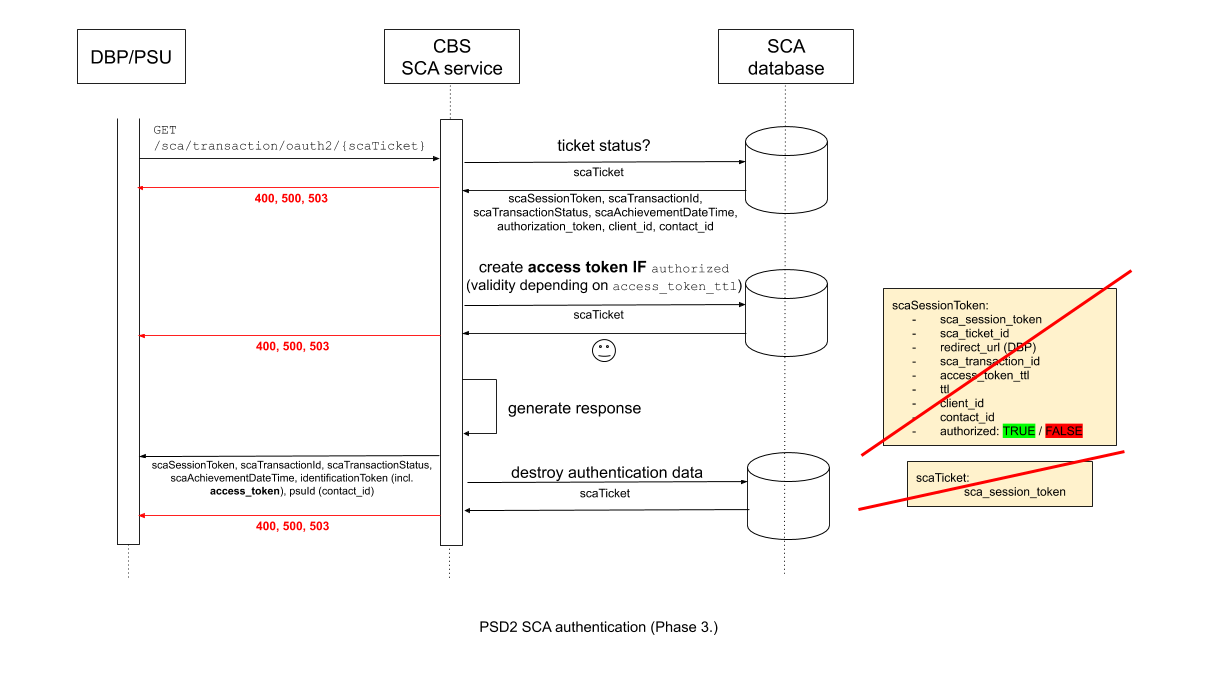
GET /sca/transaction/oauth2/{scaTicket}
Actions:
- Checking the validity of the
scaSessionTicket, on positive response, internal session data is returned. - On positive internal authentication status, an Access Token is generated for the user with the lifetime set in Stage 1.
- Response to DBP is created
- Session data is destroyed
- Authentication status together with the Access Token is returned to the DBP
Headers
{
    Request-ID: string *,   # ID of the request, unique to every call from a TPP or PSU
    tppId: string *,        # Id of the Third Party Provider
    tppName: string *       # Name of the Third Party Provider
}
Parameters
scaSessionToken
Response (200 OK)
{
    scaSessionToken: string *
    scaTransactionId: string *          # scaTransactionId
    scaTransactionStatus: string *      # Enum: "SCA_OK", "SCA_EXEMPTED", "SCA_NOK", "SCA_CANCEL", "SCA_TIMEOUT", "SCA_OTHER_ERROR", "REQUEST_REJECTED"
    scaAchievementDateTime: string *    # Timestamp of the invaliation of scaTicket (YYYY-MM-DDTHH:mm:ssZ)
    psuData: {
        identificationToken: string *   # String value composed of "access_token#client_id#contact_id"
        psuId: PSUId string *           # contact_id
    }
}
Errors
{
    code: string *,
    description: string *
}
Where code and description go such as:
| Code | Description |
|---|---|
| 400 | Bad request error, generic message sent to the PSU |
| 404 | SCA ticket does not exist, generic message sent to the TPP |
| 500 | Internal server error, generic message sent to the PSU |
| 503 | CBS IS down, generic message sent to the TPP |
Alternatives
We were considering to create a new, separate service specifically to implement PSD2 SCA authentication functionality.
However at the end we found too much in common with the already existing API Auth service.
- very similar workflows
- same templates to render
- database usage is so much alike, that the same DynamoDB database should be re-used.
Therefore we decided that adding new functionality to the Ebury API Auth serice is more convenient.
Caveats
Current Ebury authentication flows don't take most of the extra information sent by the DBP (payment details, TPP information, etc.) into consideration. Changes may need to be applied if this data would get more significance in the future.
Operation
All new functionality will run under the wings of the already existing Ebury API Auth service. No changes or additional infrastructure or service configuration is required.
Security Impact
Authentication is surely a security-sensitive matter.
In order to preserve security standards, we:
- follow PSD2 standard workflows
- follow already existing Ebury patterns
- use Equens Worldline as a DBP
- take advantage of automatic validity lifetime handling by DynamoDB
- we use unique identifiers for each individual session
- we don't reveal any sensitive data throughout the workflow
- we strictly control authentication status internally
Performance Impact
Neither the workflows, nor the impacted services introduce anything radically new to Ebury authentication flows.
Of course, opening up a new service will produce extra load by intended usage. (If sensible defaults may not be suitable, we may need to adjust those if needed for sufficient service performance.)
Furthermore we need to take into account extra load generated against the Ebury Verify Service.
Automatic expiration times on session information allows us to keep databases concise, and prevent us from storing outdated information. Data dependencies are aging together, thus locking references can't occur.
Developer Impact
All these solutions are brand-new in Ebury, specifically targeting PSD2 compliancy.
As for the Ebury API Auth service: none of the already exising functionality should be impacted.
Data Consumer Impact
Any data input/output is one of:
- internal
- strictly regulated by eWL (DBP)
Thus expected data flows are preserved towards eWL, and noone else should be impacted.
Deployment
All these changes should be rolled out natively as an Ebury API Auth service upgrade.
Dependencies
This task is self-containing, no dependencies.
References
Ebury API Auth: https://docs.ebury.rocks/#authentication
EquensWorldline Swagger: https://documentation.rce-mbwl.as8677.net/swagger/#!/
EquensWorldline Documentation: https://documentation.rce-mbwl.as8677.net/docs/Workflow-SCA-on-CBS_179962700.html