BOS Releases automation
Remove as much as we can the manual steps in the BOS Release workflow
Problem Description
Our current BOS release workflow contains a lot of manual steps where are involved SECO tool, Jenkins process, Slack communications, ... (Here an smart guide of the process).
This workflow need to be improved automating some steps considering the risk of it and the possibility to human errors during the process. Apart from that, it requires time from different areas as BOS Release manager and SRE team where, at least, needs four hours by BOS Release manager (reviewing the process and executing the proper steps) and two hours by SRE team member per day, considering that we have two releases everyday.
Background
We work all those years to automatise some pieces of the BOS release workflow like the deployments using Ansible Tower (right now AWX), some Jenkins jobs to avoid manual steps, ... and this generates a workflow with a lot of pieces of a big puzzle as you can see on this diagram.
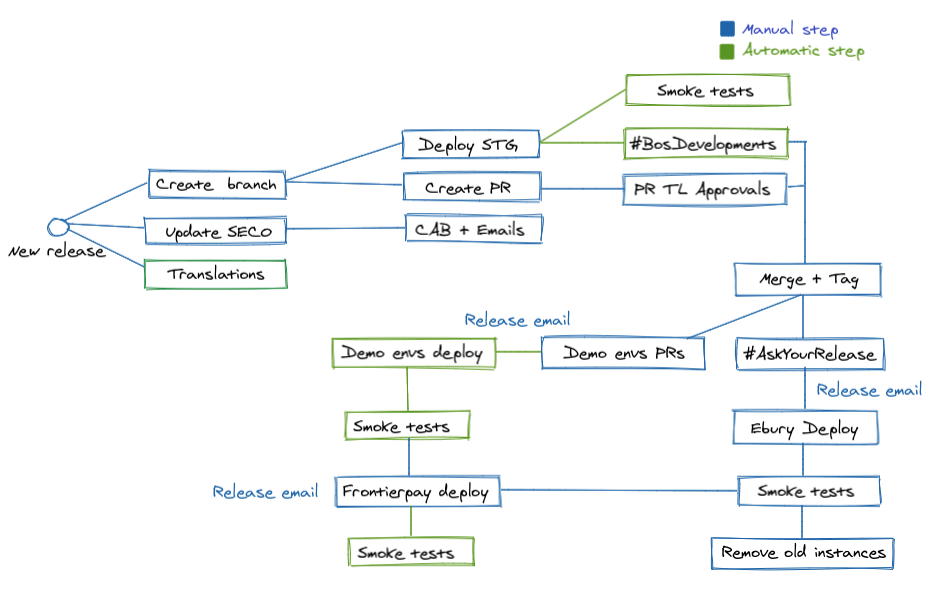
All the manual steps don't mean that you require code or perform something hard but them requires an human interaction like press button, send a communication, etc. but you have more details here:
- First start point is the SECO tool, where we define the BOS version and start and end release data using the fixVersion field.
- After first step, we need to access to Github to create the release branch, the release PR and include all the mandatory reviewers based on the SECO JIRA tasks. Apart from that, it's necessary to compare the SECO JIRA tasks with the Github commits. If everything goes well, you can create the CAB Confluence page and send the emails communications about it.
- Finally, you can proceed to deploy the release branch in the BOS staging platform to confirm that the process goes well, the BOS smoke tests execution finished OK and the release PR CIs execution are in green.
- Once we have everything ready, it's possible merge the PR using Fast-Forward strategy and tag the commit to request to the DevOps through Slack the deployment of the new code in Ebury PROD environment at the same time that you sent the SECO communications about it.
- Later, you need to create three PRs in the platform-manifest repository to update the Demo, Solutions and Sanbox environments after merge them and send the send the SECO communications.
- The last step is execute on Jenkins the Frontierpay Jenkins deployment job to update it and send the SECO communications and finish marking the SECO release as done.
Solution
We're gonna work to automate the current workflow, so the final picture will be:
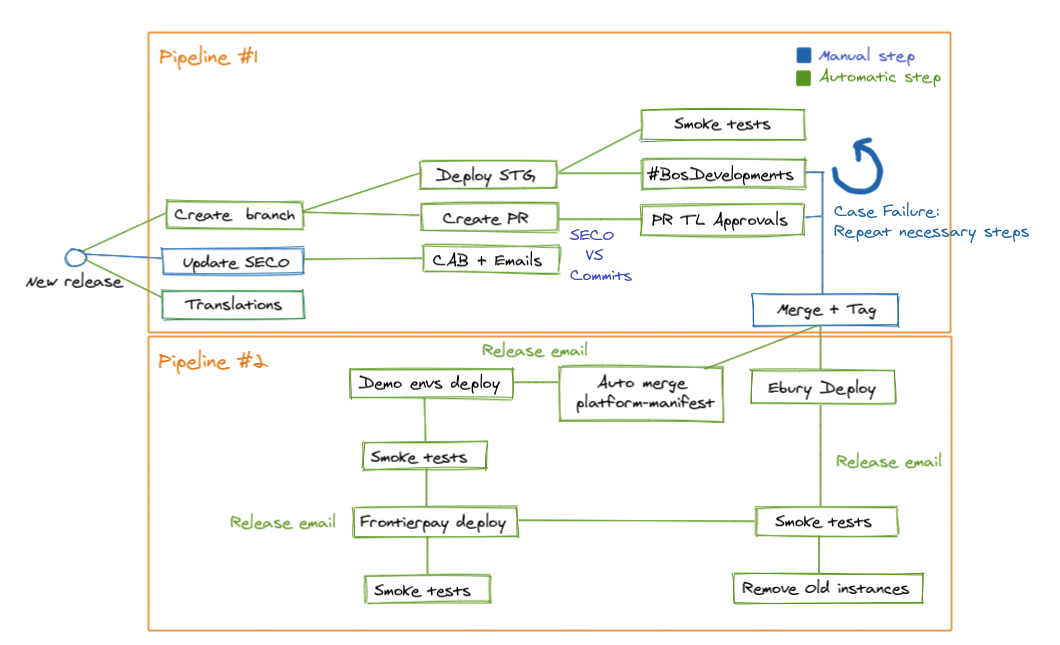
As you can see the process will be divided in two pipelines:
- First one:
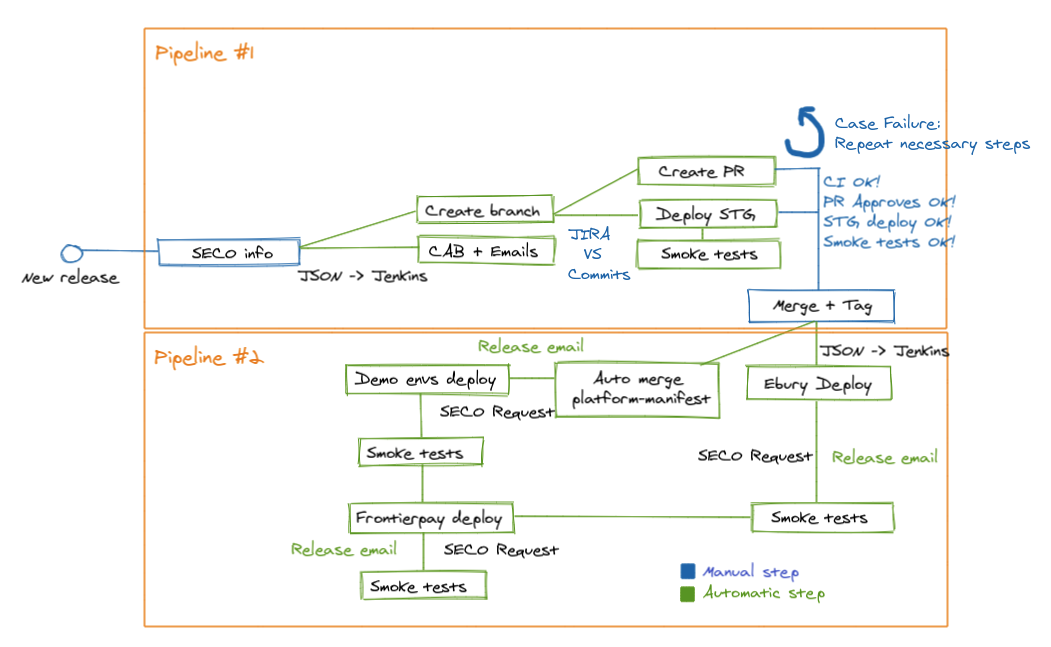
- Our start point will be SECO tool, where we define the BOS version and start and end release date using the fixVersion field as now. SECO send information to Jenkins using a JSON (information about version, service, release ID, ...)
- This action trigger a Jenkins pipeline that with the received information mentioned:
- Create the release branch.
- BOS staging deployment with the release branch and after that, automatic BOS + EBO smoke tests execution.
- Create the PR branch with:
- Description (SECO + CAB links)
- Mandatory approvals (this info comes from JIRA teams definition and based in the JIRA tasks in SECO)
- At this point, the pipeline is paused to allow to BOS Release manager compare the SECO JIRA tasks with the Github commits, if everything is OK we can continue with the workflow, if not, we'll amend the JIRA tasks setting/removing the fixVersion and adding/removing default reviewers in the release PR (the possible failure always is going to be in the JIRA side).
- And this is the end of this pipeline, the BOS release manager will check the BOS Staging deployment, the BOS smoke tests execution, the CIs execution in the release PR and the mandatory approvals before to merge it and tag the commit in Github.
- Second one:
- After merge and tag, the process to generate the BOS AMI with the new code version is started.
Once is finished two process are executed in parallel:
- BOS Ebury PROD env deployment. First at all, send the SECO email to communicate the deployment, after this will execute the Jenkins job that call to AWX scripts to execute WARM and later, SWAP machines in PROD, if everything goes well, it'll execute the BOS Smoke tests. As final step, we'll execute remove the old instances with a pause to proceed (to wait the usual thirty minutes or the Support team confirmation).
- BOS Demo envs deployments. First at all, send the SECO email to communicate the deployment, later when a new AMI is generated this creates a Github commit in platform-manifest repo so after this commit, an automatic merge is going to be done to the proper branches to trigger the deployment in Demo, Solutions and Sandbox environments.
- When the previous steps finished properly we'll continue with the last step, BOS Frontierpay deployment, as the rest of the deployment we'll send the SECO email to communicate the deployment and after that trigger the current Jenkins job to deploy it which execute the smoke tests automatically when the deployment has been finished.
Translating all this info to a smart diagram:
About metrics and time consuming during the workflow, this is a comparative table that can help to understand how and where this implementation is going to save time:
| Action | Current time (minutes) | Expected time (minutes) |
|---|---|---|
| Fill the SECO information | 2 | 2 |
| Create branch | 1 | 0 |
| Create PR | 5 | 0 |
| Compare SECO vs Github | 5 | 5 |
| CAB + Email | 1 | 0 |
| Deploy Staging | 2 | 0 |
| Check PR approvals + CI + Deploy + Smoke tests | 10 | 10 |
| Merge + Tag | 2 | 2 |
| Ebury env deployment + Email | 20 | 0 |
| Demo envs deployment + Email | 10 | 0 |
| Frontierpay env deployment + Email | 1 | 0 |
Apart from that, it's necessary mention that with the workflow automation the people involved don't need to be aware all the time of the process because we'll have Slack messages in case of failure and after finish steps to have visibility all the moment.
Alternatives
One of the alternatives to this was this RFC where the releases are based in the Github commits instead of SECO but it was declined to divide the process in two steps, one to SDLC and another one to the deployments in production. Anyway, the requirement right now, is automate the current workflow to avoid manual steps.
Caveats
We evaluate the full process to decide which steps make sense automate and which not. At the end, we have a few steps that requires a huge coding effort to avoid a little manual step and it requires pause or break the process, it isn't the best but in this first iteration on the BOS Release automation. Anyway, the requirement as we mentioned in Alternatives section, is automate the current workflow to avoid manual steps.
Hotfix or fix necessary to apply in the release branch interrupt the process and it's going to require a manual re-deploy in the BOS Staging environment apart from the proper branch update in the "dev" branch.
Operation
This process is going to be done by the DXP team, at least in this first iteration, but the maintenance need to be done by the BOS teams (updates, new stages, etc) and used by the BOS Release managers who are involved in the execution of this workflow.
Security Impact
NA
Performance Impact
NA
Developer Impact
This only affect to manage in a proper way the BOS Releases, so it'll affect to a better performance in our daily work with it.
Data Consumer Impact
NA
Deployment
Taking into account that we divide the workflow in two pipelines, we'll divide the work in those two phases where the pipeline two (the deployment in production) have more priority and impact that the first one so, for that reason, we'll start with this pipeline. For more details you can access to this spreadsheet where every step is analysed from the develop, impact, ease and priority.
Dependencies
This implementation requires some improvements/developments in the SECO tool, the main one is generates an API.