Data lake to the Data Warehouse
Problem Description
This document aims to describe the flow of data from the data lake (S3 – AWS) to the data warehouse (BigQuery – GCP).
The data lake is an S3 bucket used to hold all the messages that flow through Kafka for the monitored topics. Kafka Connect is used to standardise the messages into NDJSON format.
The data warehouse is the central information repository used by the Data team to fulfil their reporting obligations. The data warehouse is hosted in GCP’s ( Google Cloud Platform ) serverless warehousing solution, BigQuery.
The cloud platform disconnect between the data lake and warehouse drives the need for a solution to keep both platforms synchronised in a timely manner.
This solution will be generic for all sources hosted in the data lake regardless of the content coming from them.
Solution
Due to the disconnect from the event driven architecture provided by Kafka, generated by reading from the data lake, the solution will aim to follow a micro match architecture.
The process of loading data from the data lake to the warehouse will be fully hosted in GCP to minimise inter-cloud communication between the different providers. This process will also try to minimise the maintenance costs by leveraging as many fully managed services as possible.
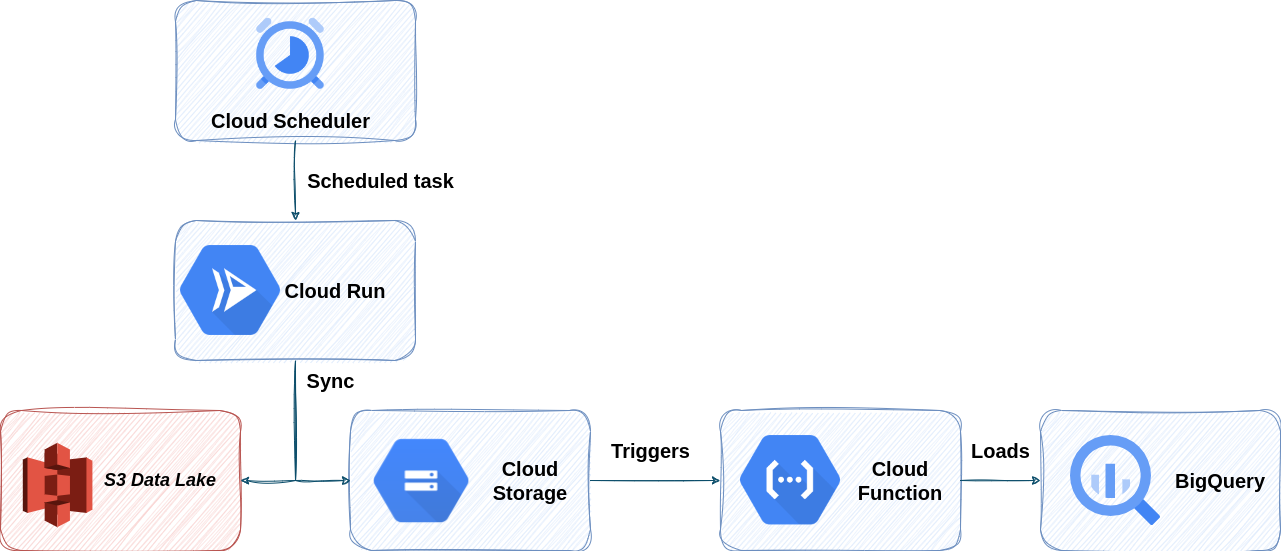
The process to load data from the data lake to the warehouse is composed of four different GCP services.
Cloud scheduler: Triggers the cloud round sync on a fixed time schedule, under 1 hour.
Cloud Run: Executes a modified version of rclone which is an implementation of rsync.
Cloud Storage: Replicates the data from the data lake in GCP for auditability and to reduce inter-cloud costs in case of a backfill.
Cloud function: Leverages the interconnectivity from cloud storage and Big Query to load the data into the warehouse.
Data Lake Replication
The first step of the process is to replicate the data in the data lake in GCP. For this we use cloud scheduler as a lightweight scheduler since we just need an HTTP POST request containing minimal information to begin the micro batch process.
To reduce an error propagating from a single source to multiple models there must be one cloud schedule job per kafka topic we want to replicate from the data lake. To keep the Rsync generic the scheduler request will contain the S3 prefix to use as a POST payload value.
The cloud scheduler will trigger a cloud run executing a custom entry point for an rclone image. This service efficiently syncs the content of a given prefix with an hour granularity to minimise the time spent generating md5 checksums.
To reduce error propagation in the cloud run there will be a different service running the same code for every source ( ie: BOS, Sherlock, FenX, … ), this eliminates the possibility of a volume spike killing all sources, instead of just the affected one.
We used cloud run for this service due to its ability to use higher spec machines, since this process may consume significant amounts of RAM, while rarely ever experiencing spikes in requests, since they always come from the scheduler. With these considerations cloud run is the best option to host this service.
To improve the accessibility of the data and the ease of debugging we will split the data load into different buckets, one per source ( ie: BOS, Sherlock, FenX, … ) this will ensure each source has its data isolated within the Google data lake to minimise cross contamination.
Raw data loading
Once the data lands in cloud storage, also known as the Google data lake, we can use the direct connection between storage and cloud functions to trigger the latter on an object creation. Due to the differences in how S3 and storage handle incremental file modifications there will always be an object creation signal, and never an object modification signal, meaning no data will be lost on incremental writes to an S3 blob.
On an object creation in storage a cloud function will trigger executing the load into BigQuery. The cloud function leverages the direct connection between the two systems to avoid needing high resources machines to load the data. Instead of that, the cloud function only needs to trigger an external job from BigQuery having this one fetch and load the data. This allows the cloud function to be extremely lightweight as it will consume the same resources regardless of the content of the file it’s loading. This makes cloud functions the ideal tool for this job, since they have smaller machines but are much better at scaling. Contrary to the previous step where a single instance execution could handle any number of files in the bucket here we will need a single execution per file in the bucket, making the ability to scale quickly and painlessly a must have.
A few considerations to take into account during this step is, since we are using BigQuery as the engine to load the data we are very vulnerable to schema modifications as big query is not good at dynamically determining the schema when trying to write to an existing table. Thus we must handle the schema at the cloud function. There are two safeguards here, if we find a non-breaking change such as column deletion we proceed with the load normally, but if the load fails due to a breaking change such as field type change, or field addition we will proceed with a partial load. During a partial load the cloud function forces the BigQuery job to only load columns already existing in the warehouse and without schema changes. This partial load ensures downstream services continue working regardless of possible errors in the process while also tagging the file as failed to be reprocessed at a further date after manual investigation and correction.
Whenever a file fails to load without any errors or warnings the cloud function will copy the file into an error bucket. This bucket will be completely independent from the main google data lake and there will be one for each source ( ie: BOS, Sherlock, FenX, … ). The error bucket will sort every error depending on the source of the problem within a different prefix in the error bucket. Within each error prefix the structure will be identical to the one on the data lake.
The cloud function has a retry strategy whenever a file has had any errors, the retry will not perform the partial load again to reduce dirty data in the warehouse, but it will try and perform a full load again to see if the warehouse now matches the schema the error file expects.
Monitoring
All services in this process are directly connected to GCPs built in monitoring tool, stackdriver. All services must have at least one Policy monitoring its logs. Additionally the error buckets must be monitored for files there longer than a specified period of time depending on the acceptable recovery window for the source.
Error Recovery
There are 3 critical points in this process that may experience issues: - Cloud scheduler: Since the cloud run execution picks the current and previous hour, any error in this service would require at the very least 5 consecutive errors ( assuming 15m period ). Any errors beyond this point could result in an irrecoverable state without manual interaction. The solution to recover from this issue is to manually trigger the cloud run either locally or through a POST request to the production server for the missing time period. Alerting from this service must trigger at the very least at the fourth consecutive error for a given topic. - Cloud Run: Same as cloud scheduler, we need 5 consecutive errors to consider data loss ( assuming 15m intervals ). Recovery steps for this service are the same as above, re-execute the missing time period. Worst case scenario mitigation could be achieved by manually moving the files from S3 to storage. - Cloud function: Any cloud function error must be investigated ( excepting rate limits error which are self-recovering ). Impact is mitigated by the partial upload but alerting must trigger while there are any error files present on the error folder.
Data backfill
In case of an error of any kind that requires the data to be backfilled or re-uploaded to the warehouse this process only requires the necessary files to be re-uploaded to the Google data lake. This will retrigger the cloud run execution and the SCD$ format used for building the raw tables in BigQuery will handle the data without problems. This action can be performed as many times as needed and will be perfectly trackable through the raw data table in the warehouse in a queryable manner.
Alternatives
This is simply one solution to the problem of loading data from the S3 data lake into the data warehouse. Multiple alternatives exist that are just as valid as the one described above.
The most interesting ideas to modify this process would be developing in AWS if there ever is a need to reduce inter-cloud communication.
Another valid consideration is whether a dynamic schema is a valid approach or if we’d rather work on a constant forced schema. This would reduce the need for partial loads and the reactiveness of fixing the warehouse on unexpected errors, while at the same time increasing exponentially the cost of adding new columns to the warehouse if a backfill is required, as a full historic backfill would be required to keep the historic nature of the warehouse intact.
Future improvements
The most obvious improvement to this process would be to scratch the need to use the S3 data lake and connect directly to the kafka topics and change this whole structure to be event driven, greatly improving the reporting capabilities of the warehouse.