The underlying goal of this RFC is to describe the implementation and the different phases to roll out the project, how to automate discoverability through the catalog, empower developers with self-service capabilities through its scaffolder, integrate our technical documentation and the future adoption of developers.
Ebury Developer Portal - Implementation
Prerequisites
- Measure what is the current onboarding time by extracting data from GitHub for each new joiner to identify the time that it took for them to merge the 25th pull request.
- Select (or build from scratch) a suitable Kubernetes cluster for the deployment.
Problem Description
Backstage has been chosen as the preferred developer portal to be used and implemented by Ebury. You can find more information about the decision in this blueprint.
Solution
Create a Backstage deployment, in a cluster able to reach the needed resources and accessible from the public Internet through Single Sign On.
We might be tempted to integrate or build out a bunch of new great plugins for our existing internal tools but we will keep it simple initially.
The MVP of the project will focus on three of the main features: Service Catalog, Software Templates, and TechDocs in order to provide an initial value when a new service is created through the portal out of the box.
Service Catalog
Each service will have its own dedicated space that aggregates information about each component gradually, including where is running a service and which team is responsible for it and documentation.
The Catalog is flexible enough to host a wide variety of software assets, known as Entities in Backstage, and it’s powered by metadata stored in YAML files straight from repositories from our code base, which describe the kind, type, name, owner, and more details of a single entity per file.
apiVersion: backstage.io/v1alpha1
kind: Component
metadata:
    name: example-website
    description: This is an example of a Website
spec:
    type: website
    lifecycle: production
    owner: team-a
Tracking ownership and dependencies is one of the most important use cases for the Service Catalog. These are also declared in the YAML file describing a software component. The Software Catalog will give us a default set of processors but writing our own will be a key point of customisation when adopting Backstage.
Being part of the Catalog does not become a chore, it should be an obvious choice for all users regardless of how much of the common tooling each and every particular service relies on. Engineers should benefit from having all the tooling available in one place rather than bouncing around different places and Slack messages to accomplish a task.
Components
Components in Backstage are used to allow engineers to add entities to the Catalog and it can be delivered in three different ways:
- Manual registration uploading a YAML file.
- Automatic registration using Software Templates.
- Integrating with an external source.
Service Ownership
For each service, there should be a single team that owns it as defined in the Service Ownership blueprint who will be responsible for keeping its information up to date. Teams must be registered in the Catalog as an entity as well. Backstage allows us to define how the component depends on another entity and what it exposes so others can consume.
Using the Developer Portal you should be able to quickly find the team that owns a service, links to Slack or email addresses in order to contact them directly.
Software Templates (Scaffolder)
One major use case for Backstage is helping onboard new team members and promoting golden paths among regular contributors. The Scaffolder provides developers with the ability to execute software templates that initialise repositories with skeleton code and predefined settings.
Backstage is not necessarily read-only. Instead of developers opening tickets to request infrastructure components to deploy a new service, Platform teams can provide them with templates that provision infrastructure through a single click. The benefit is double: developers are more productive because of nearly instant availability, and Platform teams can nudge developers into golden paths without forcing it.
A software template is defined in a YAML file that specifies parameters and steps to execute. Backstage will generate a UI in the Scaffolder based on the parameters that are specified within the template. For the steps, it’s possible to leverage built-in actions for common fetch operations, and it will be possible also to define our own.
Templates are stored in the Catalog under a template kind. Furthermore, all components initialised by the Scaffolder are automatically added to the Catalog. Therefore there’s a virtuous cycle between the Scaffolder and the Catalog that promotes discoverability and standardisation.
TechDocs
The TechDocs plugin aggregates documentation for our software components directly into their corresponding entity page in Backstage. TechDocs are written as Markdown files in the repository where the entity that they document is kept to make it easier for developers to keep it up to date. Then, the plugin fetches these files from all services, generates static pages, and publishes them in the portal instead of navigating through different GitHub repositories
The plugin includes navigation and pages, which will be made available under the “Docs” tab of its associated component.
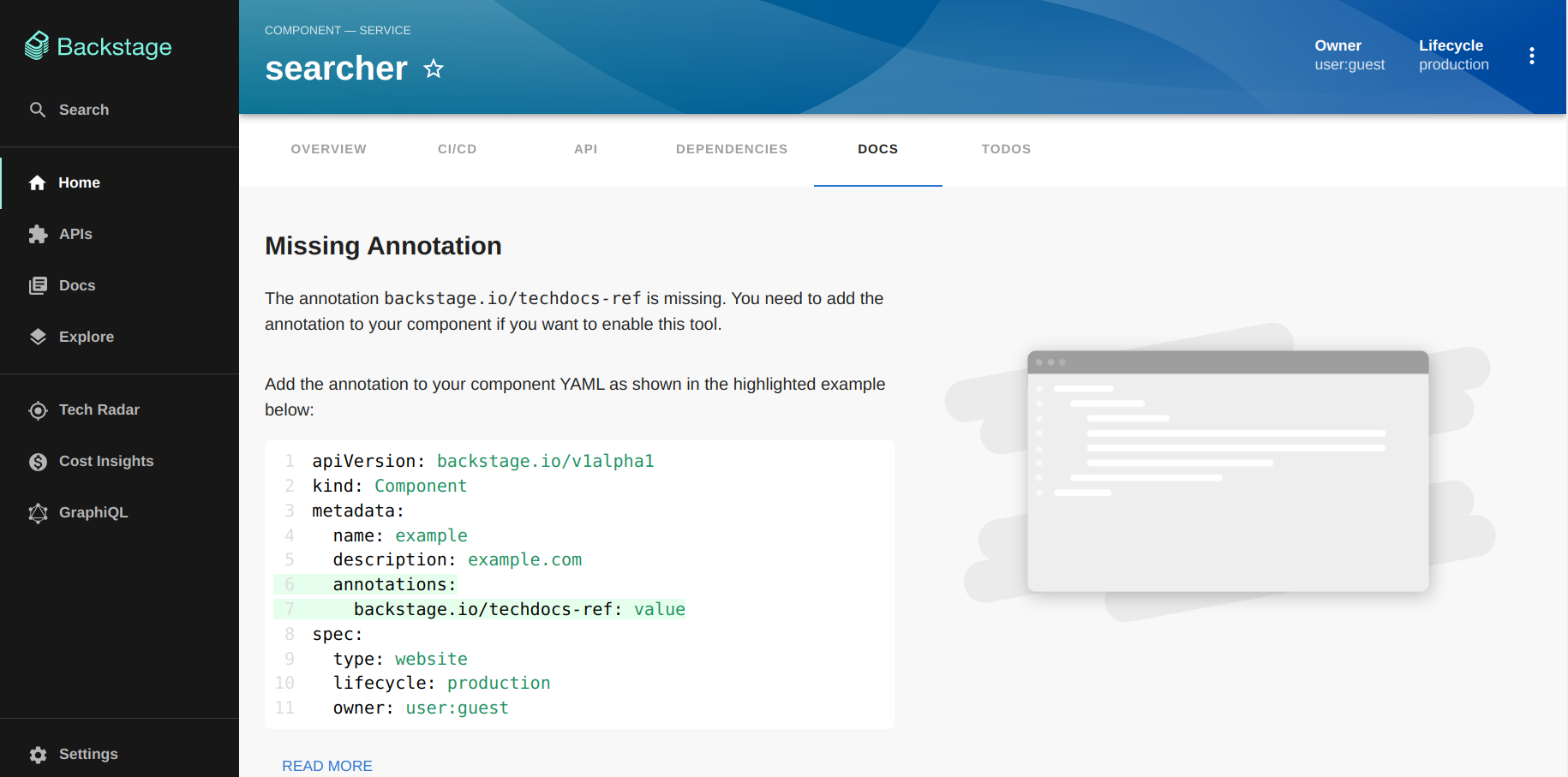
Docs are associated with a component when their YAML file includes the backstage.io/techdocs-ref annotation. The annotation tells Backstage that there are docs available that it should show to the user.
Build Strategies in TechDocs
It goes through three stages to make documentation from markdown files in a repo to pages deployed in the instance: preparation, generation, and publishing.
During the preparation stage, TechDocs clones the component’s repository into a temporary directory to be able to access the docs locally. Then, the generation stage proceeds by leveraging a docker image called mkdocs-techdocs-core, which uses a Python library to build the static assets that compose the documentation. At last, in the publishing stage, the assets are moved somewhere so they can be deployed.
In order to properly pull down the documentation from our source code we will configure the techdocs.builder to external in the TechDocs annotation, and publish the generated assets in a Cloud storage. A pipeline in Jenkins will generate the documentation when a Pull Request is merged. The generated assets will then be published in an S3 Bucket, and the Backstage instance will read them when needed.
Writing TechDocs
TechDocs generates the documentation using MkDocs and styles it using Material for MkDocs.
The navigation can be configured in the mkdocs.yml for our documentation. For writing the documentation it can be used standard markdown. The Python library in charge of the generation complies with standard markdown syntax, with very minor differences.
Architecture Overview
Backstage is a framework that provides a collection of plugins and libraries that will be used to create our own Developer Portal. The Backstage instance is a React/Node app built on top of the core libraries whose functionality can be defined by installing plugins.
There are five core functionalities: a software Catalog, software templates, a documentation generator, a Kubernetes cluster visualiser, and cross-ecosystem search capabilities.
Backstage uses a three-layer model to explain how a Developer Portal is built using its framework.
- Core: Base functionality built by core developers in the open-source project composed of around 25 packages, which include a CLI, utility tools, API definitions, themes and helpers.
- App: The app is an instance of a Backstage app that is deployed and tweaked. The app ties together core functionality with additional plugins. The app is built and maintained by app developers, usually a productivity team within a company.
- Plugins: Additional functionality to make our Backstage app useful for the company. Plugins can be specific to a company or open-sourced and reusable. There are over 150 open-source plugin packages available, which include the framework’s main features. We can pick and choose what we need and extend its functionality by creating new plugins too.
Technology Stack
- YAML files are the primary source of metadata.
- For a basic setup, some knowledge of React will be required to update our instance’s UI to include plugins.
- For custom processors or plugins, it will require a good understanding of Node, as it’s what powers Backstage’s backend. TypeScript is favoured across the project.
- For local development, it will be important to know how to use Docker. It will allow us to run a Backstage instance more efficiently or to build TechDocs before deploying them.
- To follow up with the framework better, it will be also handy to understand how monorepos work, as Backstage is implemented as such.
- Backstage follows a Semantic Versioning schema, cutting minor versions once a month.
General approach
Ebury Developer Portal will not be just a web page with a collection of things, it will become a single place for our entire platform that will include all the tooling that our developers need. Things like CI/CD, monitoring, security tooling, testing, and whatever tooling that developers are accessing daily should live in the portal eventually.
A typical scenario is a developer working on a team that builds a couple of components that need to interact with something else or it needs to get data from somewhere else. Then, they might not know what that something else is. However, exploring the portal will allow the developer to have a place to go to find the specific service or component that will be required to interact, where the documentation is located, what plugins are available to use, and who to contact in case of any questions.
The portal will be built on our own, with our own visual theme, branding and name. The core content of Backstage it’s YAML, and files will live with our source code in the repository with each service.
Backstage Updates
Keeping Backstage up to date with the latest releases is very important as the tool continues growing and improving.
The Backstage CLI has a command to bump all packages and dependencies we are using to the latest versions. Additionally, on March 2022, they announced their Upgrade Helper.
The update cycles and plans fall out of the scope of this RFC. However, they will be described in more detail in the Platform Handbook as part of the development of this project.
Alternatives
- Hire an external team to develop the MVP and hand it over to the Developer Portal Team (DTT) to coordinate the adoption and orchestrate the next steps across the entire Technology department. However, we might not acquire enough knowledge to handle the portal, and the adoption phase will take longer considering that a new team will need to manage and coordinate it.
- Managed and hosted Backstage by an official partner. This will allow us to get a production instance and need no knowledge of React or Node. Integrations and plugins are set up through a UI and get all updates automatically. Effectively, this translates into needing fewer people to maintain our Developer Portal. However, we will have less flexibility.
- Instead of a Jenkins pipeline, we can use GitHub Actions to generate and publish TechDocs sites.
Caveats
- Autonomy shouldn't mean anarchy. We must try to provide a helpful baseline on top of which developers can build their solutions.
- The plugin system demands code base change of the front-end and the back-end.
- The advantage of self-hosted Backstage is that we have practically no limits on how much we customise our instance. However, we need to keep in mind that the farther away we go from the original state, the more work it will involve for us to keep our instance up to date with new features and fixes.
- The disadvantage of a self-hosted Backstage instance is that we need to spend considerable effort learning about Backstage, upgrade the core libraries monthly, and each plugin after a new release. Managing our instance can represent a part-time engineer or more, depending on the final scale of our Developer Portal.
Operation
While anyone in the Technology department can contribute to the portal, the vast majority of work will be done by teams that also have developers as customers. As a result, the creation and maintenance of the Developer Portal will require additional resources within the Developer Experience area.
Most of the work delivered by the Developer Experience team within the last few quarters has been focused on generic solutions to be consumed later for a developer portal. Things like the example service in Kubernetes and the Ebury Helm Library will be the foundations for Software Templates components and the Developer Handbook together with the technical documentation templates will be the golden path for developers to create new content from scratch.
Core, Additional integrations and further infrastructure automation will be planned and defined after the MVP of the project is delivered.
Developer Portal Team
The aim of this team is to become the central team. It won’t be required to create a new big team. Still, they will be orchestrators of the entire organisation to facilitate development teams to join and contribute to the portal and coordinate the adoption of the tool.
As has been already mentioned, we will start small. Later, the team will continue organising and orchestrating the next steps to accomplish what a developer needs to see every day.
Developers and Management
Engineers and managers will use Ebury Developer Portal as a unique interface to interact with any particular service.
We want to give autonomy to the teams to enable them to make decisions for themselves and get back control over the platform. For that reason, expert teams in different fields will own the integration of specific plugins in the future. Such as CI/CD, monitoring, testing, incidents, on-call information, etc. However, there will exist a tight feedback loop between the teams in charge of plugins and the Developer Portal Team to ensure that things keep moving forward.
Adoption
The adoption of Ebury’s Developer Portal will be split into different phases.
Phase 1: Analysis
During this phase, the Developer Portal Team (DPT) will analyse the tool by deploying it in a local environment and will collect feedback from stakeholders (mainly the Technology department).
Later the DPT team will run a proof of concept of the portal by connecting it to our service. This might take a few weeks by 2-3 developers.
Phase 2: Service Catalog
The first deliverable in the project will be the Service Catalog, as it’s crucial for the department to have a track of all the services that are running and where, who are the owners, and how to contact them.
Phase 3: Software Templates
After the Service Catalog is implemented, the DPT will define a code skeleton with variables to be filled in and push the template to GitHub. The developers will then select the relevant template and use the creation wizard to fulfil the relevant parameters to create the required component.
Phase 4: TechDocs
This is the last addition to the MVP. During this phase, the DPT will enable the TechDocs feature and will centralise the current documentation spread in the different /docs folders in GitHub as the first step.
Phase 5: Adoption
We will start the adoption phase with one single team as we have been doing with other projects (GitHub, Kubernetes, etc). This is mainly to ensure everything is running as expected and to collect any feedback before introducing the rest of the teams into the portal.
After the pilot team phase, we will coordinate the adoption by using a spreadsheet.
The adoption phase will consist on: - Providing the development teams with access to the portal. - Schedule an introductory meeting to explain how to use and interact with the portal. - Review the information of their services in the Service Catalog in order to complete the required metadata. - Review the information regarding their documentation using TechDocs. - Create a new sample service from scratch by using an already existing Software Template. - Provide feedback to the DPT team based on the experience of using the portal and use the collected feedback to improve the adoption experience. - Continue with the next team of the same domain and jump to the next domain when the previous one is ready.
Security Impact
The authentication system in Backstage serves two distinct purposes: sign-in and identification of users, as well as delegating access to third-party resources. Google will be used to configure Backstage as an authentication provider.
On top of Backstage authentication, the Developer Portal will be reachable from the outside through the authentication proxy.
Ebury Developer Portal Team will be responsible for implementing the security requirements provided by the SECENG team to ensure the right level of access and authentication to the portal.
Performance Impact
No performance impact is expected in client applications. The portal will run in a different cluster and most of the metadata will be stored in code using GitHub.
Developer Impact
Engineers don’t need to become experts in using plenty of tools, they just need to focus on learning how to use Backstage, develop new plugins or collaborate to improve and own them.
The developer portal will provide the organisation with automated discoverability. This will reduce the need for the word-of-mouth strategy; you ask a question in a Slack channel or Stack Overflow, they point you to another channel, and once there, you get a couple of referrals of people who may be able to help you, then you figure out a way to talk to them and luckily you will find a slot in the agenda. This becomes even more complex if the related team is located in a different timezone you are located.
Deployment
- Backstage will be deployed in a Kubernetes cluster with SSO ingress available.
- It will require a new database for the Service Catalog, running in the cloud provider outside the cluster.
References
- Backstage documentation
- Backstage is a CNCF Incubation project after graduating from Sandbox
- How to configure TechDocs in Backstage to publish documentation from code
- Backstage Adopters
- Official partners for additional support:
- Frontside offers Developer Experience consulting services.
- Thoughtworks offers Digital Transformation consulting services.