Ebury Developer Portal - Motivation
This document aims to describe a Developer Portal as a centralised place for developers to manage their day-to-day work in order to support the onboarding efficiency initiatives and the department growth.
Background
As developers these days they are not in charge of just writing code, they need to write good documentation, tests and invest hours contending with multiple infrastructure challenges.
There are many problems that we are facing to support them in their daily work:
- Software and infrastructure complexity due to the quick growth of the department and products. There are no templates to be consumed to facilitate the work for new software components.
- Very high level of fragmentation across the different services, components, tools and documentation.
- Difficulties finding useful information and documentation about services and owners, so engineers need to ask around and jump between different channels, teams, and people.
- There is no real starting point for a new engineer.
- Collaboration and coordination between teams get harder.
As a consequence, the current onboarding time is high, and we are aiming to reduce the time to be effective to 3 months. Additionally, the time to stand up a new service is also very high, and we are aiming to reduce it to 3 days.
Solution
Build a developer portal along with an ecosystem of plugins as a unique entry point for developers to collect software, tools, documentation, teams, people and assets into one place with a focus on scale-up, self-service, reducing fragmentation and speeding up the onboarding of our new engineers. Opening up an opportunity for another level of automation. Something that can take up to weeks or months could be done with a single click of a button.
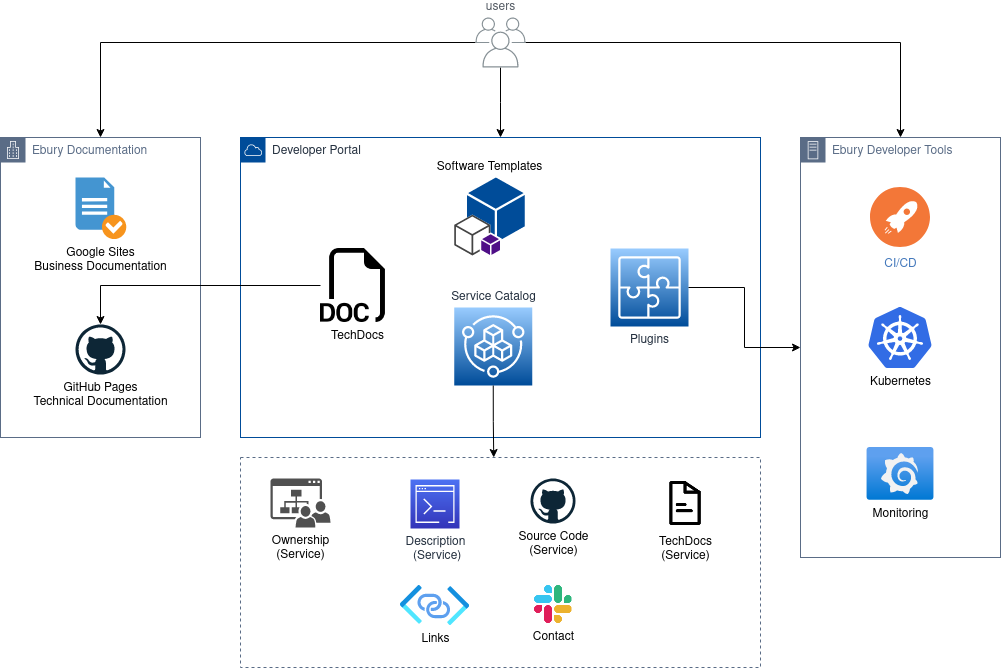
MVP (6-9 months)
Service Catalog
Each service will have its own dedicated space including an overview page with general and useful information.
This will allow us to build more than a simple inventory of all of our services. It will become the the place where developers can interact with services through their complete life cycle, their integrations, and explore the entire software ecosystem, enabling easier and better collaboration across the Technology department without needing to have a dozen or more browser tabs open for various tools.
Software Templates
The software templates concentrate on the self-service element of the Developer Portal. It will enable developers to create new software and documentation aligned with our best practices using automated templates with the click of a button.
Technical Documentation
As described in the blueprint for knowledge transfer, we went for a docs-like-code approach in order to make it more visible and easy to maintain.
The Developer Portal must provide an easy way to create, find and modify documentation without requiring any additional developers' time or changing too much the way to work. This means that the documentation from GitHub should be searchable and readable within the Developer Portal on a single page instead of navigating through different repositories.
Core Integrations (9-18 months)
Plugins
Plugins are isolated features that should be managed by expert teams and own them end-to-end. They will be shown on each service’s overview page in the Service Catalog.
This will become the most extensible part of the portal, and initially, it shouldn't cover too many things. However, we might find integrations to things like CI/CD, GitHub, Kubernetes, monitoring dashboards, control cloud costs, and Stack Overflow among other tools that will be integrated eventually in the Developer Portal.
CI/CD
A Jenkins plugin to display builds of the related service and their statuses from our Jenkins instance.
GitHub
A GitHub plugin to see pull requests of the related service.
Kubernetes
A Kubernetes plugin in the Developer Portal to allow us to add details about the related services, pods, deployments, etc, to the component dashboard page.
Monitoring Dashboards
A Grafana plugin to list alerts and dashboards for the related service.
Control Cloud Costs
A plugin to visualize, understand and optimize our cloud costs so that engineers can see the impact of their cloud usage and make optimizations wherever and whenever it makes sense.
Stack Overflow
A plugin to provide Stack Overflow specific functionality that can be used in different ways (e.g. for homepage and search) to compose a specific section on the service's page in the Developer Portal.
Additional Integrations (18+ months)
Apart from the already mentioned Core Integrations, we will provide additional integrations with other tools like JIRA, and will provide teams metrics, services scorecards, and many more, in order to define engineering standards and initiatives that get checked automatically across our ecosystem.
This will allow us to:
- Find out which teams are experiencing challenges, offering insights into who may need more support to adopt new practices.
- Understand our migration's progress, offering insights about the change across software components.
JIRA
A JIRA plugin to display a summary for our projects in the Developer Portal.
Scorecards
A plugin to visualize, understand and optimize our team's tech health based on a series of predefined rules and best practices.
Metrics
A plugin for DORA metrics.
Conclusions
For a developer, the Developer Portal can be the fastest way to create new software or documentation components and it should be simple to manage the existing ones. For platform teams, it can be the easiest way to encourage best practices and automation.
We did research on the different solutions in the market based on our current needs. The evaluation of the different providers has been collected in this spreadsheet.
Based on that research, the chosen option is Backstage. The main reasons for choosing this option were:
- It’s open source. Therefore, we can add code that will allow us to customise and manage the content.
- It provides all the integrations and plugins we need out of the box.
- It provides a remarkably powerful and extensible plugin architecture (130+ plugins ready to go)
- Backstage pulls the documentation that lives in the code and displays it in the portal.
- We will take control of the infrastructure running behind it and costs will be associated with those assets.
Alternatives
Cortex
Cortex is also a very good candidate. They offer almost all the requirements we need. However, some core features like technical documentation, do not have a centralised interface to display the documentation. They have integrations with most of the tools we use but they do not provide the ability to develop custom plugins.
One of the best features they showed us during the demo is the Initiatives. They are used to coordinate work across different teams (e.g: migration to Kubernetes), and it automatically creates tasks in JIRA to all the affected teams based on predefined rules.
The price is associated with the number of users, they have no restrictions about the number of services registered. Taking into account that we are approximately 185 members in the Technology department, the total monthly costs go to $37.000 ($50 per user/month)
Configure8
Configure8 probably has the best catalog organisation. Cloud components are synchronised with the developer portal, and you can use the global search for locating individual components in AWS.
Additionally, you can compose complex queries to filter by specific components to help the engineers to find components based on given criteria. This is very useful for their scorecard functionality so you can find services that match the specific criteria. They are working on a federated search to show additional results from Jira, GitHub, etc.
The price is associated with the number of users, they have no restrictions about the number of services registered. Taking into account that we are approximately 185 members in the Technology department, the total monthly costs go to $37.000 ($50 per user/month)
OpsLevel
OpsLevel is another good candidate. They don't cover the entire list of proposed requirements. However, they are constantly adding new features. They also have Initiatives features to manage and coordinate actions across all the departments. They are not directly integrated with JIRA, but they provide a much better visualisation of the situation of each service/team on the related initiative or campaign.
The price is associated with the number of services, they have no restrictions about the number of users registered. Taking into account that we have approximately 40 services, the total monthly costs go to $1.960 ($49 per service/month)
Caveats
- The Developer Portal shouldn’t be considered the source of truth. It’s not there to replace all the different tools that we use, it’s more like an aggregator that will help us to unify all of them in one interface.
- We don’t want the portal to be a duplicate of all of the details of our tools. In case you need to dig deeper into any problem, you can still access the required tool for further analysis.
- We need to be careful with the number of plugins we are showing to developers and make sure we are using the right tools in the right places.
Operation
The first step is to choose the tool that fits our requirements. Later, we will manage the business case and it will be published a new RFC with design details to start moving forward with the development of the portal.
Security Impact
N/A
Performance Impact
N/A
Developer Impact
- Developers will have a single entry point for their day-to-day work instead of multiple bookmarks in the browser.
- Developers will be able to find all relevant information about the services: owner, documentation, Slack channels, pipelines, and more.
- Developers will have a unified view of all the technical documentation that lives in the code.
- Developers will be able to automatically create new projects from scratch quickly.
- Platform engineers will be able to extend and scale by integrating new tools via plugins.