Device Binding (IOS)
Device binding is a OWASP Resilience Requirement, MSTG-RESILIENCE-10 which consists in the process of linking a token to a trusted device.
Problem Description
The goal of device binding is to impede an attacker who tries to both copy an app and its state from device A to device B and continue executing the app on device B. After device A has been determined trustworthy, it may have more privileges than device B. These differential privileges should not change when an app is copied from device A to device B.
Background
We need to identify a user with a certain device. To obtain this, it is necessary to obtain an identifier that associates the physical device that is being used. We must contemplate how much time we will need to do it and how to scale this solution in future.
In the future, we will need to attach a group of devices to a user.
Solution
First step: One device per user
For a longer term horizon: We need to consider attaching more than one device per user.
According to Apple, we require the UUID to identify an App_id with the Application installed into the device. The identifierForVendor is a UUID that uniquely identifies a device to the app's vendor. The value of this property is the same for apps that come from the same vendor running on the same device. A different value is returned for apps on the same device that come from different vendors, and for apps on different devices regardless of vendor.
The value in this property remains the same while the app (or another app from the same vendor) is installed on the iOS device. The value changes when the user deletes all of that vendor’s apps from the device and subsequently reinstalls one or more of them. The value can also change when installing test builds using Xcode or when installing an app on a device using ad-hoc distribution. Therefore, if your app stores the value of this property anywhere, you should gracefully handle situations where the identifier changes. For this reason we need to be prepared to change it quickly, however in this first step implementation, we would assume to do it manually because we have no relevant number of users in this stage.
Note: Normally, the vendor is determined by data provided by the App Store. If the app wasn’t installed from the app store (such as enterprise apps and apps still in development, even testflight), then a vendor identifier is calculated based on the app’s bundle ID. The bundle ID is assumed to be in reverse-DNS format.
Solution: Device binding service
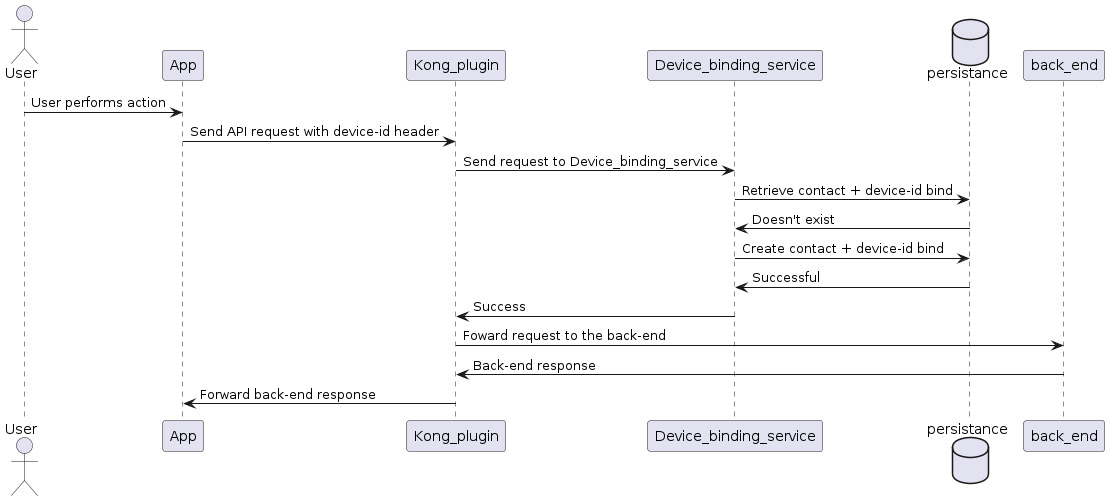
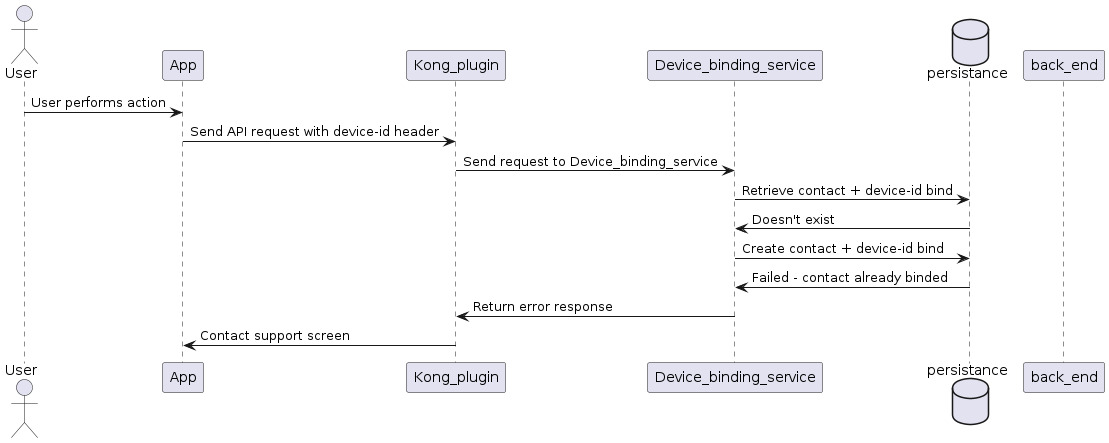
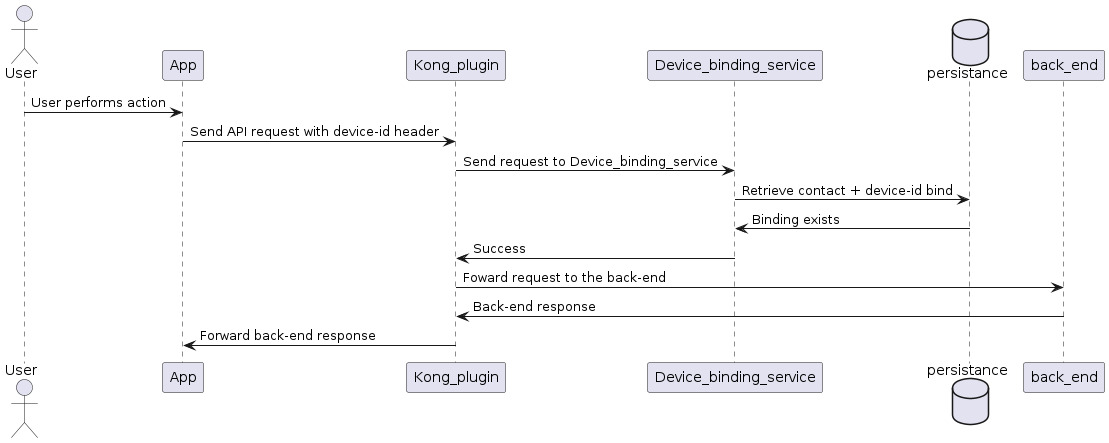
We can use a Kong plugin to enforce device binding. By using a plugin we can implement the functionality in a fast and easy way. The plugin would be applied to every non authentication related API endpoint, it would look for the device binding header in the mobile app request, after that it will use the value of the header and the contact id to send a validation request to the device binding service which will check UUID and contact_id in the persistence database. If a match is found the device binding service will return “ok” and the plugin will allow the request to proceed. If no match is found we can face two scenarios, in the first one the contact has already another device binded, in this case the device binding service will return an error and the plugin will reject the request. In the second the contact doesn’t have any device binded, when this happens the current device will be automatically binded to the contact.
We can check the possible scenarios in the following diagrams:
No device binded
Other device already binded
Device binded
PROS:
- Possibility to build a new dashboard panel for management.
- Easy to add new features.
- *Persistence can’t be accessed by KONG. *
CONS:
- Building a new service has a lot of overhead.
How can we scale it ?
TBD by product team. We need to think about how to add more devices for a user. It can be done automatically (saving an array of UUID’s and validating or not with any of them for each app request). Another solution can be that each client would have one preferred account which is in charge of giving access to different devices. In this case, we should change a big part of the logic workflows.
In addition, we can also implement a messaging service each time we detect an intent of binding fail. e.g: if any user send API any request from an account with an existing device-id, it can receive an e-mail reporting that failed intent.
Impacted systems, workflows and service endpoints
- No impact in BOS , except additional traffic to validate Keys.
- Authentication endpoints, KONG
Caveats
It will be only applied to Mobile APP users for IOS. However for Android, we’ll offer a similar solution.
What do we do with historical data ?
When current users log in to our App, it will automatically bind the device with the account. In case they need to change devices, they need to inform us via contact email address.
Security Impact
- We send the UUIDs through HTTPS:
- The App has a certificate pinning.
- Each time the mobile app sends a request to our server, it goes with the UUID in the header.
Performance Impact
Very small impact generated by extra request to send UUID. It is worth reviewing the UX design flow in the case the user has already an UUID attached. Also we will add a bit of latency because we are using a new Kong plugin and the new device binding service.
Deployment
Plugin will automatically be deployed with KONG. Device binding service needs to be deployable in ECS and EKS.
Dependencies
Small dependencies with SRE and DXP.
Developer Impact
There is no developer impact.
Credits and External Documents
- Alan Lopez
- Juan Miguel Molina
Tools used for this RFC
- https://app.diagrams.net/
Sources
- https://developer.apple.com/documentation/uikit/uidevice/1620059-identifierforvendor
- https://mas.owasp.org/MASVS/Controls/0x15-V8-Resiliency_Against_Reverse_Engineering_Requirements/#device-binding
- https://github.com/OWASP/owasp-mastg/blob/master/Document/0x05j-Testing-Resiliency-Against-Reverse-Engineering.md#testing-device-binding-mstg-resilience-10