Trade Finance - File upload/download
This is a proposal of processing file uploads submitted by EBO users in Trade Finance. Estimated work requires adding new EBO endpoints, connecting EBO to SCANII and existing Documents Service, adding new endpoints in Documents Service and adding a new SF table.
The trade finance functionality is only implemented in EBO and doesn't affect other channels like Ebury API.
Problem Description
The trade finance views contain multiple places where a user can upload a file or multiple files:
- After a new trade request is created
- From existing trade detail
All these files must be reviewed and approved by the operations team, thus we need them to upload automatically to Google Drive and organise them into a meaningful folder structure.
Requirements
Product requirements must match the ones specified in ONL-5935, see part about Ideal Process and Security Requirements.
Background
Currently, there is existing solution in EBO which uses Avoka forms for uploading the documents after the trade has been created. This solution has several limitations, e.g. it takes the user outside of EBO and doesn't allow users to see uploaded documents later. When discussing next batch of product improvements in Trade Finance, we decided to rework the existing solution and make it a part of EBO and SF, completely removing Avoka from the process and integrate a new documents-service built by CSI team last year instead.
Solution
To achieve the given requirements, we have to extend or create the following services/UIs:
-
EBO API. EBO will expose to the UI new endpoints for uploading files. EBO will do the authentication and authorisation of the requests. EBO will send the file to SCANII to check for malicious content, then it will send the file to Documents Service and at the end it will store the file metadata in Salesforce.
-
EBO UI. Vue app should provide a new views and components to upload multiple files in parallel to the new endpoints, handle errors and display progress indicators for each file. Existing Trade Finance view, that displays after the new trade is created in SF, will be modified so the users can add as many files as they want. A new trade detail view will be built from scratch as part of Trade Finance improvements and will contain an option to upload additional files. It will also shows list of existing files and allows to download them.
-
Chameleon components. If needed, some reusable parts of the UI may be moved into this library if they are not application-specific and could be useful for other projects, e.g. file upload component can be reused for multipayments and beneficiaries in the future.
-
Documents Service (DS). Existing service needs to be expanded so it can handle uploading binary files into Google Drive (current endpoints only allow to pass a URI to a document which is already uploaded somewhere else, e.g. S3). Another added functionality will take care of creating folders in Google Drive so each trade will have its own folder. EBO API will be calling this service directly.
-
SCANII API. A service used for scanning files for malicious content will be used to scan files before they will be saved to Google Drive via Documents Service. The service will be called directly from EBO using existing library python-scanii. If needed, this library has to converted to Python 3 first.
-
Salesforce API. Salesforce will be used as a storage for file metadata, e.g. name of the file, Google drive file ID, view link and trade ID which file is associated with. EBO will be validating access control of all files, whether the user can add a file to the trade or read a file that belongs to the trade. A new table must be created in SF and a 1 to N relation between a trade and trade files. In order to read/create metadata, a new API endpoint to query list of files will be created and a new endpoint to create new metadata in the SF.
Creating new trade in SF
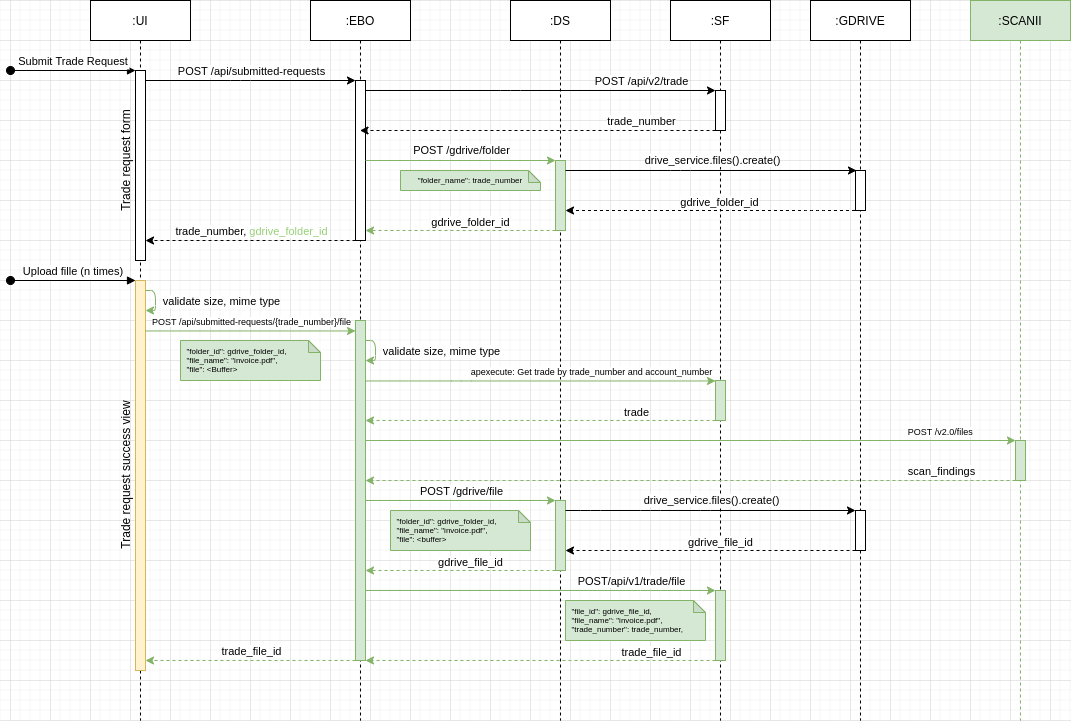
There is already existing functionality to create a trade request from EBO in SF. After all user inputs are submitted and the trade is stored in SF, the user is redirected to the success view. This view will contain the new upload components that will store the files for supporting evidence of the trade request.
The operations team wants to store these files in Google Drive so they can review them easily. Each trade should have its own folder and all files should be uploaded there. This folder will be created right after the new trade is created in SF, before the first file is uploaded. A new endpoint in Documents Service for creating folder will be created POST /api/gdrive/folders/.
User can submit multiple files in parallel from the success view. EBO will perform validations about the size, mime types and will use external service to scan the file before sending that file to Google Drive via Documents Service.
Documents Service has already an endpoint to upload a file but unfortunately, that endpoint only supports URIs and not a binary content, so the existing endpoint (POST /api/gdrive/upload) must be extended or we can create a new endpoint to handle this scenario (POST /api/gdrive/files/) and reuse as much functionality from existing endpoint as it gets.
Once the file is in Google Drive, EBO will receive a file ID and view link in the response and will ask SF to store all these information in a new table together with the file name. SF should generate a unique ID for the file that EBO can later use for downloading the file when displaying all files to the user in the trade detail view.
All of this is visible in the following diagram, green parts has to be built, yellow ones has to be extended.
Uploading to an existing trade and downloading existing files
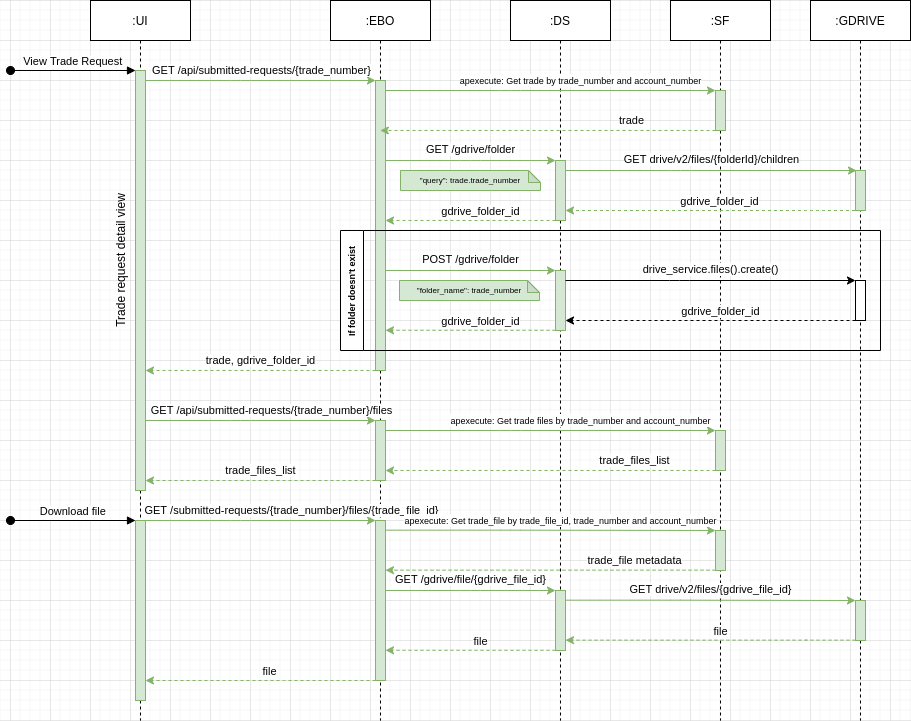
The process of uploading file to an existing trade is almost identical. EBO will create a new trade detail view in Trade Finance module and every time a trade is displayed in the view, EBO will load list of all files associated with the trade from SF. User can download any file from the list or upload a new one.
If users want to add more files they will use the same upload process as in creating of trade request.
Each existing file in the file list will have a unique ID that will be used in the URL and stored in SF. When user clicks the link to download the file, EBO will verify what trade the file belongs to and what SF account (EBO's client) the trade belongs to. If all matches, EBO gets the google drive file ID from SF and ask Documents Service to get the binary content from Google Drive. A new endpoint in Documents Service must be built in order to serve the files from Google Drive (GET /api/gdrive/files/{gdrive_file_id}).
All of this is visible in the following diagram, green parts has to be built, yellow ones has to be extended.
Alternatives
Other considered approaches to store the files
Detailed analysis of all alternatives we were considering to use can be found in the document compiled by Javier Vazquez. The document considers:
- storing files in SF (lots of limitations - not a good idea)
- managing whole upload process via SF (too complicated and unnecessary to involve SF in handling files)
- duplicating files in S3 and Google Drive, so the S3 will be used as a readonly storage for EBO while Google Drive will be just a copy for Operations Team (too much complexity).
CQRS and Ebury 2.0
We'd like to start implementing functionality from this RFC in the next sprints so we will not use CQRS. The Ebury 2.0 it's not ready for production either. There is a plan to integrate EBO and the new beneficiaries service in next months to see if there are any performance issues and other problems. We'd like to see that working before starting integrating other services.
Caveats
Google drive folders creation
(Thanks to CSI team to point this out)
Google Drive allows to create folders with the same name. Each folder has different ID but the name doesn't have to be unique. Due to this feature, we have to create a folder for each trade request synchronously when creating the trade in SF. Initial discussion was counting on creating the folder when uploading a file but multiple parallel uploads will create a multiple folders with the same name.
Trades that have been created before this RFC is implemented will have no folder created in Google Drive. So before displaying the detail of the trade, we have to check if the folder is there or not and create one if it isn't.
Operation
N/A
Security Impact
Authentication and authorization
The full authentication and authorization will be provided by EBO, including:
- allowing to upload files only for the user which manages the current client in Trade Finance
- allowing to upload files to existing trades only by the user which manages the client associated with the Trade
Scanning content before is stored in a storage
All files uploaded to the Documents Service will be verified by 3rd party service (SCANII) and rejected if a scanning result raises a suspicion.
Uploading big files
EBO API should be restricting the file size limit to 2MB and return HTTP code 413 Payload Too Large in case an attacker is trying to exhaust all available resources using big files. Currently the Django in EBO is configured to reject any file larger than 2.5MB, the WAF in front of EBO has a limitation of 5MB.
If product will require raising this limits, we need to consider the configuration changes in Django and WAF. e.g. WAF currently cannot have a specific limit per endpoint. It would require lots of changes to make it work.
OWASP recommendations
OWASP also provides very exhausting list of impacts to consider.
Performance Impact
Transferring files between services must be done via streaming of the file content and without waiting until the file is fully uploaded to the service. This reduces the waiting time for the user and also lowers the memory footprint of EBO and Documents Service to process a single file. EBO's endpoint should not wait until 2MB of data is uploaded and then fire the request to SCANII and DS. DS should not wait until 2MB of data is uploaded too and then send it to Google Drive. Instead of that, EBO should fire a new request to SCANII immediately when request processing starts by piping the binary content to the new request and using a buffer of a reasonable size (usually 64KB).
We expect around 30-40 Trade requests to be made every day, users upload usually 3-4 files for each. This should not cause any significant performance load on Documents Service and it should not have a big cash impact on SCANII billing.
Developer Impact
N/A
Data Consumer Impact
N/A
Deployment
All new Trade Finance improvements will be rolled using flags in EBO. A couple of configuration changes will be required:
-
A new Google Drive account for EBO will be created by Security team. The account must be configured to impersonate a Google service account used by Documents Service in Staging and Prod.
-
Documents Service configuration must allow the new EBO's Google Drive account to access the endpoints -
GDRIVE_IMPERSONATION_WHITELIST. -
EBO must have a configurable Google Drive folder ID where all folders for Trades will be created.
-
EBO must have a configurable access key for SCANII API.
Dependencies
To implement the solution in EBO, we will need the SF team to add a new file metadata table and endpoints for reading and creating them.
All other changes (including changes in Documents Services) will be owned by the ONL team.