EMP Infrastructure Changes - Data Engineering Remediation
Evaluating the impacts of EMP Infrastructure Migration on Data projects.
Reference Documents
| Reference | Document Location |
|---|---|
| EMPDE001 | EMP Infrastructure Migration |
Problem Description
As described on this RFC we are going to migrate the current EMP infrastructure to a new environment. On the data engineering side, we have to make sure the CDC + Kafka pipeline will continue to work correctly and avoid any data loss during the migration process.
Background
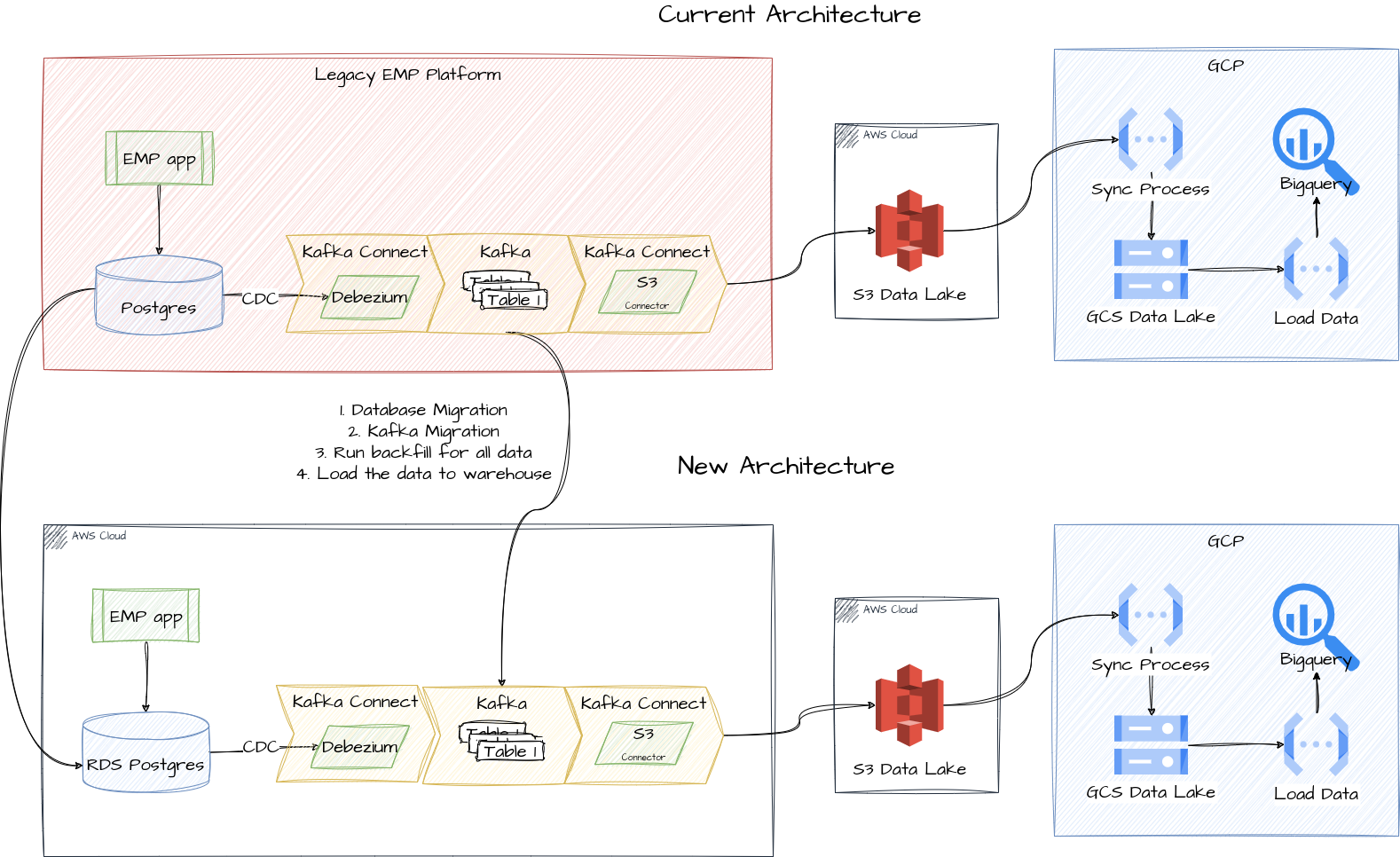
The current Data Platform uses Kafka as a data source for EMP, following the same architecture design as BOS data pipeline. We have CDC enabled for the important tables on EMP Postgres Database, which enables the Debezium Kafka Connector to read the data changes and generate Kafka Events. Hence, we can use Kafka Connect S3 Sink to put Kafka messages into an Amazon S3 bucket. The data in S3 is replicated to GCP Google Cloud Storage and then loaded to BigQuery, where we create data models to be used by analytics requirements.
EMP Tables
The current EMP tables included in this process are listed below. We expect to have exactly the same tables being replicated after the Infrastructure Migration.
This information was extracted from the terraform configuration
| Table Name | Connector Group |
|---|---|
public.clients_client |
connector_1 |
public.clients_clientproperties |
connector_1 |
public.core_currency |
connector_1 |
public.core_entity |
connector_1 |
public.settlements_balancecheckpoint |
connector_1 |
public.settlements_currencyaccount |
connector_1 |
public.settlements_currencyaccountentry |
connector_1 |
public.settlements_currencyaccountproperties |
connector_1 |
public.settlements_currencyaccounttype |
connector_1 |
public.settlements_currencybalancecheckpoint |
connector_1 |
public.django_content_type |
connector_2 |
public.reconciliation_reconmatch |
connector_2 |
public.reconciliation_reconmatchproperties |
connector_2 |
public.settlements_bankaccount |
connector_2 |
public.settlements_bankaccountentry |
connector_2 |
public.settlements_bankaccountholder |
connector_2 |
public.settlements_bankaccountmask |
connector_2 |
public.settlements_beneficiarypayment |
connector_2 |
public.statemachine_statehistory |
connector_2 |
EMP Kafka S3 Sink Configuration
Currently we have the main configurations for the Kafka S3 Sink as listed below. We expect to have the same configurations as the current ones but for the topics.dir and topics.name.
The entire configuration can be found here
After the migration we expect to see 3 EMP folders in the S3 bucket:
- Current folder:
emp/ - Dry Run folder:
emp_dr_202303 - New folder:
emp_v2/
Since we are not going to migrate the Kafka instance in Migration Phase 1 we need to keep the current topics and have the new Kafka Connector working with new topics.
The new topics will have bellow name pattern:
- emp-devel-events-bos-v2.public.table_name
| Configuration Name | Value |
|---|---|
s3.bucket.name |
ebury-bos-streaming |
format.class |
io.confluent.connect.s3.format.json.JsonFormat |
partitioner.class |
io.confluent.connect.storage.partitioner.HourlyPartitioner |
topics.dir |
emp_v2 |
Solution
The main change that affects data projects is related to moving CDC data: from the old RDS to the new RDS in Phase 1 ("Parity"), and from the MSK (Kafka) to a new instance in Phase 2 ("Equivalence").
In summary, Debezium uses the Postgres LSN in order to keep track of the changes that needs to be processed. This offset is stored in Kafka Topics. More details here. Since we are going to migrate database instance and Kafka instance, keeping this LSN offset in sync is a concern. We have taken two approaches in consideration and the main one is described below. Considering the data volume and number of tracked tables is not big, we are proposing to rerun initial snapshots for EMP tables. The Data Platform is able to handle a new initial load of the data because we have SCD2 + SCD4 data modeling and it enables us to avoid data duplication.
Also, following this solution we are minimizing the risks for data loss.
Solution Overview
- This solution will need be executed at same day when the Platform Team migrate the infrastructure;
- This solution will be implemented only if the Platform Team confirm that the infrastructure migration has been successfuly completed;
- This solution considers the approach taken by the Platform Team: Export a database dump from the current instance and load it to the new instance;
- This solution assumes the Kafka Connect configuration for the S3 Data Lake Sink will remain almost the same:
- Same S3 bucket;
- Folder structure:
{Prefix}/emp-prod-events-bos-v2.public.{object_prefix}/year={cd:%Y}/month={cd:%m}/day={cd:%d}/hour={cd:%H}/ - Different prefix as specified in EMP S3 Sink Configuration
The main solution consists of some steps on Platform Team side and some on DIO Team side. This document aims to document the steps to be performed by DIO team during the migration:
SRE steps
The detailed explanation about the SRE steps can be found on EMP Infrastructure Migration - SRE
DIO Concerns
Volume of Data
Since a new event for each row on the tables that have CDC activated is going to be created in Kafka, this will create a high volume of events and in turn a high volume of data to load into BigQuery. Because of this we will simulate the volume of data on the staging environment to perform a load test to BigQuery.
Cold Run
Because of this risk related to a high volume of data the idea is to perform a cold run on the Production environment using temporary folders (emp_dr_202303) to test BigQuery Load/Insert rate limits.
The Cold Run will have below configuration:
- Bucket: s3://prod-kafkaconnect-ebury-bos-streaming
- Prefix: emp_dr_202303
- Topics: emp-prod-events-bos-dr_202303.public.$TABLENAME
To do this we propose the following steps:
- Platform Team will configure the new environment pointing to production S3 but in a new folder as described here;
- DIO will setup the main procedure except the release part;
- Validate data flow, check for issues related to the rate limit.
- Perform final validations
- DIO will clean up the migration tables;
- DIO will disable the migration cloud function;
- DIO will disable the dry run S3-GCS sync;
- Platform Team to perform the necessary clean up
- Temporary DR topics;
- Temporary DR bucket.
Main Procedure
The new production configuration will be as described below:
- Bucket: s3://prod-kafkaconnect-ebury-bos-streaming
- Prefix: emp_v2
- Topics: emp-prod-events-bos-v2.public.$TABLENAME
Following the migration steps:
- Once the Platform Team starts the migration DIO will disable the load from GCS to BigQuery;
- DIO will create new sync job to read from the new S3
emp_v2folder and load to the new folder on GCS bucket; - DIO will create temporary tables on Biquery for loading the migration data instead of doing it directly to the production tables;
- DIO will configure a temporary cloud function to load data from the new
emp_v2folder to the temporary tables; - Once the Platform Team completes the migration and confirm that we are going to proceed with the new infrastructure:
- Platform Team to run SQL code provided by DIO to take row counts from the EMP tables;
- DIO team will monitor the Cloud Function which loads data from GCS to the Data Warehouse;
- Once the data is fully loaded to the Data Warehouse, DIO team will run validation queries to ensure data has been fully loaded;
- Cross-join between files in the bucket and loaded files in BigQuery, since upload of a file is an atomic event, this ensure all is loaded if all files names are present in the database.
- On data validation success:
- DIO will run insert as select from the temporary tables to the production tables;
- DIO will configure the production cloud function to read from the new EMP folder;
- DIO will remove the temporary cloud function created for the migration;
- DIO will notify the Platform Team that DIO side has been completed and they can enable the new environment to be used;
- On data validation failure, we will need to work together with the Platform Team to identify the issue and solve it;
- In case data validation is not completed till the end of the day, a rollback should be considered;
Rollback Plan
In case of a major problem during the migration DIO team will run the following steps in order to rollback the migration on data side:
In case of a rollback, the DIO team will perform the following steps:
- Turn on the production Cloud Function we turned off on step 1. of the main procedure;
- Retrigger the sync between S3 and Google Cloud Storage for the period the cloud function was offline;
- Since no data should have been generated during this period, this step is not necessary but we will perform it regardless since it has no negative impact;
- We will execute the validation script to ensure data completeness.
No further action is required from DIO since all the migration will be executed on temporary tables. DIO will notify the Platform Team that DIO rollback has been completed, so they can perform any infrastructure rollback.
In case this rollback has to be applied after step 8.1 of main procedure had been executed, additionally we will need to perform the following actions:
- Cross join the Google Cloud Storage file names under the
emp_v2prefix with the bigquery tables and remove all the matching rows;
In case this rollback has to be applied after step 8.2 had been applied: 1. We will need to rollback the Cloud Function to the original production state.
Caveats
Volume of Data
Since a new event for each row on the tables that have CDC activated is going to be created in Kafka, this will create a high volume of events and in turn a high volume of data to load into BigQuery. Because of this we will simulate the volume of data on the staging environment to perform a load test to BigQuery.
It's a sensitive process that requires a lot of effort and care. We need to make sure all steps are followed in the correct order to avoid data loss on data analytics side during the migration.
In case of any issue with this migration we might see some problems with some regulatory processes -- specifically safeguarding -- for mass payments as that process needs this data.
Security Impact
The security is going to be improved as we delegate to the database the integrity of the data instead of having it in the application.
Performance Impact
The performance of loading data from Data Lake to Data Warehouse can be affected due to the volume of data. Such performance impact will be analized during the dry run on Staging environment.
Deployment
We'll need to coordinate with teams to make sure we are not blocking each other on the migration step.
Alternative Solution
-
Alternative 1: We may consider to keep track of the LSN and Kafka offsets manually during the migration. This will include more steps on Postgres/Kafka and make sure we have all monitoring on Debezium enabled to ensure all data has been ingested before shutting down the database. A new RFC must be created in order to add more details about this solution if necessary.
-
Alternative 2: As explained before, the main issue with the BigQuery rate limits is related to the number of jobs writing at the same time to a single table. In order to avoid many cloud functions being triggered, we may increase the S3 Kafka Connect batch size in order to have fewer, larger files. This would trigger fewer cloud function calls and less parallel writing to the target table. The parameters to be changed are listed below:
flush.size: Number of records written to store before invoking file commits;rotate.interval.ms: The time interval in milliseconds to invoke file commits;rotate.schedule.interval.ms: The time interval in milliseconds to periodically invoke file commits.- More details can be found here