Client Risk Rating (CRR) governance implementation
This RFC proposes how to implement the Client Risk Rating (CRR) governance processes on top of FenX.
Reference Documents
| Reference | Document Location |
|---|---|
| FXDCRR0001 | Product Requirements |
| FXDCRR0002 | CSI analysis |
| FXDCRR0003 | CRR governance process |
| FXDCRR0004 | FenX-SF integration RFC |
| FXDCRR0005 | FenX risk user guide |
| FXDCRR0006 | FenX risk calculator |
| FXDCRR0007 | FenX data migration blueprint |
| FXDCRR0008 | CRR C4 models |
| FXDCRR0009 | S3 Select POC |
Background
When a client is onboarded at Ebury a risk rating (e.g. low, medium, high) is associated with the
client to help decide what kind of business is Ebury willing to do with the client. There is a
CRR (Client Risk Rating) algorithm that gets as an input a set of the client's attributes (e.g.
country, industry) and returns a risk score, which is then mapped to the risk rating (categorical
variable).
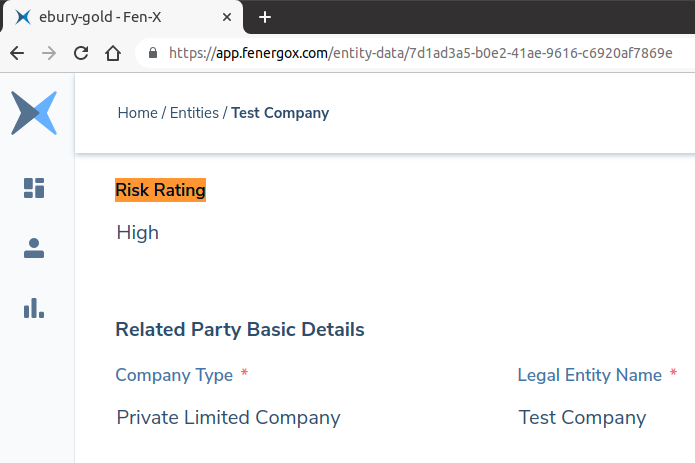
There is a governance process that defines how improvement proposals to the CRR algorithm have to be submitted, approved, tested and released. The improvements are referred as change requests (CRs) and usually a set of them is bundled together for a release.
Testing CRR changes
An impact analysis has to be conducted before the changes can be pushed into production. There are two types of tests being performed:
- Test against predefined scenarios (client personas), e.g. for fake client X the risk factor must be HIGH
-
Test the new CRR algorithm against the majority of production clients. The product team will typically look at the number of:
- total number of clients with a changed risk rating
- downgrades (risk rating became lower)
- upgrades (risk rating became higher)
They will also run various adhoc queries to better understand the impact.
** No changes are applied in production at this stage.
The Governance Process document (FXDCRR0003) describes the process in more details.
Releasing CRR changes
Releasing a new CRR algorithm implies applying it for any new clients and also re-scoring all the existing clients with the new algorithm.
Status Quo
The onboarding and compliance processes are being moved from Salesforce into FenX (FXDCRR0004). New clients are already going through Fenergo and the clients pre-Fenergo were partially migrated. Fenergo already offers a highly configurable equivalent solution for calculating the risk score that was used to fully replace Eburys in-house solutions (FXDCRR0005). This is already in use for new clients.
The existing automation around the CRR governance process is no longer usable in the Fenergo context.
Processes pre-Fenergo
The previous testing and release processes are presented here as a reference.
Testing CRR changes pre-Fenergo
- The release is agreed in the CRR WG (e.g. scope of CRs, deadline, etc.)
- Tech and Data work on the changes in SF / Data Service in dev
- Tech and Data push the changes into Salesforce staging
- UAT is performed in staging with scenarios defined by Product
- Data runs a pre-release impact analysis (number of upgrades/downgrades)
- The release is approved at SteerCo (including UAT results and impact analysis)
Releasing CRR changes pre-Fenergo
- The release is performed - changes are pushed to production by Tech and Data. This means the changes apply for new risk scores
- Tech runs a script to re-score every existing customer. This is needed because otherwise changes in the CRR won't be applied until the next customer risk review date
FenX configuration management
Managing the configurations in Fenergo, including adding a new risk model and changing journey schemas is done by the BizAps team.
Problem Description
Compliance agreed on putting CRR changes on hold during the FenX roll-out, last release was P3 R3 on March 2022. There is a number of CRs that accumulated since then (code name P4 R1) that have to be released. To unblock the releases the following processes have to be implemented on top of Fenergo:
- Testing CRR changes
- Test against predefined test cases.
- Production data report. It will contain the risk fields, a few additional fields, existing risk score, new risk score. The impact analysis will be done on top of this report.
- Releasing CRR changes
- new clients risk score is calculated with new risk model
- all existing clients are evaluated with the new risk model (re-scoring)
More details in the product requirements document (FXDCRR0001).
Dependencies
Fenergo data migration (FXDCRR0007)
Solution
The proposal is to use the Fenergo production environment for the entire process. To enable the risk score simulations, a new risk model will be added upfront in the production environment, but not used in any production workflows yet. Normally Fenergo operates through journeys, but for the risk score calculation it also offers a stateless calculator (FXDCRR0006) that receives a reference to a risk model object and the risk fields, and returns the risk score. This will be used through the API. The risk model used in the simulation will also be fetched through the API and stored on our side for traceability (GetRiskModelByVersionNumber API method, json format).
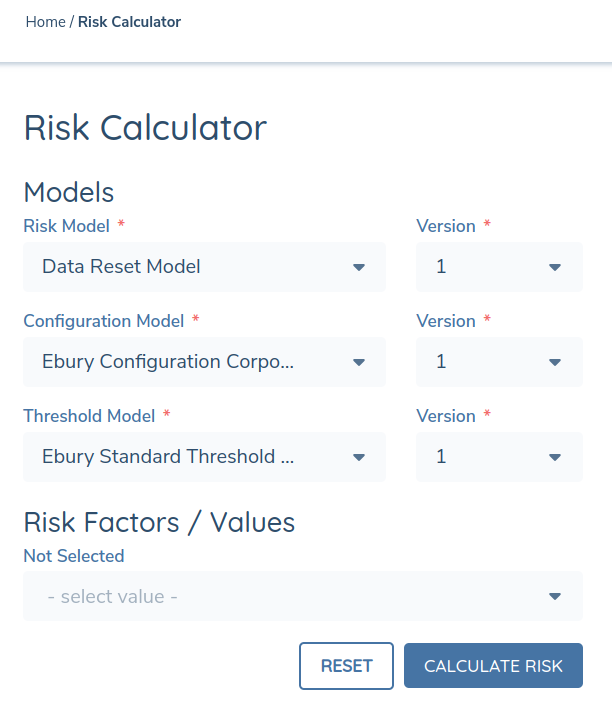
Note: This does not imply that the staging environment cannot be used for other kind of tests that do not depend on the actual production data.
In case of CRRs that require adding new fields, the new fields will be added in production in an inactive state before the simulation, making no difference for the proposed solution.
The following software components will be implemented, also check the C4 models (FXDCRR0009):
FenX data fetcher - shared component
Provides an interface to fetch Fenergo entities, hiding the implementation details, e.g. kafka topic / DB / API.
This component must consume Fenergo entities in a json file that, are inside an S3 bucket, using S3 select (FXDCRR0010) so that it is not necessary to load all messages simultaneously in memory and processing can be performed in batches.
This json file should contain the most current entities present in Fenergo system. The message structure must be the same as the message present in the kafka topic ebury.events.fenx.entity-update.command, except for the presence of an additional key that must contain a numerical index starting at zero and incrementing by one for each following entity. Suggested name for this key is aws_s3_index.
FenX risk score simulator
This component will be used to validate the new risk model by simulating the risk score on either predefined scenarios or existing production data.
Sketch (happy flow)
Input: * Scope Conditions (Provided by product team). * Risk Factors of each risk model (Provided by product team). * Risk values remapping. There are cases where the production values will be replaced as part of the CRR release and we have to anticipate what the new values will be. Simple one to one mapping only (agreed with product). * FenX entity data (Obtained from a file on S3 maintained by the DIO team). * Risk data (optional). Used to test with predefined scenarios. Contains the risk inputs and the expected risk score results.
Steps: * Use the risk score model reference to fetch the configuration and store it * Use risk data input or fetch all entities using the FenX data fetcher * For each entity * Remap risk factor values if needed * Call the risk score api to obtain the new risk rating * Generate report entry * Generate report
Output:
-
Risk score model from FenX
-
A report that will contain:
- risk factors (name and value)
- some additional entity attributes
- existing risk score
- new risk score
All the other insights required for the analysis (e.g. number of downgrades/upgrades) will be computed on top of this report by the product team directly.
FenX re-scorer
This component will trigger the re-scoring for existing entities that have a score computed with a previous risk model.
Sketch (happy flow)
This component will manage your state using an S3 bucket. Every time the component is restarted it will check the last stored state and restart the process from that state.
Input: * List of FenX entity IDs (optional)
Steps (state management included) * Use given entity IDs or obtain the list of entity IDs using the FenX data fetcher * For each entity ID (stream the process metadata) * Create a draft entity * Create the re-score journey * Generate report entry containing new risk score (part of journey information), journey status * Monitor journey * Generate report
Output:
A report that will contain: * entity_id, journey_id, journey_status, new_risk_score, error
Note: The scope is only to trigger a journey. The journey schema will be created by the BizAps team and will have the following logic: * If the risk score is not changed, the journey will be closed automatically. * Otherwise, the journey will remain in progress waiting for user input.
FenX risk auditor
There will be a delay between the simulation and when the changes will be applied in production. This is a tool that will help in understanding if the updated risk score (after the release is finished) matches with the simulation results. It will do so by comparing the simulation report results with the FenX production data after all re-scoring journeys are closed.
Caveats
The FenX API has Rate Limiting and Throttling mechanisms, so any design changes in this project must consider these limitations. This information can be obtained directly from FenX support team.
None of the scripts have the ability to be run concurrently.
As part of the technical plan and implementation, all possible corner cases and failure scenarios will be considered and testing plans will be defined.
Ownership
DIO team will be responsible for update the S3 bucket with the most current FenX entities that will be consumed by FenX data fetcher. The update can always be done before the execution of any of the two components.
CSI team will be responsible for the new software components.
CSI team will be responsible for triggering the automated flows as part of the CRR governance process.
Operation
The processes will be triggered every time a set of CRs is proposed to be deployed in Fenergo. Typically, this is once a couple of months.
Security Impact
Everything will run in the Kubernetes production cluster making use of the existing security best practices.
Google Drive will be used to upload results. A dedicated service account has to be used and the resulted documents have to be shared only with specific people.
Deployment
All software components will be initially part of the same repo, i.e. fenx-automation. However, components must be deployed differently because of their unique characteristics.
FenX Risk Score Simulator
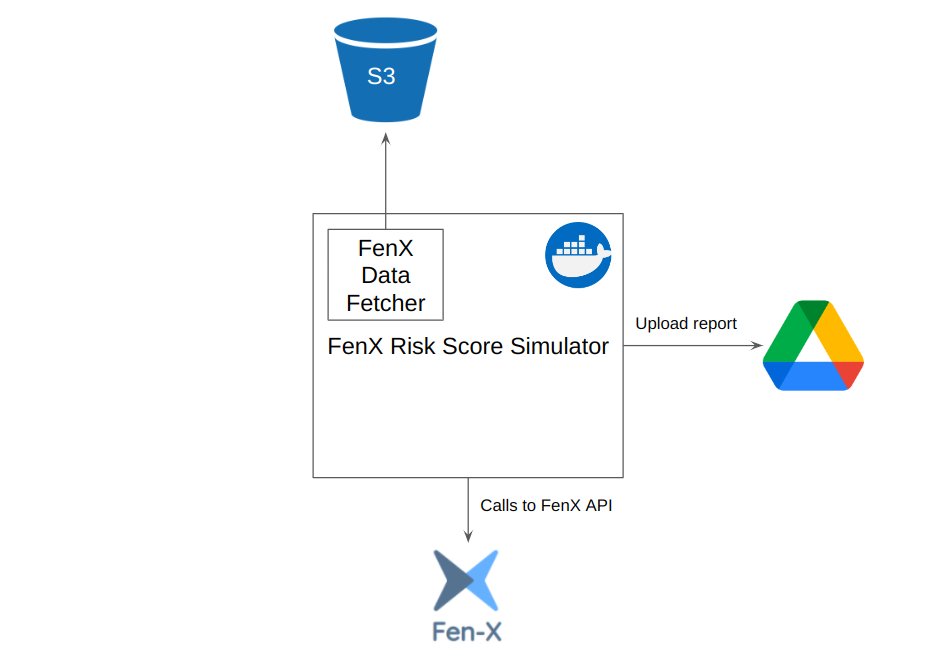
This component must be run as a script on a support team person's computer. The CSI team must inform the support team which command must be executed in order for the component to start. This is a cost effective solution as resources will be used only on demand.
FenX Risk Re-Score
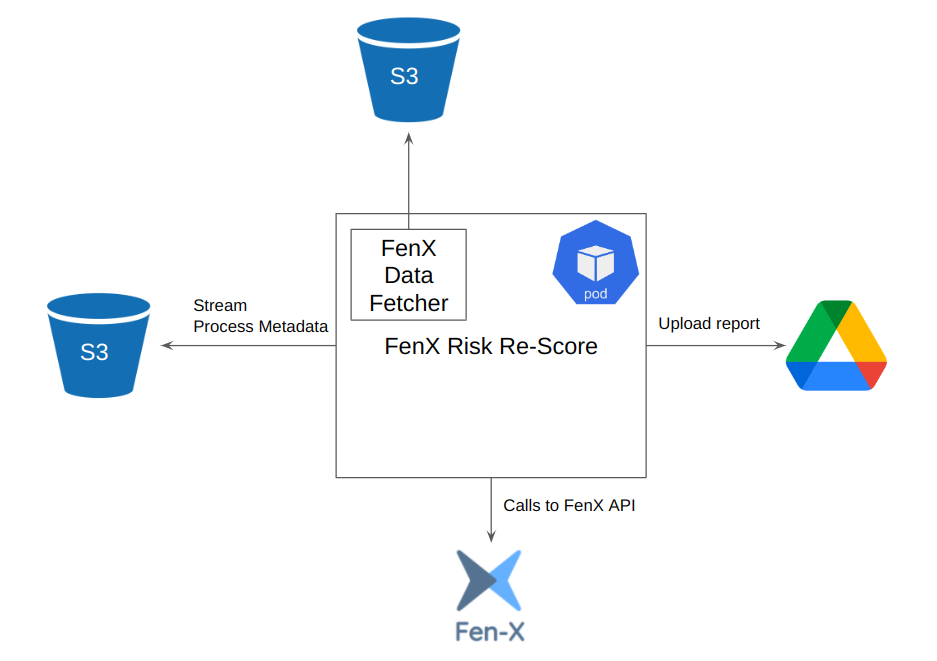
Given that this component is idempotent, it is possible to use Kubernetes CronJobs to execute it. This CronJob should execute the component every hour. What will cause the re-score process to run or not will be the previous state of the component.
A release would imply making an update in the ebury-manifests repository, setting a new process unique identifier to this component. As the Journey Schema will be defined hardcoded in the component, the pull request must be approved by a technician from the product team in order to confirm that the Journey Schema to be used is correct one.
Best practices
Best practices for monitoring and alerting will be used:
- centralized logging
- Prometheus Pushgateway to publish metrics
- Alertmanager, Grafana