Securing Kong webhook with OIDC Client Credentials Grant via Keycloak and Kong OAuth Plugin
Prerequisites
N/A
Reference Documents
The reference document table contains links to information relevant to the RFC, a link to the referenced document is also required. Here is an example:
| Reference | Document Location |
|---|---|
| KWA00 | Kong webhooks |
Problem Description
In scope of the projects in Ebury, we may need to exchange data with third parties. Today, we have different outbound connections with third parties via SFTP, API, etc. For the inbound connections, we use SFTP, AWS infrastructure (e.g. SQS queues etc, S3 buckets) and API (implemented with Kong). For both flows (inbound and outbound), it is required to secure communication and ensure that all requests are properly authenticated and authorized. In scope of this RFC we want to address a problem of securing inbound connections received from third parties via API, that need to be secured to prevent unauthorized access, ensure data integrity and maintain confidentiality
Background
Today we use two mechanisms in API (Kong) to secure communication with third parties. One mechanism includes whitelisting IP addresses from which requests are allowed and the second one using Basic authentication or HMAC(Hash-Based Message Authentication Code). When we need to open large number of IP addresses (because third party cannot provide more restrictive range or specific IP address), Basic authentication is not recommended from Security team, HMAC is primarily used for message integrity and authenticity in securing communication between known parties. Therefore, we want to propose a solution that implements OAuth authentication using components we have in Ebury: Kong + plugin (https://github.com/Ebury/ebury-api-gateway, https://docs.konghq.com/hub/kong-inc/openid-connect/) and Keycloak (https://github.com/Ebury/ebury-keycloak). OAuth2 allows more granular access control through scopes and Resource Servers. OAuth2 tokens can be revoked or expire after a certain period, enhancing security. If a token is compromised or no longer needed, it can be invalidated without requiring a change to the user's credentials.
Solution

The proposed solution is given in the image above. Before invoking API endpoint, third party service will use Keycloak to obtain a valid token and that will be included in all API calls sent towards Kong. For generating the token, we will use Keycloak that exposes separate endpoint that requires valid credentials to be supplied by third party to issue a valid token. Kong will be setup to perform necessary authentication and authorization checks using for Keycloak token.
Access tokens are preferred in service-to-service authentication due to their short-lived nature and regular rotation, enhancing security by minimizing exposure windows and simplifying token management. The use of access tokens contributes to a robust and secure token strategy, reducing dependencies on long-lived tokens and facilitating straightforward token revocation processes.
To enable the above workflow, we need to perform some steps to configure OAuth in both Keycloak and Kong.
Keycloak
Setup
- Create new realm https://thalesdocs.com/idpv/integrations/idpv_integrations/keycloak/set_keyclk/index.html#create-openid-connect-client
- Create openid-connect Client https://thalesdocs.com/idpv/integrations/idpv_integrations/keycloak/set_keyclk/index.html#create-openid-connect-client
- Once we create a new user https://www.appsdeveloperblog.com/keycloak-creating-a-new-user/ we can see / change client credentials that will be used for retrieving token
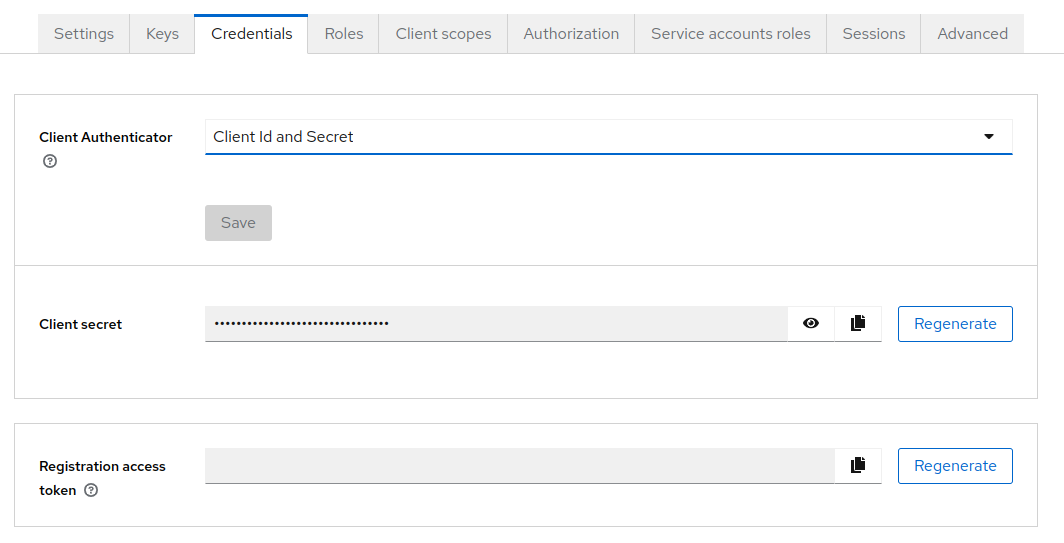
In keycloak RS256 is an algorithm used for signing JWTs in the context of OAuth 2.0 and OpenId Connect. RS256 is widely used for securing the identity and authentication processes within keycloak.
Keycloak and OpenID Connect Flow
- When a user tries to log in or access a protected resource in an OIDC-enabled application, the client initiates an authentication request. The request includes parameters such as client_id, client_secret and grant_type.
- Keycloak handles the user authentication process, upon successful authentication, Keycloak generates an ID token containing user information and other claims.
- Keycloak provides a token endpoint where the client exchanges the authorization code received in the redirect URI for tokens, including the ID token and optionally an access token and refresh token.
- In OpenID Connect the discovery mechanism allows clients to dynamically discover information about an OpenID Connect provider, this is done through a well-known URL known as the OpenID Provider Configuration Endpoint. The configuration endpoint provides metadata and configuration details about the OpenID Connect provider, including endpoints, supported features, and more.
- For Keycloak, the OIDC discovery endpoint is typically available at the following URL:
https://
/realms/ /.well-known/openid-configuration, where ketcloak-server is the base url and realm is the realm define above. example: https://keycloak.ebury.rocks/realms/master/.well-known/openid-configuration - The OIDC discovery endpoint provides a JSON document containing key information about the OpenID Connect provider, such as:
- issuer: The URL of the OP (OpenID Provider).
- authorization_endpoint: The endpoint for initiating the authorization request.
- token_endpoint: The endpoint for token requests.
- userinfo_endpoint: The endpoint for obtaining claims about the authenticated user.
- jwks_uri: The URL for the JSON Web Key Set (JWKS) containing the public keys used to verify the signatures of JWTs.
- This information is useful for OIDC clients (applications) to dynamically configure their interactions with the OpenID Connect provider without requiring manual configuration.
- The OIDC discovery mechanism streamlines the setup and configuration of OIDC clients by enabling dynamic configuration based on information obtained from the discovery endpoint, facilitating seamless integration and maintenance as clients automatically adapt to changes in the OpenID Connect provider’s configuration.
Kong
Our recommended solution is OpenID Connect
Configuration:
- Install plugin to the webhook route
- Configure it the following parameter:
- config.issuer - This parameter tells the plugin where to find discovery information, and it is the only required parameter. https://keycloak.ebury.rocks/realms/master/.well-known/openid-configuration
We can use this plugin for both JWT Access Token Authentication and Introspection Authentication
Please check Alternatives section for other plugins
User Authentication flow
- Client initiates an authentication request to Keycloak:
Values for client_id and client_secret should be provided by us.
curl --location 'https://keycloak.ebury.rocks/realms/master/protocol/openid-connect/token' \
--header 'Content-Type: application/x-www-form-urlencoded' \
--header 'Authorization: Bearer eyJhbGciOiJIUzI1NiIsInR5cCI6IkpXVCJ9.eyJpc3MiOiJ0ZXN0IiwiZXhwIjoxNzA1MzI5MjU4fQ.tVbw-ecoWaWHX3IuidZQlxSSMM0_rtjHHgmoQgQLYlc' \
--data-urlencode 'grant_type=client_credentials' \
--data-urlencode 'client_id={{client_id}}' \
--data-urlencode 'client_secret={{client_secret}}'
- Keycloak responds with an authorization code if the user grants permissions
{
    "access_token": "eyJhbGciOiJSUzI1NiIsInR5cCIgOiAiSldUIiwia2lkIiA6ICJpVXM5TlBEZEN2dll1UzZwbWJNRVk4Y0N3dG5ROHo3Rk83N203cmxXSS13In0.eyJleHAiOjE3MDcyMzU3MzgsImlhdCI6MTcwNzIyOTczOCwianRpIjoiY2I4ZDBiM2UtYTIxNC00ODc4LTk0MjgtMGVmOGY5NzQ3OTFlIiwiaXNzIjoiaHR0cHM6Ly9rZXljbG9hay5lYnVyeS5yb2Nrcy9yZWFsbXMvbWFzdGVyIiwiYXVkIjoiYWNjb3VudCIsInN1YiI6ImM0ODk5YjE3LTI0ZmMtNGVjOC1iM2RjLWEyMGRiMGUwZDA5NiIsInR5cCI6IkJlYXJlciIsImF6cCI6InNhbnRhbmRlci10ZXN0IiwiYWNyIjoiMSIsImFsbG93ZWQtb3JpZ2lucyI6WyIvKiJdLCJyZWFsbV9hY2Nlc3MiOnsicm9sZXMiOlsiZGVmYXVsdC1yb2xlcy1tYXN0ZXIiLCJvZmZsaW5lX2FjY2VzcyIsInVtYV9hdXRob3JpemF0aW9uIl19LCJyZXNvdXJjZV9hY2Nlc3MiOnsic2FudGFuZGVyLXRlc3QiOnsicm9sZXMiOlsidW1hX3Byb3RlY3Rpb24iXX0sImFjY291bnQiOnsicm9sZXMiOlsibWFuYWdlLWFjY291bnQiLCJtYW5hZ2UtYWNjb3VudC1saW5rcyIsInZpZXctcHJvZmlsZSJdfX0sInNjb3BlIjoiZW1haWwgcHJvZmlsZSIsImNsaWVudEhvc3QiOiI1Mi41MC4xMS4yMTAiLCJlbWFpbF92ZXJpZmllZCI6ZmFsc2UsInByZWZlcnJlZF91c2VybmFtZSI6InNlcnZpY2UtYWNjb3VudC1zYW50YW5kZXItdGVzdCIsImNsaWVudEFkZHJlc3MiOiI1Mi41MC4xMS4yMTAiLCJjbGllbnRfaWQiOiJzYW50YW5kZXItdGVzdCJ9.JZOgo2v1xc7xUJk8vvgxWTBXBPljucc_c7a768B7XYHTcFnOd33rwrGKnWZ5M0kl6_G74buGx7NBr_dtTsB-upiACF4fWFWfKBeOlNV9asDwad9l9n3A74WvdqAn3yQwVv-Mx9xK7kTyebF72jvMrS1uKmaOR_KTjB3zlLj1kyXpUyATkynlcNqpqJZJyKVMd9re78G3_zO96M13w2eoQLEqP4ppIA9D3A9MrkGR6R04ZYV_IXKn_0ge38KYtnrKNrrD3vTPwTUJNW9TtsrKgv8g1GojYADobT8SpKRg5JYEfVF3Hz_mk4JXthzzB_3TBJRClo-we2xfSmM7eVe8jA",
    "expires_in": 6000,
    "refresh_expires_in": 0,
    "token_type": "Bearer",
    "not-before-policy": 0,
    "scope": "email profile"
}
- With the generated token above client will call Kong webhook
curl --location 'https://webhooks-apistaging.ebury.rocks/webhook_url' \
--header 'Authorization: Bearer eyJhbGciOiJSUzI1NiIsInR5cCIgOiAiSldUIiwia2lkIiA6ICJpVXM5TlBEZEN2dll1UzZwbWJNRVk4Y0N3dG5ROHo3Rk83N203cmxXSS13In0.eyJleHAiOjE3MDcyMzU3MzgsImlhdCI6MTcwNzIyOTczOCwianRpIjoiY2I4ZDBiM2UtYTIxNC00ODc4LTk0MjgtMGVmOGY5NzQ3OTFlIiwiaXNzIjoiaHR0cHM6Ly9rZXljbG9hay5lYnVyeS5yb2Nrcy9yZWFsbXMvbWFzdGVyIiwiYXVkIjoiYWNjb3VudCIsInN1YiI6ImM0ODk5YjE3LTI0ZmMtNGVjOC1iM2RjLWEyMGRiMGUwZDA5NiIsInR5cCI6IkJlYXJlciIsImF6cCI6InNhbnRhbmRlci10ZXN0IiwiYWNyIjoiMSIsImFsbG93ZWQtb3JpZ2lucyI6WyIvKiJdLCJyZWFsbV9hY2Nlc3MiOnsicm9sZXMiOlsiZGVmYXVsdC1yb2xlcy1tYXN0ZXIiLCJvZmZsaW5lX2FjY2VzcyIsInVtYV9hdXRob3JpemF0aW9uIl19LCJyZXNvdXJjZV9hY2Nlc3MiOnsic2FudGFuZGVyLXRlc3QiOnsicm9sZXMiOlsidW1hX3Byb3RlY3Rpb24iXX0sImFjY291bnQiOnsicm9sZXMiOlsibWFuYWdlLWFjY291bnQiLCJtYW5hZ2UtYWNjb3VudC1saW5rcyIsInZpZXctcHJvZmlsZSJdfX0sInNjb3BlIjoiZW1haWwgcHJvZmlsZSIsImNsaWVudEhvc3QiOiI1Mi41MC4xMS4yMTAiLCJlbWFpbF92ZXJpZmllZCI6ZmFsc2UsInByZWZlcnJlZF91c2VybmFtZSI6InNlcnZpY2UtYWNjb3VudC1zYW50YW5kZXItdGVzdCIsImNsaWVudEFkZHJlc3MiOiI1Mi41MC4xMS4yMTAiLCJjbGllbnRfaWQiOiJzYW50YW5kZXItdGVzdCJ9.JZOgo2v1xc7xUJk8vvgxWTBXBPljucc_c7a768B7XYHTcFnOd33rwrGKnWZ5M0kl6_G74buGx7NBr_dtTsB-upiACF4fWFWfKBeOlNV9asDwad9l9n3A74WvdqAn3yQwVv-Mx9xK7kTyebF72jvMrS1uKmaOR_KTjB3zlLj1kyXpUyATkynlcNqpqJZJyKVMd9re78G3_zO96M13w2eoQLEqP4ppIA9D3A9MrkGR6R04ZYV_IXKn_0ge38KYtnrKNrrD3vTPwTUJNW9TtsrKgv8g1GojYADobT8SpKRg5JYEfVF3Hz_mk4JXthzzB_3TBJRClo-we2xfSmM7eVe8jA' \
--header 'Content-Type: application/json' \
--data '{
    "body": "message content"
}'
Service Ownership
Webhook authentication is expected to be owned by Security Engineering team.
Alternatives
If you’re considering alternatives we identify two more options. Here are the additional alternatives along with brief explanations:
JWT authentication
The connection flow between Keycloak, JSON Web Tokens (JWTs), and Kong involves the authentication and authorization processes managed by Keycloak, the issuance of JWTs, and the use of Kong as an API Gateway to secure and manage access to APIs. Here is a high-level overview of the flow:
- Keycloak
- Create new realm and openid-connect client - we will use the same setup as we defined above
- Once we receive the token we can get information about it:
curl --location 'https://keycloak.ebury.rocks/realms/master/protocol/openid-connect/token/introspect' \
      --header 'Authorization: Bearer eyJhbGciOiJIUzI1NiIsInR5cCI6IkpXVCJ9.eyJpc3MiOiJ0ZXN0IiwiZXhwIjoxNzA1MzI5MjU4fQ.tVbw-ecoWaWHX3IuidZQlxSSMM0_rtjHHgmoQgQLYlc' \
      --header 'Content-Type: application/x-www-form-urlencoded' \
      --data-urlencode 'grant_type=client_credentials' \
      --data-urlencode 'client_id={{client_d}}' \
      --data-urlencode 'client_secret={{client_secret}}' \
      --data-urlencode 'token={{token}}'
Response should be similar to:{ "exp": 1707744569, "iat": 1707738569, "jti": "bc801a9c-e61c-4b69-b707-b8c6e8711212", "iss": "https://keycloak.ebury.rocks/realms/master", "aud": "account", "sub": "c4899b17-24fc-4ec8-b3dc-a20db0e0d096", "typ": "Bearer", "azp": "username-test", "scope": "email profile", "client_id": "client_id", "username": "username", "active": true } -
Retrieving Realm RSA public key:
curl --location 'https://keycloak.ebury.rocks/realms/master/protocol/openid-connect/certs'Response would look something like this:
{
      "keys": [
          {
              "kid": "iUs9NPDdCvvYuS6pmbMEY8cCwtnQ8z7FO77m7rlWI-w",
              "kty": "RSA",
              "alg": "RS256",
              "use": "sig",
              "n": "wZfd1_5OwI1ceCwryASlHjH5MWXiUhOKT_FT_jwLT8wG1xjk4tcMRYEpZAWMy46DbPk3yny02JzhpC1gS7QbM3NBApvwRy0bDj2ydMl09m7P8GoCXdw6nkTvGb616A8d3sdc3gYhhzjL8K60c7LC0eUJ-Ae_f2JSvbVKI8vH1bRS4B0LfSkJqQR25sX3qq6ef8l4_h17rmTwIILhUg6CnHttKeKm5RGokakeiKrFvQKohRkjTVMEFon4dvtJK3ARDwAsO8yqZ5FZAaOM64ktIHOdzs2gLDpi_EaeUHhdfIEdPGusXsvgp5amtdmeIEOLe4HFDN1KERRQdatR7e-eRw",
              "e": "AQAB",
              "x5c": [
                  "MIICmzCCAYMCBgGAYQMlHjANBgkqhkiG9w0BAQsFADARMQ8wDQYDVQQDDAZtYXN0ZXIwHhcNMjIwNDI1MTM1NTM3WhcNMzIwNDI1MTM1NzE3WjARMQ8wDQYDVQQDDAZtYXN0ZXIwggEiMA0GCSqGSIb3DQEBAQUAA4IBDwAwggEKAoIBAQDBl93X/k7AjVx4LCvIBKUeMfkxZeJSE4pP8VP+PAtPzAbXGOTi1wxFgSlkBYzLjoNs+TfKfLTYnOGkLWBLtBszc0ECm/BHLRsOPbJ0yXT2bs/wagJd3DqeRO8ZvrXoDx3ex1zeBiGHOMvwrrRzssLR5Qn4B79/YlK9tUojy8fVtFLgHQt9KQmpBHbmxfeqrp5/yXj+HXuuZPAgguFSDoKce20p4qblEaiRqR6IqsW9AqiFGSNNUwQWifh2+0krcBEPACw7zKpnkVkBo4zriS0gc53OzaAsOmL8Rp5QeF18gR08a6xey+Cnlqa12Z4gQ4t7gcUM3UoRFFB1q1Ht755HAgMBAAEwDQYJKoZIhvcNAQELBQADggEBAFhQzoYTPgfVV4exWOYUFHRiCf3snHj1aEeWKvtDo4OWD0jlWBirkA2XhagvafkZ8/wSeezoxrjv+EhrgWzcEhfb73mqfw7YQOpyq1UdhAOjocJHOj46LbqljhbrfFmuFxd9FkM95AH7v8PttqB1nlrB16F9K9yzj6ZJALQQ6IFxBmS0i6idETxulUZEY0FRp2DOFy8mnfPbVMsLoI2cdlppUTXjwNTVGJZH2+OLQvs4QaRvzTpw8Laa/Gj3Q6PnLDdCf1Z7TmZlgtSALGJ8/OGar+V5/Fa+uCPQcvfLA7z6yJ0NQ3Wd5PTXyDaZvv5DF6JuMAgbUf8UCXDlRZnB4Hw="
              ],
              "x5t": "dZqjw5UXy-QeJEBH26kLyO0zuwA",
              "x5t#S256": "oop6txajjyLrCPDbWShpfRGnoi8zNyUSx37-irKprJA"
          }
      ]
  }
* kid – The unique identifier for the key. * kty –Identifies the family of algorithms used with this key * alg – Algorithm – Identifies the specific algorithm * use – How the key was meant to be used; sig represents the signature. * n – The modulus for the RSA public key. * e –The exponent for the RSA public key * x5c – X.509 Chain of certificates used for verification. The first entry in the array is always the cert to use for token verification. The other certificates can be used to verify this first certificate. * x5t – The thumbprint of the x.509 cert (SHA-1 thumbprint) * x5t#256 – The thumbprint of the x.509 cert (SHA-1 thumbprint) (SHA-256 thumbprint) -
From the information above we can obtain a certificate file for the realm public key (.pem format)
- Kong
- Install JWT plugin to the webhook route
- Configure it the following parameter:
- key - issuer value from token details
- secret - “n” value from response from retrieving Realm RSA public key
- rsa_public_key - response from retrieving Realm RSA public key
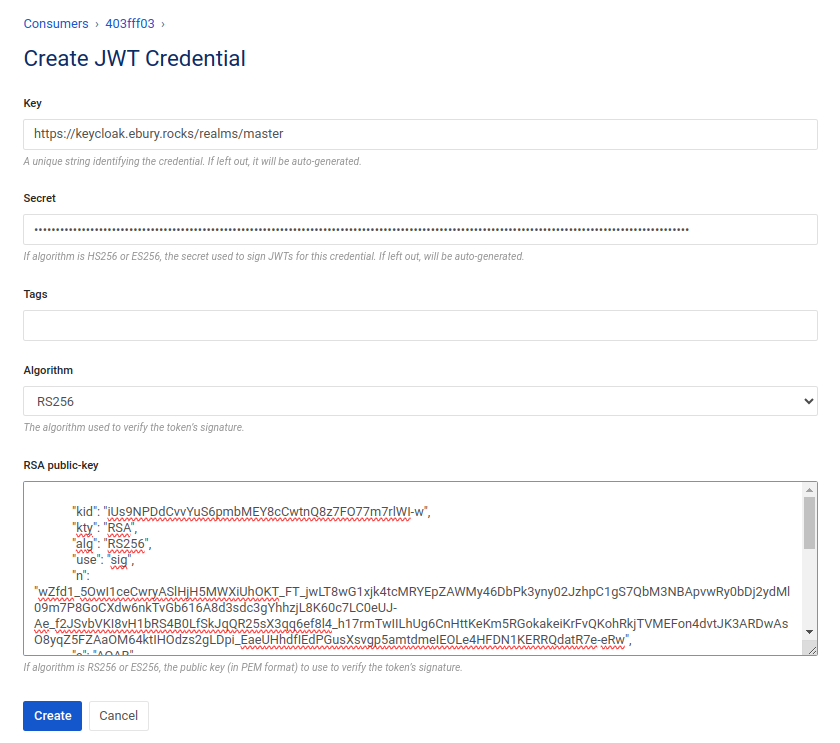
OAuth 2.0 Introspection
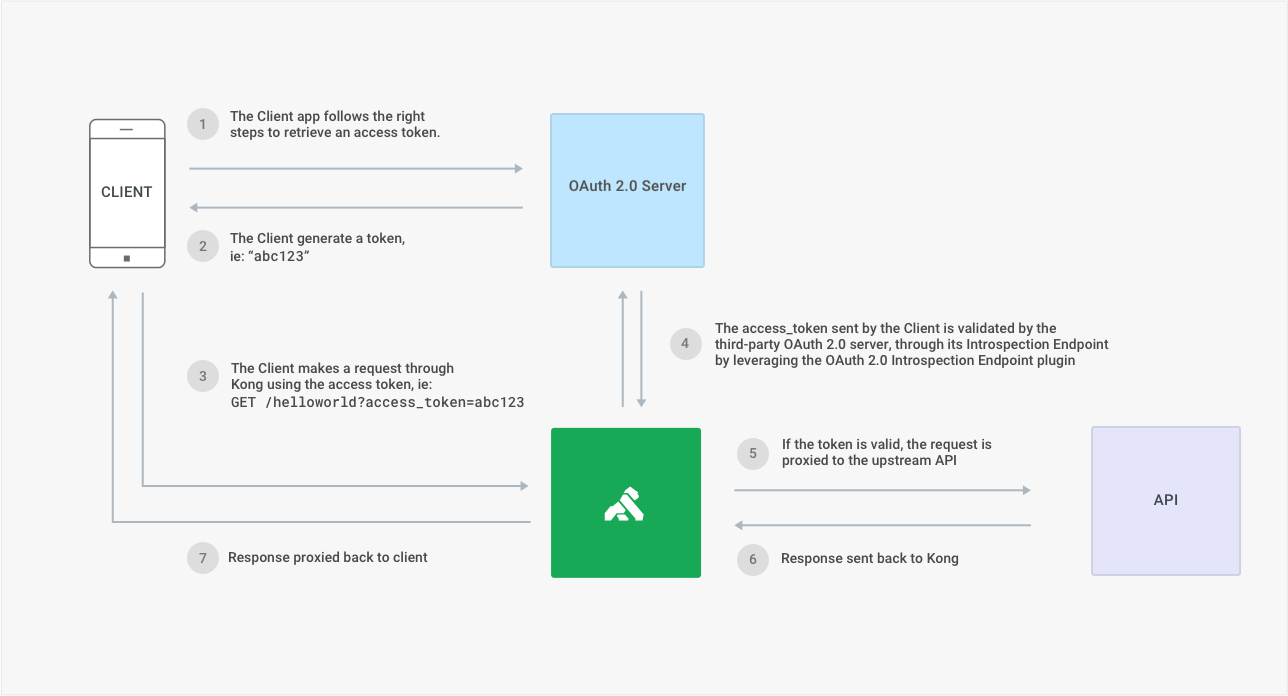
OAuth 2.0 Token Introspection is a mechanism to inquire about the validity and attributes of an OAuth 2.0 token (access or refresh) by making a request to the token introspection endpoint.
Configuration:
- Install plugin to the webhook route
- Configure it the following parameter:
- Config.Introspection - introspection endpoint https://keycloak.ebury.rocks/realms/master/protocol/openid-connect/token/introspect
- Config.Authorization Value - Base64-encoded Basic Auth string from client_id and client_secret defined in Keycloak
- Config.Consumer By - client_id
Caveats
N/A
Operation
N/A
Security Impact
Securing externally exposed webhooks is crucial for several reasons, even when employing IP Whitelisting firewall rules. Externally exposed webhooks are, by definition, accessible to the public. IP Whitelisting alone does not prevent unauthorized users from sending requests if they are within the allowed IP range. OAuth adds an extra layer of authentication to ensure that only authorized clients regardless of their IP addresses, can interact with the webhook.
Performance Impact
N/A
Developer Impact
None
Data Contracts
None
Data Sources
No data source will be required
Deployment
We configure Keycloak and Kong through Terraform. We have enterprise subscription which enables us to have unlimited number of plugins, both paid and premium at no extra charge. https://konghq.com/pricing
Dependencies
Running keycloak server, where we can set up new user, which will be used for obtaining the token. Running kong server, with authentication plugin configured for the webhook, that will receive the token.
Based on RFC Template Version 1.1