Mobile CI/CD Solution (iOS)
Mobile CI/CD solution is a process that automates the building, testing, and deployment of mobile applications and it involves the following steps:
- Building and packaging the mobile application code into an installable package, in case for iOS an IPA file
- Running automated tests to ensure that the application works as intended
- Deploying the application to the desired environment for further testing.
- If the application passes all tests, it is deployed to production
For example, an Android workflow with separated CI and CD part is shown down below, but it is the same analogy for the iOS application
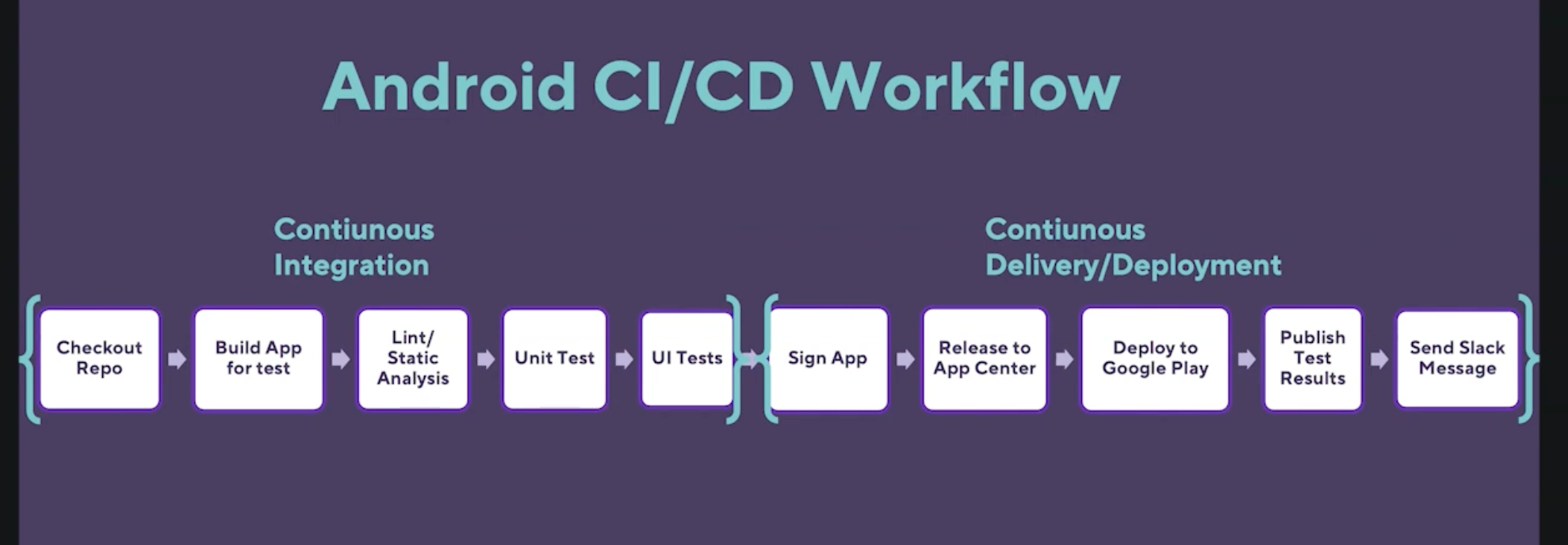
Image 1 - Sample CI/CD diagram
Prerequisites
Prerequisites for the RFC were to find a solution for Android and iOS CI/CD platform (concretely app deployment for both). This prerequisite has been met with Bitrise PaaS Mobile DevOps and CI/CD platform.
Reference Documents
| Reference | Document Location |
|---|---|
| Bitrise | Bitrise URL |
| Bitrise Docs | Bitrise Docs URL |
| Bitrise security | Bitrise security URL |
| Bitrise secrets | Bitrise secrets URL |
| Bitrise code security | Bitrise code security URL |
| Bitrise security blog | Bitrise security blog URL |
| Bitrise user roles | Bitrise user Roles |
| Github CI/CD | Github CI/CD URL |
| Bitrise Step Library | Bitrise Step Library |
| Bitrise API documentation | Bitrise API documentation URL |
| Google SSO | Google SSO URL |
| Pricing | Pricing URL |
| Connecting Bitrise to github | Connecting Bitrise to github URL |
| Configuring SSH keys | Configuring SSH keys URL |
Problem Description
For the case of our iOS app, the goal is to find a solution in which we can have a CI/CD system and use it with as little maintenance as possible from our side due to the features we need to develop and release the first version of the iOS app.
Background
CI/CD systems have existed for a long time (like Jenkins), BUT in the case of mobile systems, it is a completely different story due to the complexity that appears in these scenarios.
By complexity we mean not a simple CI/CD workflow, but more of the fact that Android and iOS mobile developments have their own quirks and specifically the iOS has many issues with Apple caveats where there are constant upgrades of the OS and Xcode versions and thus they can break many things, like the testing, especially the UI.
Also, there is an additional issue with the HW on the Apple side, where we have had Intel machines and now M1 and M2 processors. This can also break things and specific setup is required on the developers machine. On Bitrise there is a neat option to choose the HW and the OS and XCode version, thus saving us from the constant cycle of upgrades and fixes.
Mobile CI/CD solutions can be implemented using a variety of tools and platforms, such as Jenkins, GitLab, CircleCI, and Bitrise. These tools provide features for automated testing, building, and deployment of mobile applications. They integrate with other tools such as testing frameworks, version control systems, and cloud-based services (like Sonar-cloud etc) to provide end-to-end automation of the mobile app development process.
Solution
Choose a correct mobile CI/CD solution from the list above, in our case it would be Bitrise do to the following reasons:
- It is the most used and accepted solution in the mobile application CI/CD
- Apadmi agency, the one from which we’re inheriting the project, uses it for all of its projects without any issues so it’s a known platform
- It can be integrated with iOS and Android
- It can be integrated with various tools, such as Xcode, fastlane, and GitHub
- It is scalable from a technical point of view (we can choose the mac machines and OS to compile our project)
- It is scalable from a financial point of view (we can choose the subscription model)
- Other solutions for mobile like Bitbucket and github are new and still not tested enough
- Circle CI as a solution is an option, but is less user friendly and has no any advantages over Bitrise which we tested and know how to use
- Jenkins has the advantage that it is an internal solution, but it is not user mobile friendly, hard to set up and requires resources in manpower to set and maintain as well as constant involvement from the iOS devs.
How can we scale it ?
We can easily scale it and there are two columns of scalability:
- Technical stack and
- Subscription model
Technical stack means choosing the OS stack (XCode version, etc) and machine type for the chosen stack (CPU cores and RAM) or by the the
Subscription model means choosing the monthly subscription fee which we need to define whether we want flat or credit based one. If we choose the flat one we have an unlimited number of builds but there are many limitations like parallel build, tech stack etc. The credit based one gives us more flexibility, but it spends credits per minute depending on the machine (see image 2)
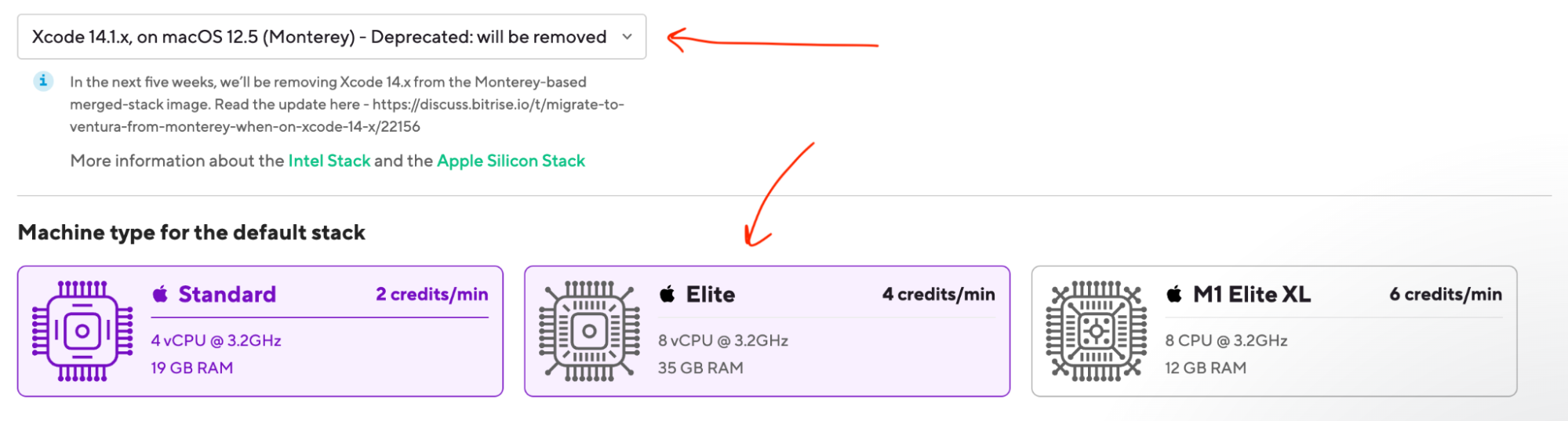 Image 2 - Technical scaling
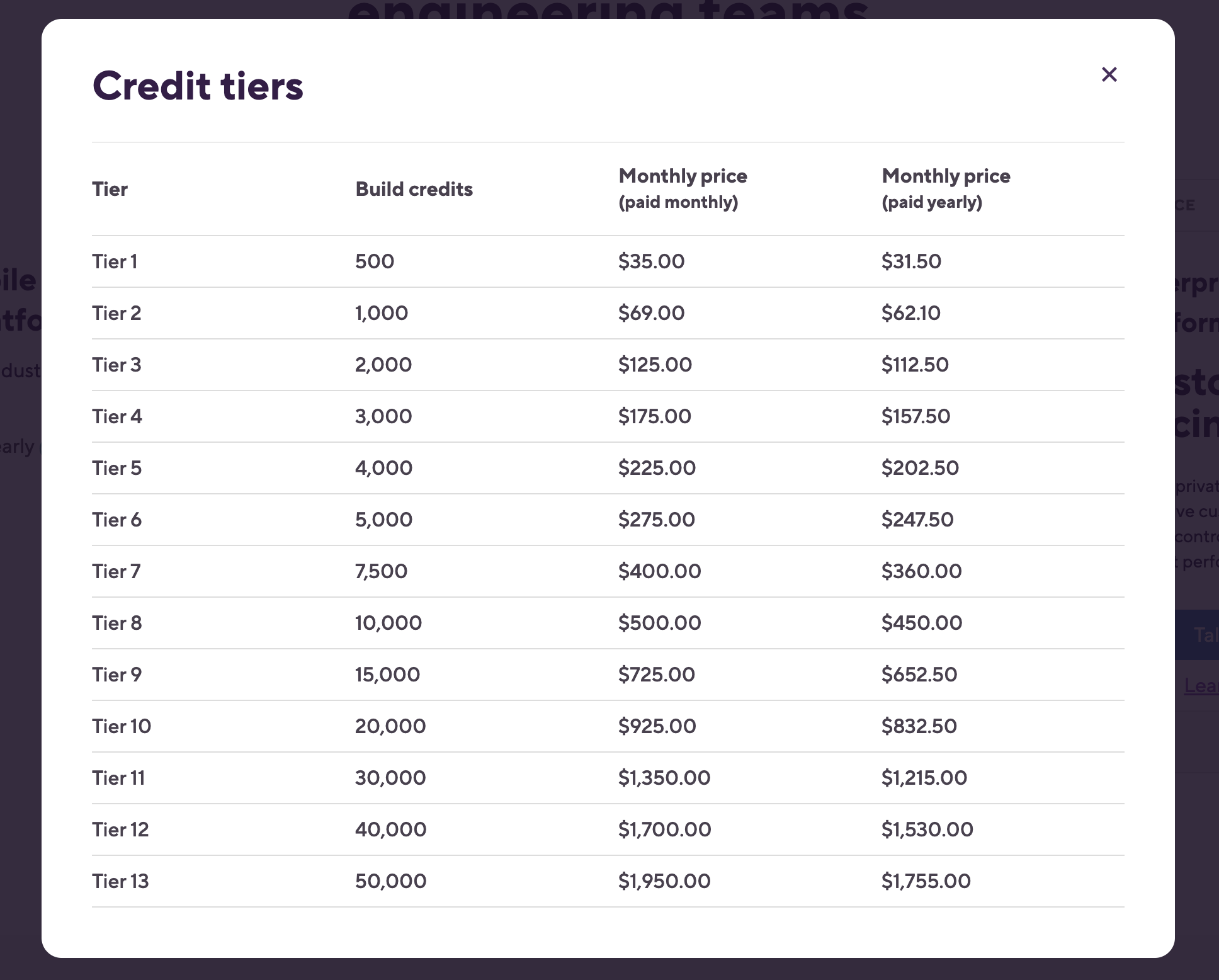
Image 3 - Financial scaling
For our case, it was agreed with Bitrise representatives for the SSO add-on to be priced at $2000 annually and would be available for clients on Tier 5 and above. This means that the total annual cost of the plan would be $4,424 in our case which has 2000 build credits.
Service Ownership
Ext. Interfaces and Mobile team would own this, since it is in its area of interests. Specifically the iOS part, but when we implement this for android as well, then the future Android part of the mobile team will also be responsible.
Alternatives
Two potential ones are:
- Github
- Jenkins
Jenkins would be an internal approach while Github is not a mobile specific like Bitrise.
It is worth mentioning CircleCI and Bitbucket, but they are not a dedicated Mobile CI/CD and have no real benefit over Jenkins and Github.
Jenkins downsides would be:
- At least two Mac mini computers are needed for redundancy although one can do the job.
- It is the main tool while MAC is added as a slave, so some complexity there to set it all up is unavoidable.
- It looks archaic in the UI part.
- It is not meant for mobile by default and has a lot of plugins.
- Time is needed to set it up correctly.
- XCode needs to be installed on the MAC slave machines.
- All of the certificates need to be installed on the same MACs
- XCode and MAC OS needs to be maintained manually, this means constant upgrades unlike with Bitrise where we choose the OS and XCode IDE version from a simple menu.
Caveats
It will be applied for the iOS platform, for which we know the process and how to set it up. We're not experienced with Android althought they claim it's an easy setup as well. Still this is something to thing about.
Operation
Mobile team will run this tool, it will be of internal access only. The workflows will be planned and implemented by the mobile team as well as output of the builds.
Security Impact
Bitrise has no access to our BOS system so from that point there are no connections.
Bitrise security measures
Detailed reference about Bitrise security practices can be found on this link Bitrise security URL and it describes:
- Certificates / Compliance
- Product Security
- Data Security
- Network Security
- Application Security
- Vulnerability
- Business Security
- Physical Security
Authorisation and authentication
We can add members to the project from the setting panel in Bitrise and roles are supported.
There are FOUR major ones and detailed explanation is here -> Bitrise Roles
They go by the importance from top to bottom:
- Owners
- Admins
- Developers
- Testers/QA
Access can be given to security using the principle of least privilege (PoLP)
Integration with third-party security scanners?
It integrates with third-party security scanners through its API, concretely:
- Custom scripts can be created that call third-party security scanners and they can be included as steps in the Bitrise workflow.
- Pre-built integrations are supported with several third-party security scanners. Like, Snyk, WhiteSource, and CodeClimate. These integrations can be added to the Bitrise workflow using the Bitrise Step Library.
- Webhooks and APIs and for this third-party security scanners can send security feedback and notifications to Bitrise using webhooks and APIs, this allows to receive security alerts directly without having to switch between different tools
Some links on this subject:
Authentication using Google SSO?
Setting up Google SSO for Bitrise is POSSIBLE, but with pricing restrictions.
To quote their documentation:
SAML SSO is only available for a Workspace with the Velocity or Enterprise Build plans.
This means that we need to have a Google administrator account where we can add Bitrise as a SAML app. Concretely, Google Workspace administrator needs to set up SAML SSO on Google Workspace.
Since Velocity package is mandatory for SSO, we must take into account that it will cost $2,500 minimum if we decide this is needed in the future. Although we will start with Teams or Starter package (see images 4 and 5) it can be more expensive in the future if we need you pass SOC2 or similar certifications and Bitrise PaaS is needed for that.
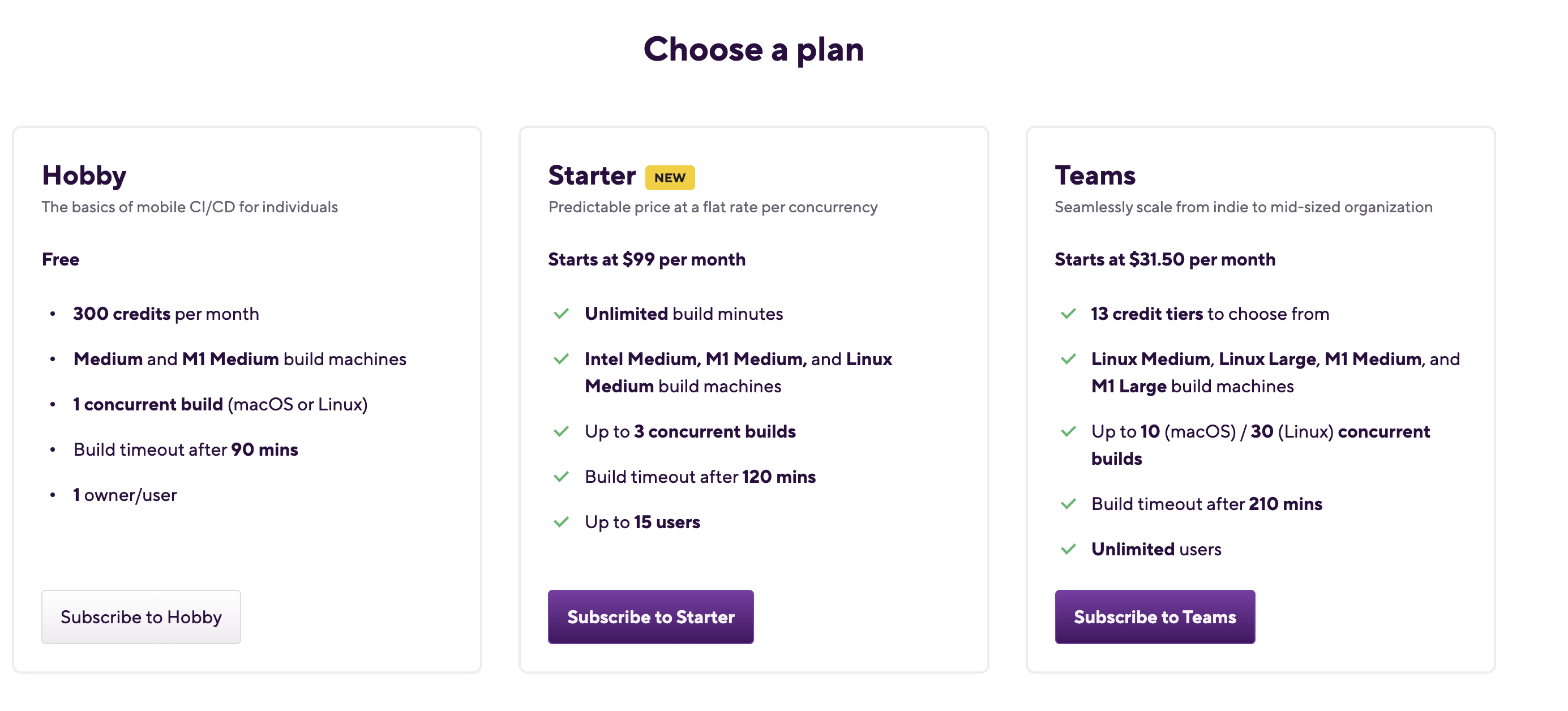 Image 4 - Pricing 1
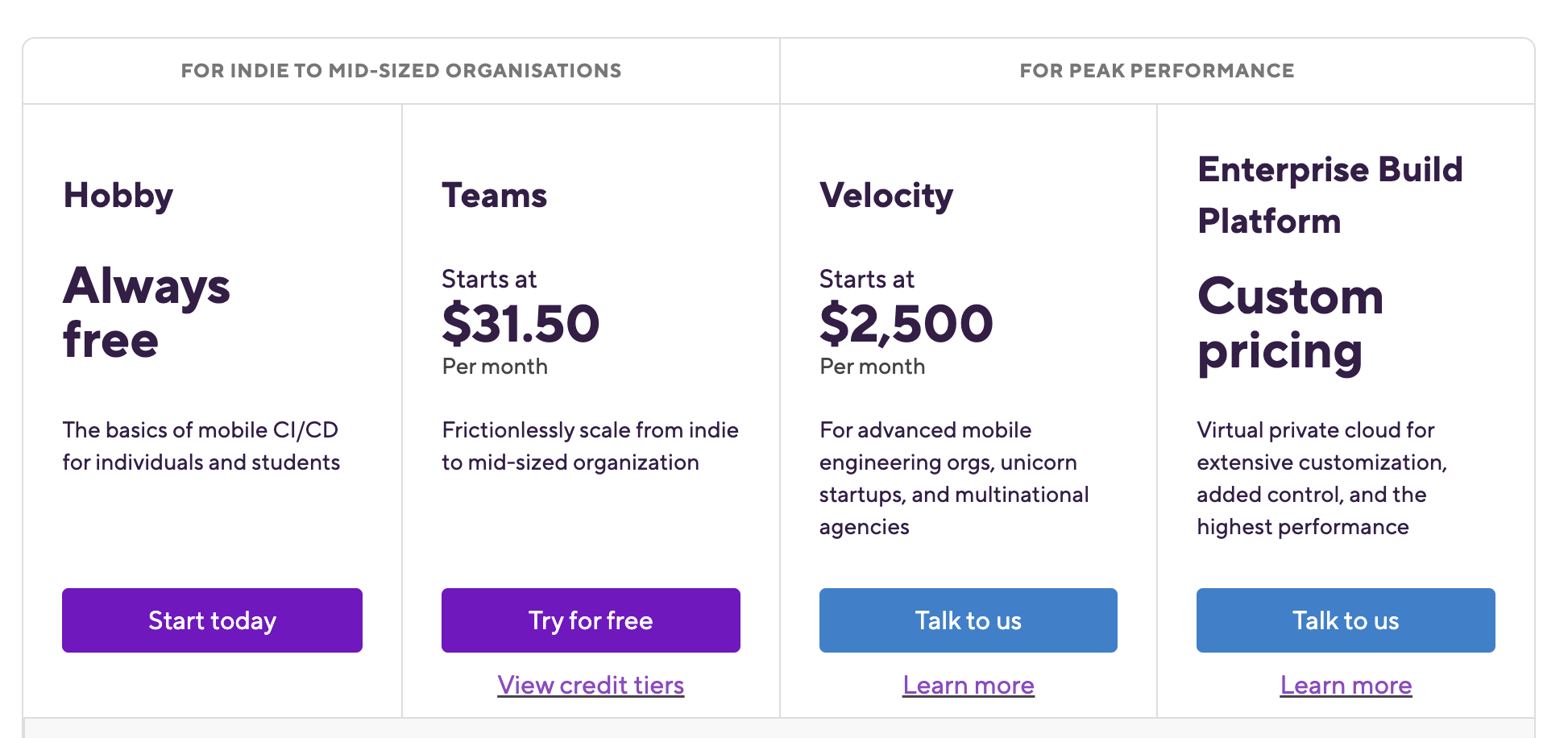 Image 5 - Pricing 2
Referenece links:
Secrets
Secrets are a specific type of Environment Variable we can use in Bitrise and they hide their information in an encrypted format while their value is not exposed in the build logs.
They also are NOT shown in the bitrise.yml configuration which is a main setup file for the workflows.
Confidential information, such as passwords or API keys are stored as Secrets
Managing Secrets from a central location is possible, and it requires two things:
-
A central vault or database - such as HashiCorp or Doppler - to store the Secrets. It must be accessible via a CLI.
-
A Script Step to access the central vault/database, pull the Secret and set it to sensitive on Bitrise.
Connecting Bitrise to Github
It is possible to join Bitrise with an existing GitHub account or link it after. Bitrise can then see our repositories, but it won't be able to check out the actual source code. To make access, there is a need for explicit access by registering an SSH key-pair for every single repository.
Other solution, which we did in fact, is to create the Owner user account and add the repos on the repo per repo basis each with it's own SSH private / public key. With this setup Bitrise needs a public-private SSH keypair, with the public key registered to your app's Git repository and they can be updated at any point.
It is important to note that only the iOS mobile app will be Connected to the Bitrise for the purpose of CI/CD and no any other repo from our system (Mobile API, BOS…).
For more info, here is the link -> connecting Bitrise to Github
Performance Impact
Since this is a PaaS platform, it will have no impact on any kind of performance mobile wise and API wise.
Developer Impact
None, since it’s a PaaS platform and this is its biggest trait. Otherwise, if we use Jenkins' solution with our dev ops team, it will require active involvement of our iOS team and overall spending developers time on the setup and maintenance of CI/CD workflows.
Data Contracts
Impacted systems, workflows and service endpoints
There are no impacts on our side since this is a platform which we use on subscription basis as a Platform as a Service (PaaS). Concerelty, no impact on our BOS system or internal network.
Deployment
None, since it’s a PaaS system.
Dependencies
None since there is no Jenkins involved
Based on RFC Template Version 1.1