SEPA Core – New Service for SEPA Payments Integration With Santander
This document describes proposal for the new service, SEPA Core, we need to implement to integrate with Santander for processing SEPA payments. Initially, it will be used for processing payments through Santander connection only, however, the final goal is to process all SEPA payments.
Background
Santander will act as a sponsoring bank for Sepa Credit Transfer for Ebury for incoming funds and outgoing payments. In the first phase of the project, we need to implement new service for processing incoming payments, including relevant R-transactions. This RFC covers the first phase of the project, incoming flow.
Problem Description
SEPA Core, a new service for processing SEPA payments through integeration with Santander, should cover processing of incoming funds, corresponding R-transaction and tracking file. Main purpose of the SEPA Core is to:
-
Receive incoming payment messages (credit transfers and R-transactions) from Santander, parse them and transform to format that can be processed by internal systems (BOS) using existing procedures either manually or automatically. Incoming payment messages should credit or debit Ebury client's account in BOS.
-
Prepare return funds messages and send them to Santander via Santander's API for further processing
-
Receive and backup tracking file.
Following use cases will be covered.
Incoming Credit Transfer Happy Flow
Incoming credit transfer happy flow assumes case where Beneficiary account (Ebury client's account ) is successfully credited.
In this case, Santander receives pacs.008 payment message from the Scheme and sends it to Ebury. SEPA Core receives and processes incoming funds by parsing message content and preparing bank account entry data that will be sent to BOS for further processing. BOS will process incoming bank account entry data, create bank account entry and credit client's account through existing automatic or manual matching procedure. There is a possibility that received funds are company funds in which case they will be reconciled manually by the Operations team.
Return Incoming Credit Transfer
Return Incoming Credit Transfer assumes case where incoming credit transfer cannot credit Beneficiary account and funds need to be returned to Originator. Reasons for returning payment include: account is closed or inactive, aml reasons and similar.
In this case, funds need to be returned to Originator by sending return message pacs.007 to Santander via their PaymentsHub API. The process is initiated manually by Operations Team via BOS interface. For each payment that needs to be returned, a 4-eye process will take place, where one person will initiate return and other one will approve it. Once the return funds request is approved, SEPA Service will prepare return message and send it to Santander's API.
Santander will perform internal validation and if message is incorrect (e.g. funds are already returned), they will respond with pacs.002 message containing status of pacs.007 message, which in this case would be Reject. If message is correct, Santander will prepare and send return payment message pacs.004 to the Scheme.
Once Santander receives return status of the pacs.004 message from the Scheme, they will send pacs.002 to Ebury. Pacs.002 will contain information about pacs.007 and pacs.004 message. In this case, pacs.007 will be Accepted, while pacs.004 can be either Accepted or Rejected. SEPA Service will process incoming message pacs.002 and notify Operations team on its result. If both statuses of pacs.007 and pacs.004 messages are Accepted, it means that funds are successfully returned, in which case Operations team will reconcile the funds against the company. If pacs.007 is Accepted, but pacs.004 Rejected it means that return is rejected by the Scheme and in that case Operations team need to investigate the reasons why return was rejected (e.g. return request was send after 3 business days). If needed, funds can be returned thanks to Swift.
Returning funds as described above will be available for funds received via Santander only.
Recall Request and Request for Recall by Originator
Recall Request assumes case where Originator wants to cancel previously sent Credit Transfer. Recall can be requested only for following reasons: duplicate payment, technical problems, potential fraudulent payment. For other reasons, Originator can send a Request for Recall by Originator. In both cases, Beneficiary needs to respond to the request either positively or negatively.
In first phase of project, for each recall and request for recall message, Santander will respond negatively to the request on our behalf. They will also send an email to Ebury Operations Team with details about the recall. Operations Team will review the request and decide how to proceed depending on the fact whether the funds have already been used or not. If the funds have been used, no further action will be taken. If the funds haven't been used, Operations Team will contact the client and if the client agrees to send back the funds, Operations Team will return the funds thanks to Swift.
Tracking file
At the end of each payment cycle (5 times a day), Santander will send a tracking file to Ebury. Tracking file includes all credits and debits for the corresponding cycle.
SEPA service will receive tracking file and backup it on S3.
Messages and files that will be exchanged with Santander
In context of this project, messages that we will exchange with Santander are following:
- pacs.008 message. The message is used to transmit the payment instruction from the Originator Bank to the Beneficiary Bank, directly or through intermediaries.
- pacs.002 message. The message is used to give a "status report" on a specific transaction. It contains pacs.007 and pacs.004 messages and their respective statuses.
- pacs.007. The message is used to transport the Credit Transfer Return instruction between banks, directly or through intermediaries.
- tracking file. The file contains all movements related to Ebury's settlement account, both credits and debits. It is used to calculate net settlement position and for verification purposes. Number of debits and credits in tracking file needs to be equal to number of individual messages we have processed.
Pacs messages follows definition of ISO 20022 messages. They will be received in JSON format.
Solution
Our solution is presented on the diagrams below.
At highest level, our SEPA Payments System is responsible for receiving payment messages and files from Santander's internal systems and sending payment messages to Santander API. Our System will route incoming messages to existing Ebury services for further processing. It will also receive a return funds request from Operations Team via existing Ebury services.
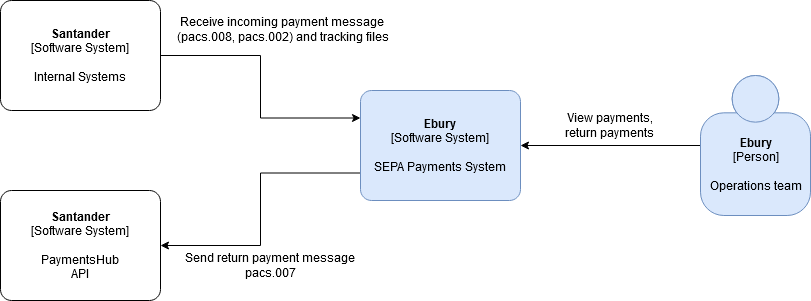 Diagram 1. System Context Diagram
Proposed Solution Architecture
The architecture of the proposed solution is presented on the diagram below.
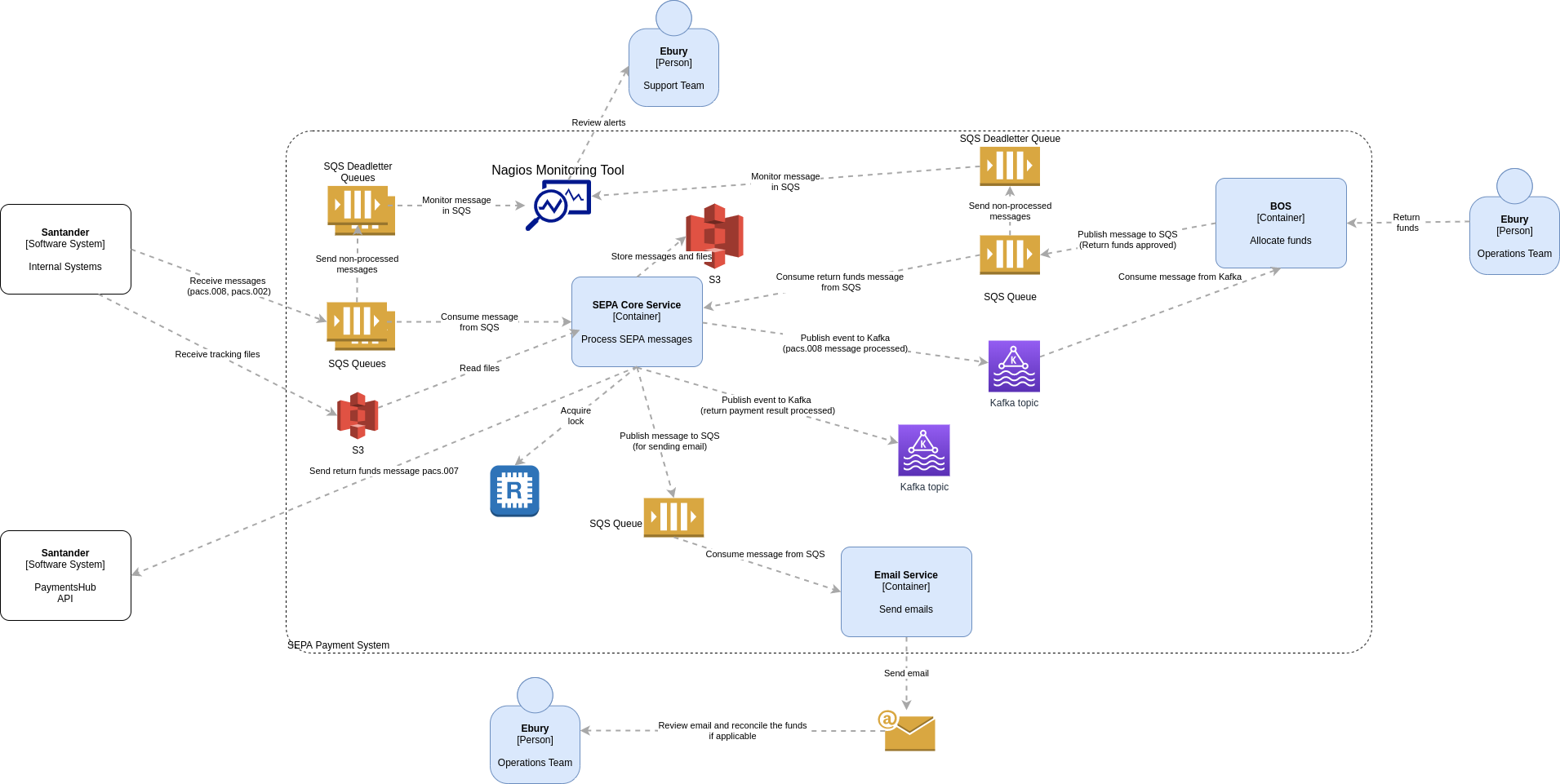 Diagram 2. Container Diagram
For receiving incoming messages from Santander we will use AWS SQS queues and for receiving tracking file we will use AWS S3. Messages and files will be transmitted over HTTPS and stored encrypted using AWS SSE (Server Side Encryption). All incomming messages and files will be stored on AWS S3 for backup. AWS S3 buckets will also be encrypted. All steps taken during message processing will be logged. Logs will be available for review through Kibana. All exceptions will be logged and reviewed using Sentry. If the message cannot be processed it will be moved to AWS SQS deadletter queue which will trigger Nagios alerts. As some actions will be done manually by Operations Team e.g. reconciling funds for returned funds, to inform Operations team about the result of processed returned funds request, we will use Email service to send emails. Solution for Email Service is covered in another RFC. For sending return funds messages, we will send requests to Santander using their API. Interoperability between SEPA Core and other services e.g. BOS or Email service will be done through Kafka and SQS.
SEPA Core Internal Architecture
Internal architecture of SEPA Core service is presented on the diagrams below. The main premise is that for each message type we exchange with Santander we will have separate daemon for consuming and processing message from respective queue. To avoid situation where one message can be processed multiple times we will use Locking service. Each received message will be parsed and validated using internal component (MaV - Map and Validate) that will parse, validate and map incoming JSON message to other JSON message in format expected for further processing. If the message is valid, it will be forwarded for further processing and deleted from SQS queue. If the message is not valid, it will remain in the SQS queue. If it cannot be successfully processed for predefined number of attempts, it will be moved automatically to SQS Deadletter queue. SQS Deadletter queue will be monitored by Nagios monitoring system that will trigger configured alerts.
To make diagrams and processes more readable, we have created one diagram per use case.
Incoming Credit Transfer
Diagram for processing Incoming Credit Transfer is given bellow.
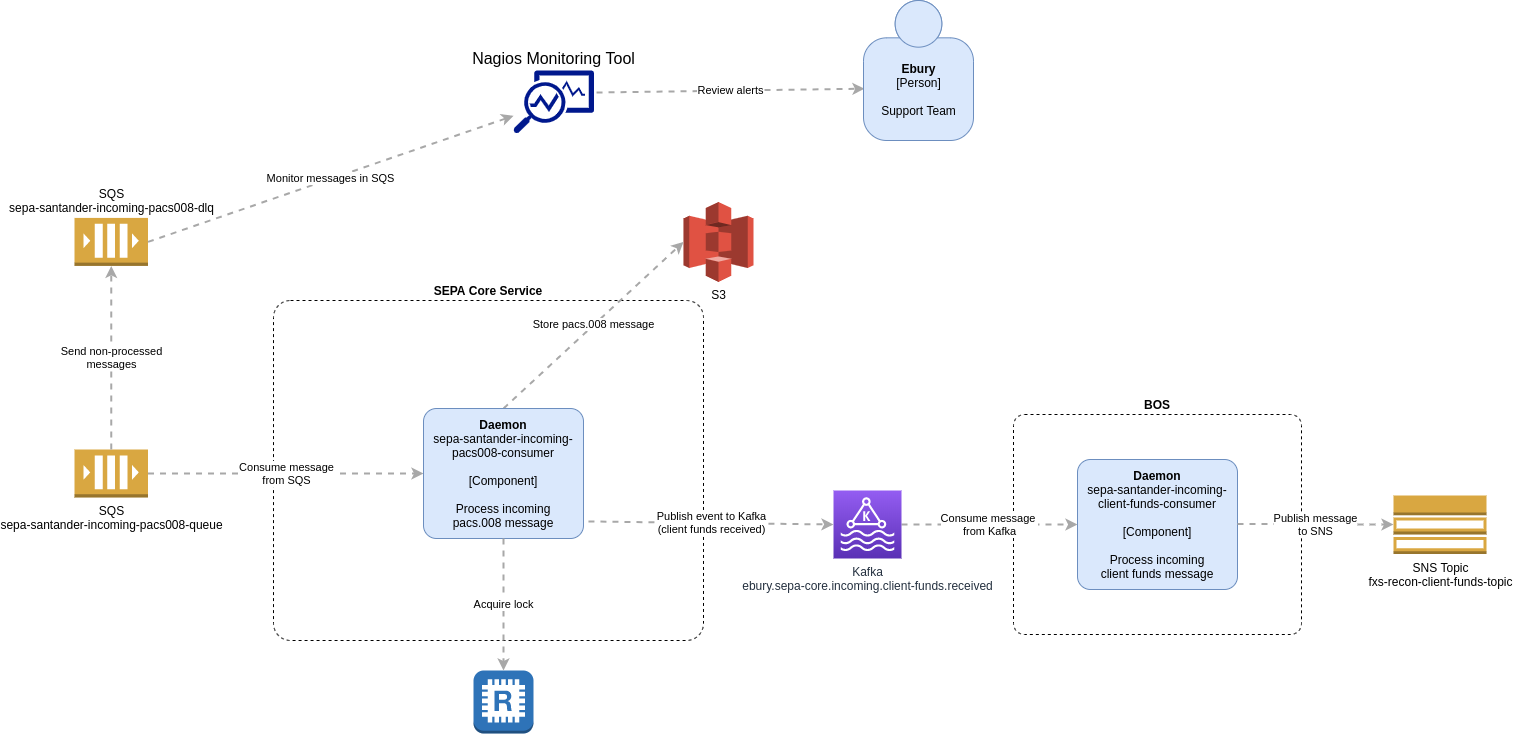
Diagram 3. Component Diagram, Incoming Credit Transfer
Santander will send pacs.008 message to our SQS queue sepa-santander-incoming-pacs008-queue. SEPA service process (Daemon sepa-santander-incoming-pacs008-consumer), that is running continiously, will consume the message from SQS queue and try to process it. Message processing consists of following steps:
-
A lock will be obtained using Redis to avoid potential multiple processing of the same message
-
Message pacs.008 will be stored in S3 sepa-core-files for backup
-
MaV will parse and validate the message. A format of incoming pacs message will be checked and all fields validated against message specification, if mandatory fields are present, if data type and format is correct (e.g. valid IBAN number) etc.
-
If message cannot be parsed or it contains invalid data, the message will not be deleted from SQS queue, lock will be released and the process will end. Reason for not being able to successfully parse the message will be stored in log. If the message cannot be processed after multiple predefined number of attempts, it will be moved to SQS deadletter queue sepa-santander-incoming-pacs008-dlq. Message in deadletter queue will trigger Nagios alert. Teams responsible for monitoring will start investigation on reasons why message cannot be processed. If needed, Santander Team can be contacted for further information.
-
If message is successfully parsed and validated, mapped pacs.008 data in JSON format back to the Daemon for further processing.
-
Daemon will prepare bank account entry data in the format expected by BOS and message with bank account entry data will be published to Kafka topic ebury.sepa-core.incoming.client-funds.received. Lock will be released and process will end.
-
New consumer in BOS will read the data from Kafka topic and publish it to existing BOS's SNS topic for bank account entry and SNS will publish it to existing SQS queue.
-
Existing BOS consumer will read the data from SQS queue, process bank account entry data following existing procedure and create bank account entry. It can be automatically matched and reconciled with client's account or manually by operator. If bank account entry cannot be created, the message will not be deleted from SQS queue. If the message cannot be processed after multiple predefined number of attempts, it will be moved to SQS deadletter queue, which will trigger Nagios alert. Teams responsible for monitoring will start investigation on reasons why bank entry cannot be created.
Returning funds
Diagram for returning funds is given bellow.
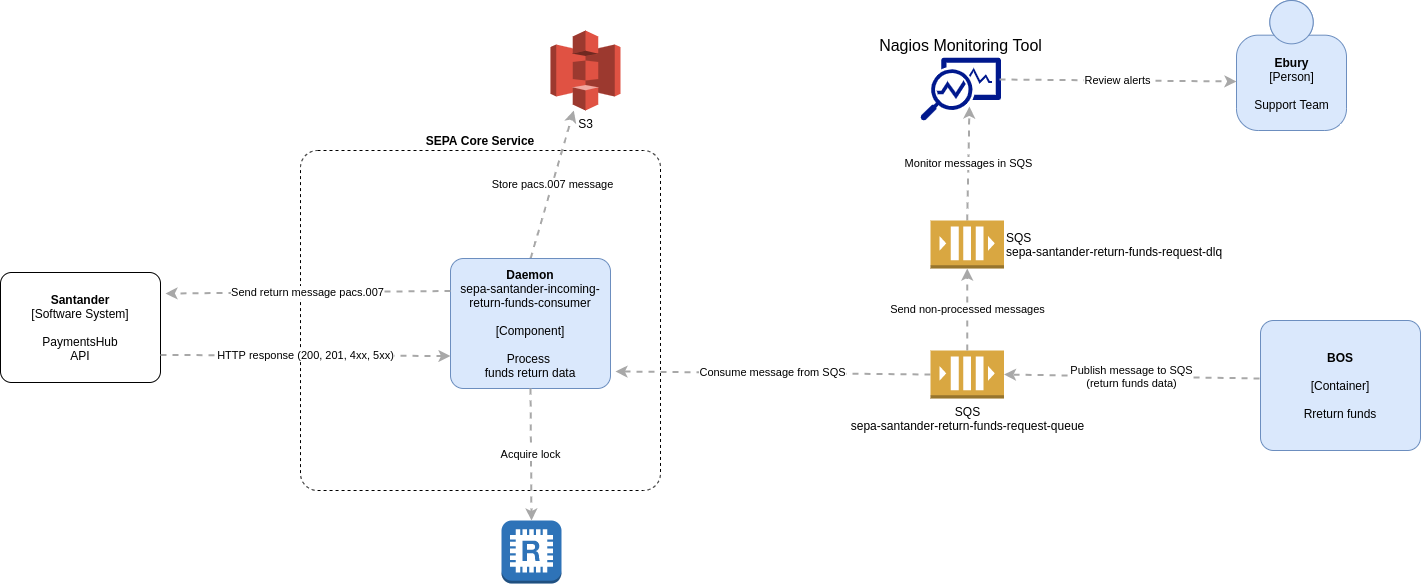
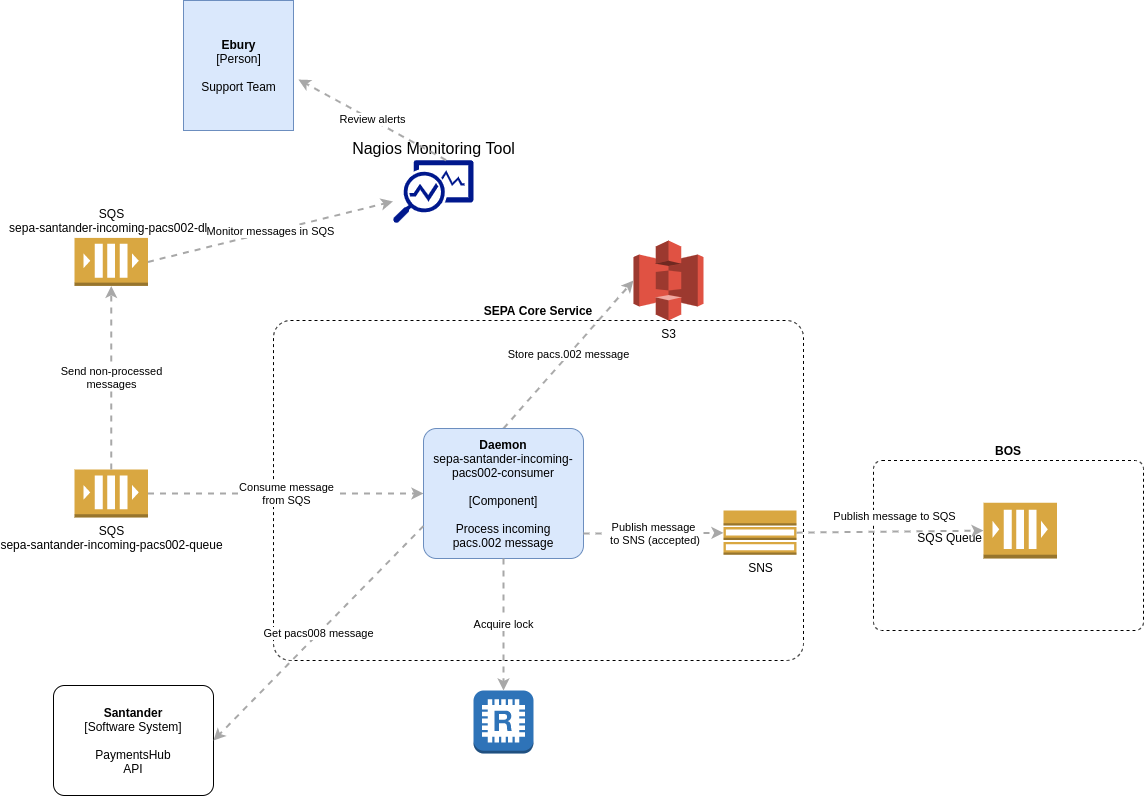
Diagram 4. Component Diagram, Returning funds
In case when client's account cannot be credited because account is closed or for aml reasons, Operations Team can decide to return funds to Originator. For returning funds received via Santander, Operations team will have an option in BOS to initiate process for returning funds. Once the return funds request is approved, message with return funds data will be published to SQS topic sepa-santander-return-funds-request-queue. Daemon sepa-santander-incoming-return-funds-consumer will consume return funds data from SQS and try to process it. Message processing consists of following steps:
-
A lock will be obtained using Redis to avoid potential multiple processing of the same message
-
Message will be parsed and validated, if all required data are present in expected format and valid for preparing message pacs.007.
-
If message contains invalid data, message will not be deleted from SQS queue, lock will be released and the process will end. Reason for not being able to successfully parse the message will be stored in logs. If the message cannot be processed after multiple predefined number of attempts, it will be moved to SQS deadletter queue sepa-santander-return-funds-request-dlq. Message in deadletter queue will trigger Nagios alert. Teams responsible for monitoring will start investigation on reasons why message cannot be processed.
-
If message is successfully validated, MaV will return pacs.007 message back to the Daemon for further processing.
-
Message pacs.007 will be stored in S3 sepa-core-files for backup
-
Message pacs.007 will be sent to Santander PaymentsHub API
-
If response from Santander is success (HTTP 200 or 201) process will end
-
If response from Santander is failure (HTTP 4xx or 5xx), message will not be deleted from SQS queue, lock will be released and the process will end. Reason for not being able to successfully parse the message will be stored in logs. If the message cannot be processed after multiple predefined number of attempts, it will be moved to SQS deadletter queue sepa-santander-return-funds-request-dlq. Message in deadletter queue will trigger Nagios alert. Teams responsible for monitoring will start investigation on reasons why message cannot be processed.
Incoming Return Funds Result
Diagram for processing result of returning funds is given below.
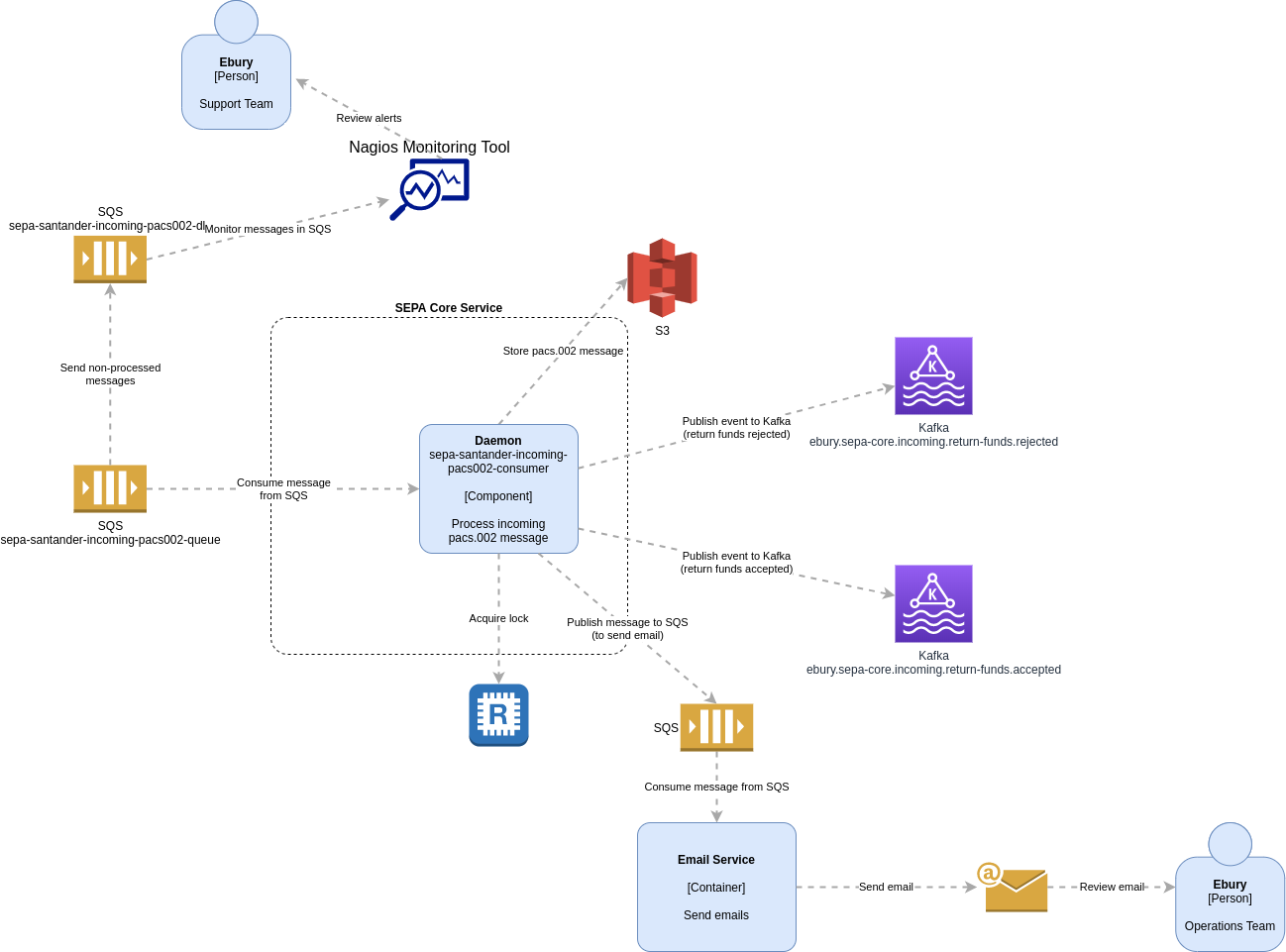
Diagram 5. Component Diagram, Returning funds result
Santander will send pacs.002 message to our SQS queue sepa-santander-incoming-pacs002-queue. SEPA service process (Daemon sepa-santander-incoming-pacs002-consumer), that is running continiously, will consume the message from SQS queue and try to process it. Message processing consists of following steps:
-
A lock will be obtained using Redis to avoid potential multiple processing of the same message
-
Message pacs.002 will be stored in S3 sepa-core-files for backup
-
MaV will parse and validate the message. A format of incoming pacs message will be checked and all fields validated against message specification, if mandatory fields are present, if data type and format is correct (e.g. valid IBAN number) etc.
-
If message cannot be parsed or it contains invalid data, the message will not be deleted from SQS queue, lock will be released and the process will end. Reason for not being able to successfully parse the message will be stored in log file.If the message cannot be processed after multiple predefined number of attempts, it will be moved to SQS deadletter queue sepa-santander-incoming-pacs002-dlq. Message in deadletter queue will trigger Nagios alert. Teams responsible for monitoring will start investigation on reasons why message cannot be processed. If needed, Santander Team can be contacted for further information.
-
If message is successfully parsed and validated, mapped pacs.002 data in JSON format back to the Daemon for further processing.
-
If status of pacs.007 message is Reject, a message with return funds request result will be published to Kafka topic ebury.sepa-core.incoming.return-funds.rejected and to Email Service SQS to send an email to Support Team for further investigation. Lock will be released and process will end.
-
If status of pacs.007 message is Accept, but status of pacs.004 is Reject, a message with return funds request result will be published to Kafka topic ebury.sepa-core.incoming.return-funds.rejected and to Email Service SQS to send an email to Operations Team for further investigation. Lock will be released and process will end.
-
If status of both pacs.007 and pacs.004 messages is Accept, a message with return funds request result will be published to Kafka topic ebury.sepa-core.incoming.return-funds.accepted and to Email Service SQS to send an email to Operations Team for reconciling the funds against the company. Lock will be released and process will end.
Tracking file processing
Diagram for processing tracking file is given bellow.
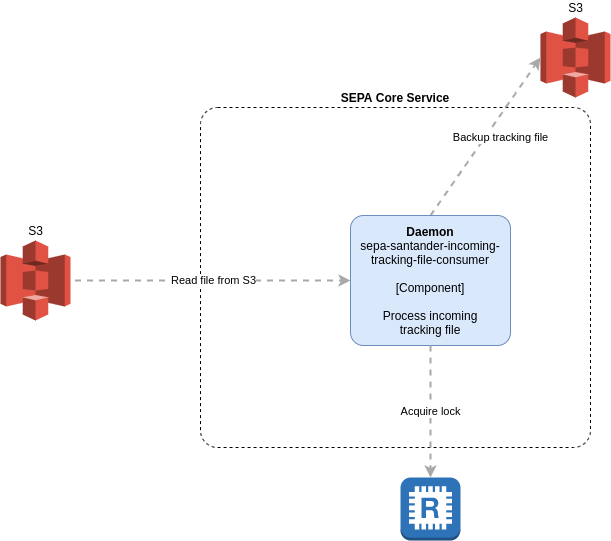
Diagram 6. Component Diagram, Tracking file
Santander will send tracking file to our S3 bucket sepa-core-santander-tracking-files. SEPA service process (Daemon sepa-santander-incoming-tracking-file-consumer), that is running continiously, will read the files from S3 and try to process it. Message processing consists of following steps:
-
A lock will be obtained using Redis to avoid potential multiple processing of the same message
-
A backup of the file will be stored to the S3 sepa-core-files
UPDATE: Procesing tracking file is defined in this RFC
Alternatives
We have identified several alternatives for different processes.
Receiving tracking files
For receiving tracking file we can use AWS SFTP server (from AWS Transfer Family) in front of S3. In this case Santander will use SFTP client to access SFTP server using provided credentials for sending files. Received files will be stored as S3 bucket object automatically by AWS.
Pros:
-
Santander already asked to send files via SFTP. It will probably be easier for them to send files via SFTP instead of developing solution to send files directly to S3.
-
Santander will not have direct access to our S3 bucket
Cons:
-
Access is managed through credentials instead of AWS roles assigned to Santander's AWS account, which need to be stored securely
-
Access to SFTP server will be controlled through security groups, but it will be accessible over public Internet
Adding Workflow engine
On top of the proposed infrastructure, a workflow engine like Zeebe can be added for defining, orchestrating and monitoring business processes across (micro)services.
Pros:
-
It will provide an end-to-end visibility, which means that it will be possible to track a single business process e.g. crediting client's account based on incoming pacs.008 message across different services (SEPA Core, BOS, Email Service)
-
It will be possible to retry failed steps in the workflow
Cons:
- I see no real cons for adding workflow engine. The only reason why we might not proceed with it in scope of this project is time and resource constraints
Alerting
For alerting on failures we are using Nagios, which is monitoring SQS queues and Kafka topics. As an alternative, we can expose metrics from Kafka to new Monitoring system, that will be in place in coming months. In this case, we need to expose record-sent-rate metric per topic, in which case if any record is sent to Kafka topics related to failures, new Monitoring System will invoke the procedure for sending notification as defined in the Monitoring System.
Pros:
- SEPA Core will need to implement metric exposure once new Monitoring System will be in production. Implementing it now will eliminate the need for new development for migrating from one monitoring system to another in the future.
Cons:
- New Monitoring System may not be operational in production at the same time when SEPA Core will be. That introduces risk of not having monitoring in place.
To avoid the risk of not having monitoring in place when going live with the project, we will use Nagios as primary alerting system and towards the end of the project, we can expose metrics if new Monitoring System will be ready, so they can be used by new Monitoring System.
Operation
In scope of this project, we are extending functionality of existing service (BOS) by enabling returning funds. New service will be running as internal service and it will not be exposed publicly.
Performance Impact
As this is a new service, there is no performance impact on existing services. In the first stage, we will deploy single daemons for consuming messages from SQS and Kafka. However, should it be required, we can deploy multiple daemons as well, thanks to:
-
implementation of locking mechanism
-
placing multiple consumers of messages in Kafka topics to single consumer group
Deployment
For deploying code we will use existing Jenkins CI.
For deploying infrastructure we will use Terraform to define all new resources that needs to be created.
Monitoring
We will develop Monitoring plan that will identify all cases that should trigger an alert and notify Support and Operations teams, depending on the type of the alert. Monitoring plan will include actions that need to be taken for each identified case.
Temporarly Solution
Due to time constraints and project deadline, a temporarly solution which includes usage of existing infrastructure and processes will be implemented by expected live date. After releasing product to production, we will work on implementing final solution according to RFC.
In temporarly solution, following is changed:
-
Kafka events are not implemented. For exchanging messages between different systems SQS is used.
-
Email Service is not implemented. We will not send emails for informing Operations team about result of return request. Instead we will log action and based on log information manually inform Operations.
Temporarly solution changes are displayed on diagrams below.
Diagram 2. Container Diagram
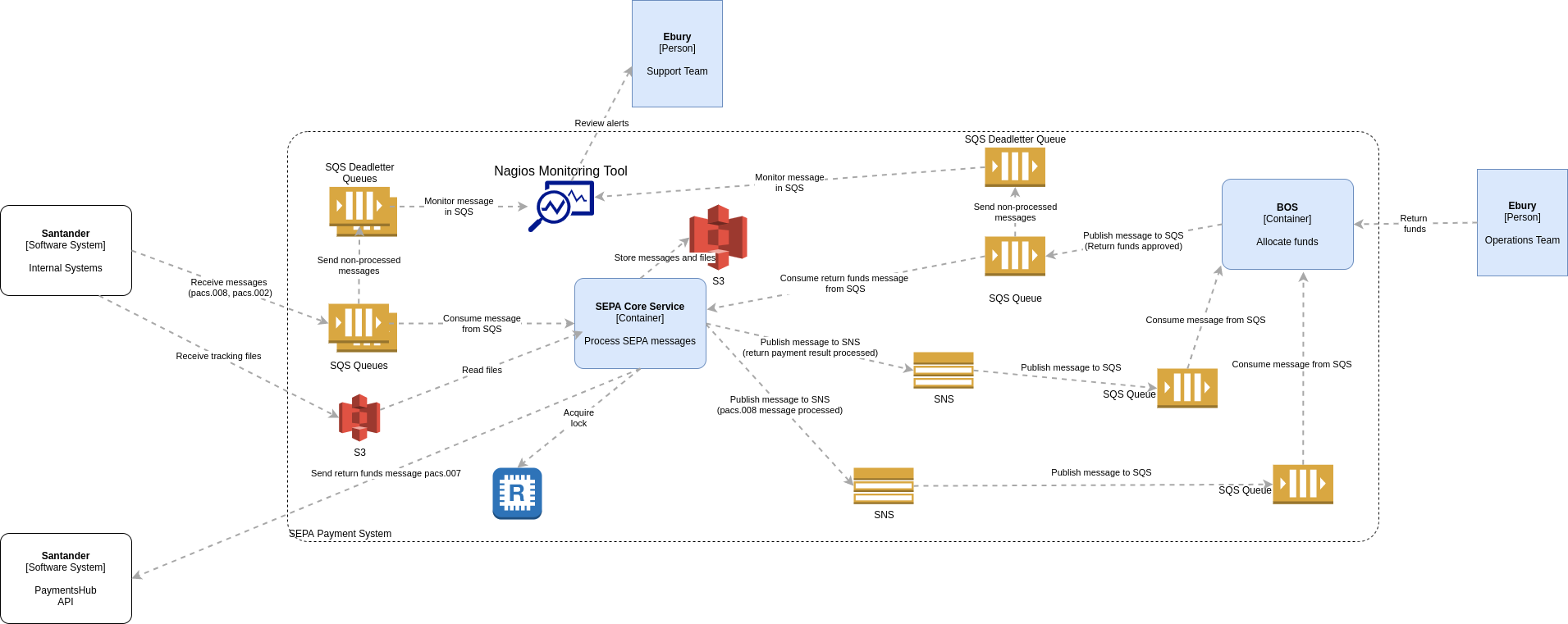
Diagram 3. Component Diagram, Incoming Credit Transfer
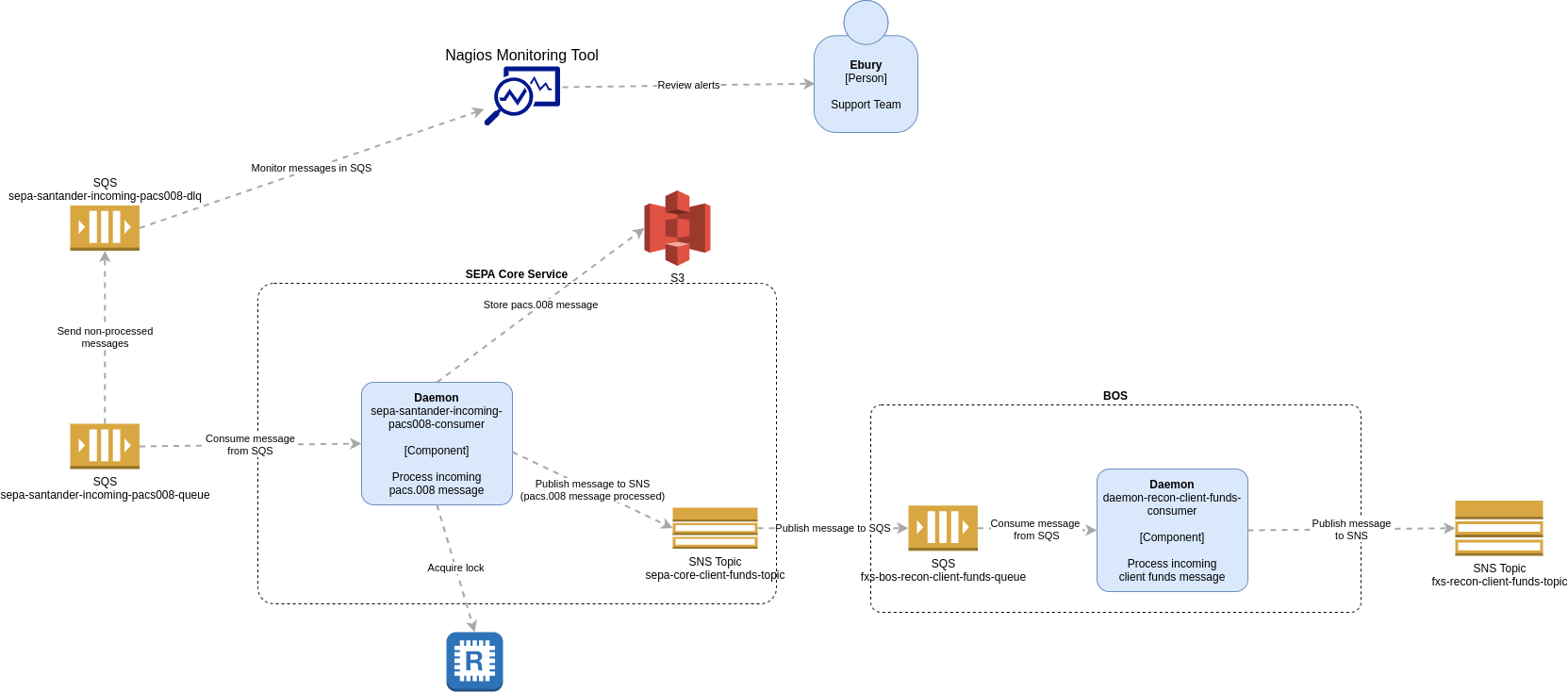
Diagram 5. Component Diagram, Returning funds result