Voice Trading
SmartTrade Voice Trading Module Integration
Problem Description
Our current status in the booking trades not support the integration of third parties GUIs in this case the VoiceTrading App from SmartTrade.
This is the current status of the booking process:
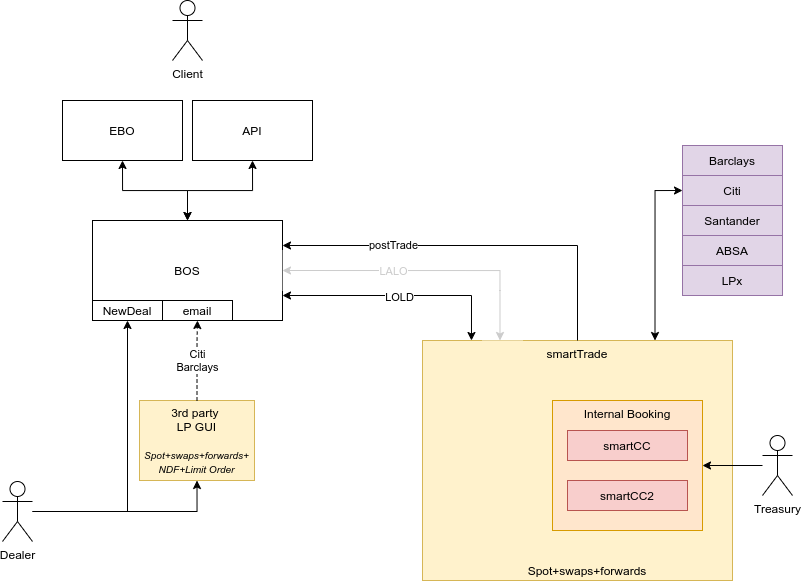
Before even creating a trade for a client, a dealer usually first reviews the rates directly against each LP and after booking the broker deal (directly with the LP), the dealer would open BOS to create the trade and associate the manually created broker deal.
If the broker deal has been created via Barclays or Citi, an email is sent to BOS with the information, allowing via drop down to select the broker deal. This would only happen for Spot. The rest of the trades must be manually inserted/linked.
Background
The voice trading module is the main interface for Sales users to send requests or orders to the traders on behalf of clients. This module is also used to monitor orders from supervised clients in the blotters (order blotter/deal blotter). The interface is displayed in four parts:
- Top Ribbon Top right part of the module, the bookmarks are used to manage supervision, the risk Book or even the trading options of the trader.
- Workspace Main panel in the center where all the rate boxes are displayed allows to trade and send orders on behalf of clients.
- Blotter Bottom part of the module, it allows to monitor orders and trades from the sales but also supervised clients
- Widgets right part of the module, it allows to have in a glance information on the current pending orders from the sales (ticket widget), be notified from any activity related to the user (notification widget) etc...
SmartTrade’s Voice Trading Module is a GUI similar to the Barx and Velocity GUI’s that allow dealers to view pricing and book trades with Liquidity Providers.
Where it differs on the front end is primarily two fold: * Allowing multiple Liquidity Providers prices to be streamed onto a single platform and for the dealer to always choose the best rate * Allowing additional control features to adapt pricing and control which Liquidity Providers levels are taken based on rules that can be implemented to take into account differences in collateralisation or fulfil minimum required volumes for example.
Additionally, there are significant operational benefits downstream in terms of confirmations, messaging, and streamlining operational functions.
The intention with the Voice Trading app in the medium to long-term is to replace the multiple LP GUI’s and provide a single Ebury price that dealers would be able to trade, rather than having to access and compare multiple 3rd party platforms.
Solution
With SmartTrade we are currently trading only spot, swaps and forwards.
“Simply” adding Voice Trading to our environment and removing other GUIs, would impact our dealing capabilities.
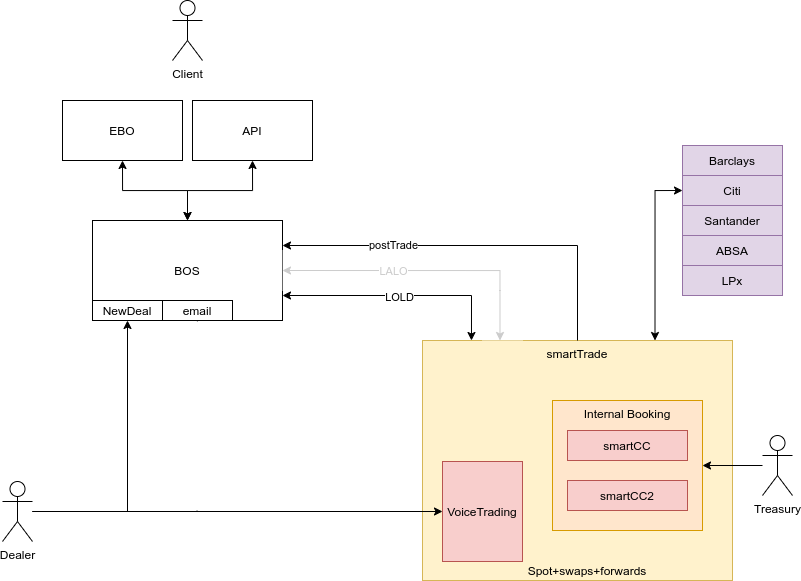
The full scope of VoiceTrading project will provide the ability of placing Spot, Forwards, Swaps, NDF and Limit Orders via VoiceTrading.
Architecturally-wise, we expect to reuse the existing components QFC (smartTrade), FIX Gateway and BOS BrokerDeal Gateway.
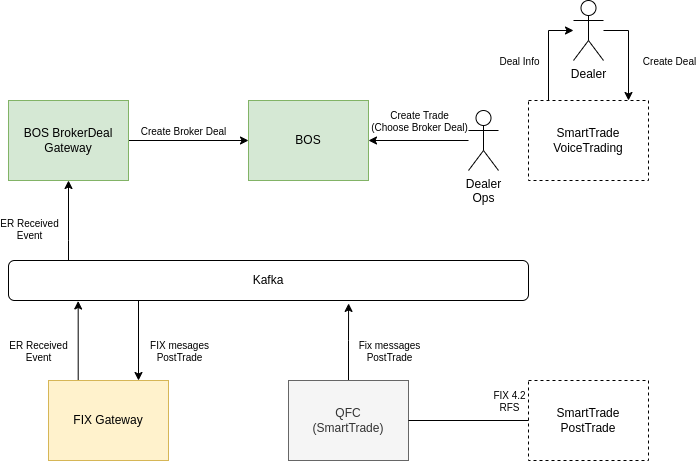
QFC (SmartTrade) will receive the new messages from PostTrade and related to Voice Trading App those messages will be transformed into ER Receivent Events (Execution Report Events) by the FIX Gateway. Then BOS BrokerDeal Gateway will get those events and create the Broker Deals through BOS API and set that they are coming from Voice Trading App.
Phase 1 - Booking Spot, Forwards
Phase 1.1 - VoiceTrading quoting spot
Business benefit
Dealer buys a spot via VoiceTrading and has a reference ID.
The Dealer or a Trade Support during the creation of the spot trade via “New Deal” page, will be able to select the Broker Deal created via smartTrade thanks to a dropdown solution. (same functionality as in BarX and Pulse)
Those Broker Deals can be filtered by the username in case we want to display only the Broker Deals created by the person who wants to create the trade.
High level tasks
- Ability to consume and recognise spot Broker Deals created via VoiceTrading
- Update BOS “New Deal” page providing a dropdown with deal booked via VoiceTrading
Architecture
No architectural changes are required for this phase.
Phase 1.2 - VoiceTrading quoting forwards
Business benefit
Dealer buys a forward via VoiceTrading and has a reference ID.
The Dealer or a Trade Support during the creation of the forward trade via “New Deal” page, will be able to select the Broker Deal created via smartTrade thanks to a dropdown solution. (same functionality as in BarX and Pulse)
Those Broker Deals can be filtered by the username in case we want to display only the Broker Deals created by the person who wants to create the trade.
High level tasks
- Ability to consume and recognise forwards Broker Deals created via VoiceTrading
- Update BOS “New Deal” page providing a dropdown with deal booked via VoiceTrading
Architecture
No architectural changes are required for this phase.
Phase 2 - Adding SWAP
Business benefit
Dealer buys a swap via VoiceTrading and has a reference ID.
The Dealer or a Trade Support during the creation of the swap trade via “New Deal” page, will be able to select the Broker Deal created via smartTrade thanks to a drop down solution. (same functionality as in BarX and Pulse)
Those Broker Deals can be filtered by the username in case we want to display only the Broker Deals created by the person who wants to create the trade.
High level tasks
- Ability to consume and recognise swaps Broker Deals created via VoiceTrading
- Update BOS “New Deal” page providing a dropdown with deal booked via VoiceTrading
Architecture
No architectural changes are required for this phase.
Not Approved Phases
Phase 3 - VoiceTrading quoting NDF
Business benefit
Dealer buys a NDF via VoiceTrading and has a reference ID.
The Dealer or a Trade Support during the creation of the NDF trade via “New Deal” page, will have to manually introduce the Broker Deal created via smartTrade. (same functionality as in other liquidity providers)
High level tasks
- Ability to consume and recognise NDF Broker Deals created via VoiceTrading
- Update BOS “New Deal” page providing a dropdown with deal booked via VoiceTrading
Architecture
No architectural changes are required for this phase.
Phase 4 - VoiceTrading quoting Limit
Business benefit
The dealer would be able to book the Limit Order via VoiceTrading.
Dealer buys a Limit Order via VoiceTrading and has a reference ID. The Dealer or a Trade Support during the creation of the Limit Order trade via “New Deal” page, will be able to manage the Broker Deal created via smartTrade as currently.
High level tasks
- Ability to consume and recognise limit Order Broker Deals created via VoiceTrading.
Architecture
No architectural changes are required for this phase.
Alternatives
Create our custom GUI instead of integrate VoiceTrading App
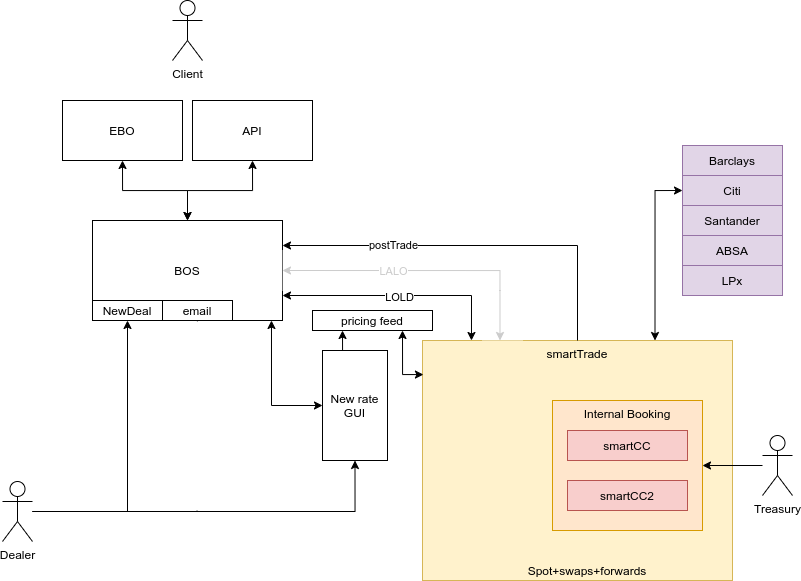
This alternative has higher cost and effort rather than supporting VoiceTrading GUI.
Caveats
We cannot provide QFC with high availability for the same reason we aren't able to do it with QFS; We only have one FIX session per application and environment with the 3rd-party booking platform.
Operation
Failures to publish or consume ExecutionReportReceived events must be logged, tracked, and alerted. To avoid not creating a BrokerDeal in BOS but having the Quote accepted via Voice Trading.
Security Impact
The communication with Kafka is ciphered.
The communication between QFC and smartTrade flows through stunnel like in the case of QFS.
Performance Impact
Since the solution is going to use kafka, and we can escalate the consumers we did not expect any performance impact.
Developer Impact
N/A
Data Contracts
N/A
Deployment
N/A
Dependencies
N/A