FenX Data Migration
The purpose of this document is to describe the technical solution to the data migration mechanism from Salesforce to FenX. We'll also cover the discarded alternatives, and the reasons why we've opted for the solution presented below.
The goal is to have all the clients in FenX containing the information as it is in the Salesforce side. There will be data transformation for date/country fields, apart from some data conversion for fields that only exist in FenX but not in Salesforce.
Problem Description
The main steps of the migration are to extract the SF information, transform it into FenX format, perform the migration in FenX, and finally reconcile the entities with the Salesforce records. By reconciling the entities we mean that the FenX IDs are going to be stored in the Salesforce records.
FenX provides an API to migrate data from other systems. In a nutshell, we need a policy to be configured in FenX and also to follow a set of calls to them:
- Create a migration record.
- Upload the CSV files with the data to migrate and the mapping resolved.
- Run the migration.
We have been given a Postman collection with some of the methods we need to invoke, so it’ll be easier to construct the calls on our side. It is on us to produce the corresponding set of files with the relevant content to complete the migration.
For future references, a ‘shell record’ is a record created with barely any information, containing just the basics of it, so we will have the skeleton for future updates. This will ensure the database is consistent in both systems. For more information, please refer to the FenX integration document here.
The migration process has to be split in three phases: an initial data migration for shell records, before starting the pilot with the first users, a final data migration to complete the information for those shell records, when the rollout has been completed and all new onboardings are managed in FenX, and lastly an automatic script which will send all the entities migrated in the last step for screening in FenX, so the screening provider tracks those entities.
The decision we made was to consider and decide which set of tools to use for the ETL to happen. So let’s describe what is the solution we’ve opted for and the different alternatives we had and the reasons why we ended up not taking them.
Background
As part of the Fenergo project and its FenX integration with Salesforce, it is necessary to migrate all records in scope into FenX so the Operations Team can start working there.
The scoped records agreed by the different stakeholders in the Fenergo Working Group are the following:
- Non-closed clients (active, inactive and blocked).
- Related parties, authorised contacts, directors and shareholders, related to those non-closed clients.
- Excluding EMP and Reliance (initially).
Not all records will be managed in FenX since day one, but we will be performing a gradual migration to start handling those accounts/contacts in FenX, finishing the rollout after all scoped clients are handled in FenX. We do have a flag field for the accounts in order to mark them as shell records, a fully migrated clients or nothing at all. These are the steps for the whole process migration:
- Initial migration. In this step, we will be migrating the shell attributes from Salesforce to FenX.
- Gradual migration. New onboards in Salesforce will be synchronized with FenX.
- Final migration. The rest of the attributes needed to complete the shell records already created in the system.
- Screening migration. All entities migrated in "Final migration" will be sent for screening in FenX.
In this document we’re focusing on the solution we’ll use to tackle the initial migration, final migration and screening migration steps.
Solution
Using a scripting language would give us full control on the migration and we would have no boundaries. As mentioned above, as this is going to be run three times, this provides us an almost automatic solution that also allows us to easily batch the amount of records that we are migrating.
For this case, we have opted for an ad-hoc solution built on Python, as it has the previously mentioned advantages plus file management and data transformation for large volumes of data is easy and fast enough. The decision on the specific language to use is because we count with a great number of Python developers in the company.
Service Ownership
| New Service | Service Name | Service Owner |
|---|---|---|
| Yes | FenX Migration | FXO Team |
Migration Scripts
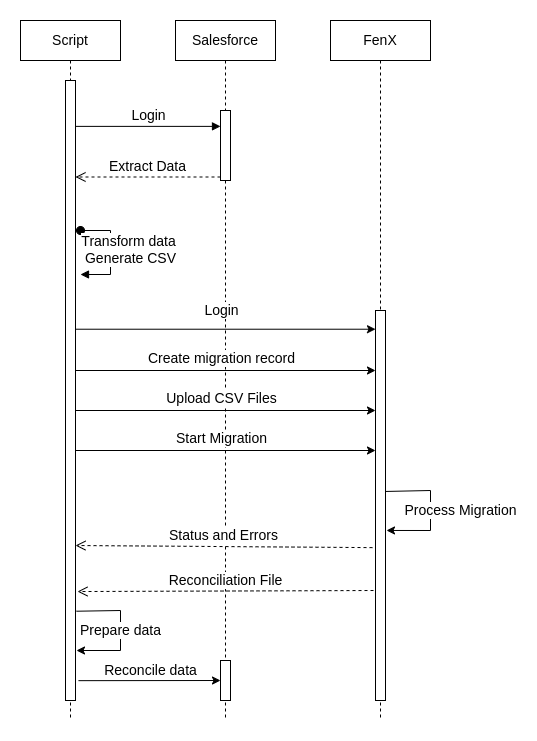
The steps identified for the migrations (both Shell and Full migrations) are the following:
- Data Extraction:
- Log in to Salesforce.
- Implement a generic query method, so it could be parameterized.
- Transform data for Company/Individual records (also Associations in the Shell migration, and Data Groups in the Full migration).
- Generate CSV file following FenX requirements.
- Data Upload:
- Log in to FenX.
- Create migration.
- Add file to the migration.
- Start migration. Get the progress and the errors.
- Data Reconciliation:
- Pull the FenX IDs and upload that information in Salesforce, also update flags in Salesforce for Shell or Full migrated accounts.
Here you have a diagram to try and improve the overview:
The intended goal is, for each execution, to specify the following:
- Target organization and credentials for Salesforce.
- Target tenant and credentials for FenX.
- Migration type (shell or full).
After the whole process is finished we would need to perform the data reconciliation step in case it cannot be automated. Part of this data reconciliation is to update the flag, so it can be checked if all those accounts are a shell record, or a fully migrated one.
Field mapping
Regarding the field mapping for the Salesforce <> FenX, we would like to mention that it is being worked on as of now. The mapping itself is going to be included in the script as, once it’s completely agreed, it will be static.
Screening Scripts
After the migration has taken part, and all data sits and is mastered already in FenX, we need to tackle the Screening scripts.
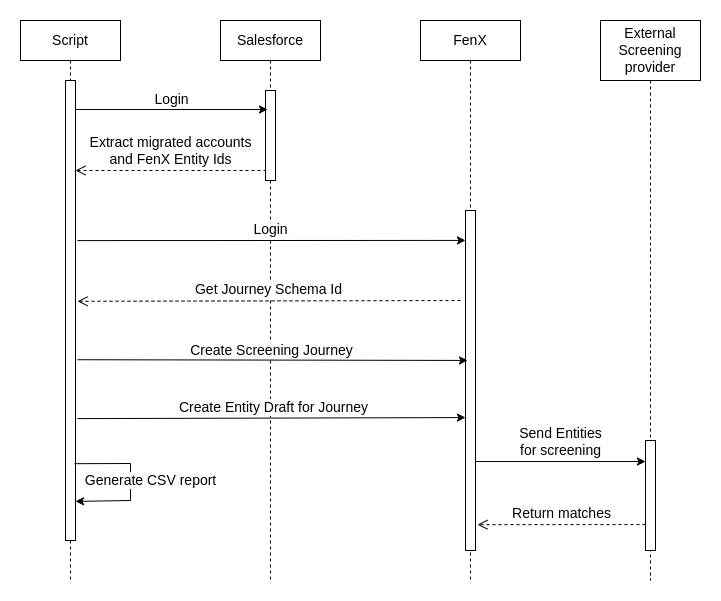
The Screening script will be on charge of sending all client entities onboarded in Salesforce through FenX, so they are tracked from the FenX Screening providers from that moment on. For that Fenergo will be creating a new Journey specifically for this purpose.
Here you have a diagram to improve the overview:
After the entities have been sent for screening, some of them will have hits, and some others will not.
The entities which do not return any hits from the screening provider will be automatically closed by the FenX platform, without us having to take any further actions.
The entities which return hits and have their screening journeys left open are the ones that will need actions from our side.
The requirement from Product is to close all ongoing screening journeys, flagging the hits as False Positives and risk accepting them.
For all the journeys created on the previous steps, the script will be on charge of checking whether their entities have hits. First the script will be generating a report with all entities with hits, their categories and scores. That report will have to be approved by product/stakeholders, once we have their approval we will be able to proceed with further actions.
Once the report is approved by relevant people, we will proceed with updates in FenX, hits from entities will by updated as "No Match" and comments to identify the update as part of the migration. Screening tasks will be automatically closed, to guarantee that the results of the matches will be returned to the screening provider.
Here you have a diagram to improve the overview:
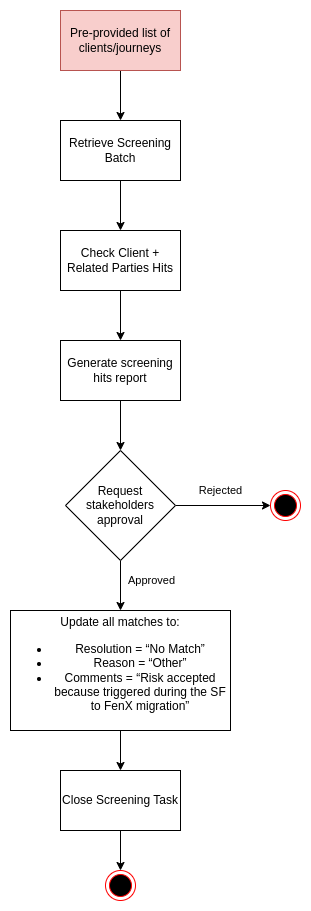
An additional report will be generated after the script to update hits is executed, retrieving exactly the same data that we retrieved in the original report. This report will be used as a way of verifying that the hits have been correctly updated as expected.
Any journeys which are left opened, after the screening task is completed, will be understood that they will need check by ops team, a report will be generated from FenX UI to share with them if there are journeys still opened.
Alternatives
Some of the alternatives we’ve checked to perform this migration are the following:
- Salesforce: we have already discarded this alternative because, due the platform limitations, it is not feasible to perform this migration. CSV management is more complex that with other tools, we do have limits on the number of records we can query (50000), in the number of records we can update (10000), in the time a transaction can be running (10 min), in usage of salesforce CPU (60s), in the numbers of external callouts we can perform per transaction (100), the time they can be open (100s), etc.
- Postman: also discarded. It is not thought for complex data transformation and requests orchestration. It would be the preferred option in case of performing a manual data migration, but we want to have it fully automated.
- Integromat: we have confirmed Integromat is able to orchestrate different operations including HTTP requests and CSV files management and data transformation -using gsheets-, and the complexity would be lower than creating a script. However, there is a risk to find a limitation that Integromat may not be able to jump, forcing us to start from scratch using a scripting language.
- Data team: they’re the experts on data management and would be perfect for this task, but they’re out of resources and cannot help.
Caveats
This will require an extra effort from the ODT, FXD (merged later as FXO) and CSI teams which was not considered initially as we were expecting Fenergo to provide a complete ETL tool. Using this ETL tool we would only need to provide them the data and they would perform the mapping, migration and reconciliation.
Even so, the resources and time impact this will have in the team has been already escalated and approved (three points estimation for Shell Migration here, and estimation for Full and Screening Migration here) and the roadmap has been updated to reflect it.
Operation
The migration is going to be executed by a member of the FXD Team, and it will be done after working hours. It is going to be run through scripting, in which we will be extracting the data, transforming it to the format FenX requires and then uploading that information as a file to a migration record in FenX. For the screening migrations no complex data transformations are needed.
Security Impact
For Salesforce, we are going to perform ‘read’ operations when extracting the data to be migrated and then 'write' operations to sync some information created in FenX back to Salesforce. We can log in with the employee’s user and credentials, and we are going to be passing them as parameters to the script. It must be an admin user to guarantee all the scoped records and fields are visible to the script and extracted successfully from Salesforce.
As a result of the queries and in order to upload the file to FenX, a set of records will be stored in a CSV file in an employee’s machine for the time the migration takes. At the end of this process, the files generated will be permanently removed.
For the connection to FenX and the migration process there, we will be using a generic user. The credentials for said user are going to be passed as parameters to the scripts, being stored in an employee’s machine.
Since either of those won’t have to be shared across the team, we consider this will not have any security implications.
Performance Impact
This process will be performed after working hours, so no user will be impacted by it.
Developer Impact
The scripting solution will need the developers to have at least a basic or medium knowledge of Python, which in this case is a technology not widely known in the teams which work with Salesforce. But the impact will not be that high, as it is an easy to learn language, and also we can have potential help from teams which work with Python (as it is the most extensively used language in the company).
Data Contracts
The migration itself doesn't affect any other system as the data will remain in Salesforce as it is now besides in FenX. However, separate work must be done to ensure that Data Team reports can still be done once users are also moved to the FenX platform. This is out of scope of this document as this covers the data migration problem only and will need a specific analysis and solution for that.
Deployment
As the process is going to be used on demand and through scripting, it does not need any deployment. This will be part of the FenX rollout plan and, once it has been created, we will have a clearer view of it.
For the shell migration, we are going to retrieve the errors found through the API (as shown in the sequence diagram above) to tackle them. Depending on the errors found, we might have to update some rows manually (most likely because of a weird character) and then retry the upload (the source of truth is going to be the file we upload).
For the full migration, we are going to retrieve the errors the same way. In this case, should there be any major issues, our desired option would be to perform a database rollback to a point prior to the migration, however, that is not an option with the tools FenX has provided us. If the errors located can be solved easily, we can isolate the records that failed and then retry the migration only for those records.
There is also the potential problem in the Full Data Migration to find inconsistencies between Salesforce and FenX database models (picklist values mainly), those issues will have to be addressed to Product or Business Apps teams accordingly to provide a data cleanup or a refactor of the models (FenX, Salesforce or both).
In both cases, if a problem arises, the source of truth should be the data CSVs generated in the first execution, as executing the entire script from scratch would mean maybe using incorrect data. In order to execute the script without querying Salesforce again we can comment parts of the code related to those querying and CSV generation, and only execute the part related to the FenX migration process.
Data validation is going to be checked during the testing phase with a exact copy of Production, that way we will be able to conduct a correct volume testing of the process and also validate that there are no data inconsistencies between the platforms. In the case of data inconsistencies they will need to be analysed and correctly addressed to the FXD team, the Product team or Business Apps team, depending on the analysis performed.
Dependencies
We can start working on it, however, we will not be able to finish up the scripting work until we have the final mapping between Salesforce and FenX. That’s currently being worked on. Here you might find its current status.