Credit Conditions - Client Acceptance
Mechanism to send an email with approved Credit Conditions to the Client, collect their response (accept/reject) and finalize the process, by synching the Credit Condition to BOS and closing the case in Salesforce (SF).
Problem Description
After Risk & Treasury (R&T) approves the Credit Conditions request, submitted by Sales/Dealing/Solutions (S/D/S), and before the Credit Conditions are enabled in BOS and the Client can start using their credit line, the Client must agree with the conditions. The response from the client (whether is accepted/rejected) must be tracked on the request, as confirmation of the acknowledgement of the client, for legal reasons.
How does this work?
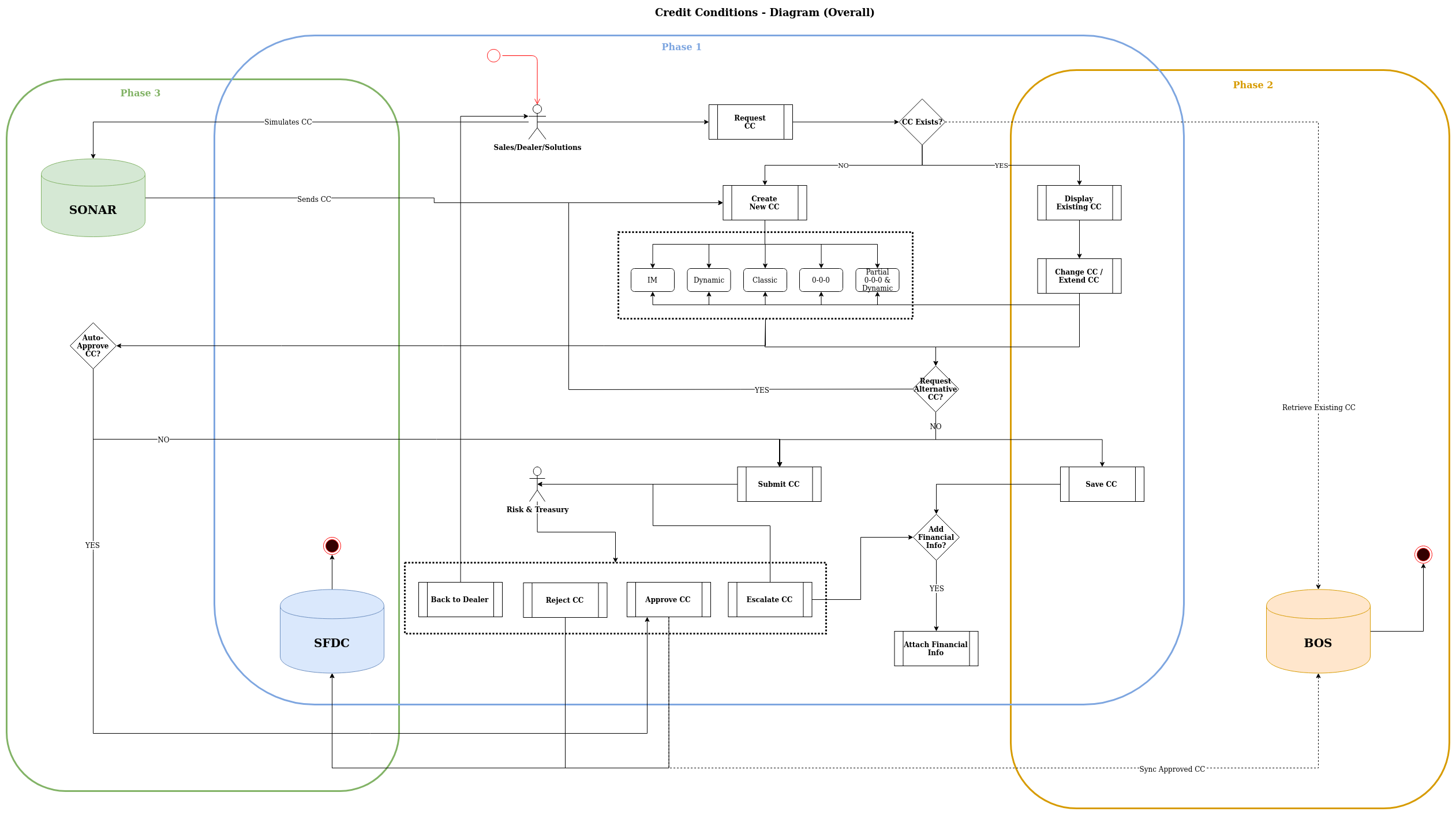
- The Credit Condition request is created and submitted (by S/D/S) and approved (by R&T) in SF;
- Then R&T inputs the conditions in BOS (manually);
- R&T blocks the credit conditions from being used, by raising the Initial Margin and therefore preventing the client from booking forwards;
- R&T sends an email with the conditions to the Client, from BOS, and awaits the response;
- If the Client responds by agreeing to the conditions, R&T unblocks the credit conditions in BOS, by restoring the Initial Margin to the original value, and the client can start using their credit line.
The main problem with the current process is that it requires many manual steps.
With the introduction of the SF-BOS automatic sync (in Phase 2), we eliminate the step #2, because once the Credit Conditions are approved and ready for BOS, it will automatically sync from SF to BOS. But steps #3, #4 and #5 still need to be performed, because the communication of the final conditions to the client and the client acceptance is still a vital part of the process.
Background
This implementation is part of the Credit Condition 2.0 Project, currently in phase 4; previous phases are depicted in the diagram.
Solution
The solution is for SF to own the communication of the final conditions to the client and the client acceptance part of the process. This approach ensures that the Credit Conditions are only sync to BOS when they have been approved by R&T and agreed by the Client, making the sync the very last step of the flow, which is performed automatically.
How will this work?
- The Credit Condition request is created and submitted (by S/D/S) and approved (by R&T) in SF, as per current flow;
- SF will generate a unique identifier for the conditions (GUID) for the credit conditions and a link for a confirmation page (built with SF Communities);
- S/D/S sends the approved conditions to the Client via email;
- the email is created from the relevant email template and it will contain the conditions and the link to the confirmation page, with call-to-actions (c2a) - “Do you agree with the conditions? Yes/No”;
- SF will set the conditions as sent to the client, Pending Client Agreement and stamp the following dates:
- Email Sent (date/time) = now()
- Email Expiry (date/time) = now()
- R&T is notified that the conditions have been sent to the client.
- From this point, there are two possible ways to proceed with the process:
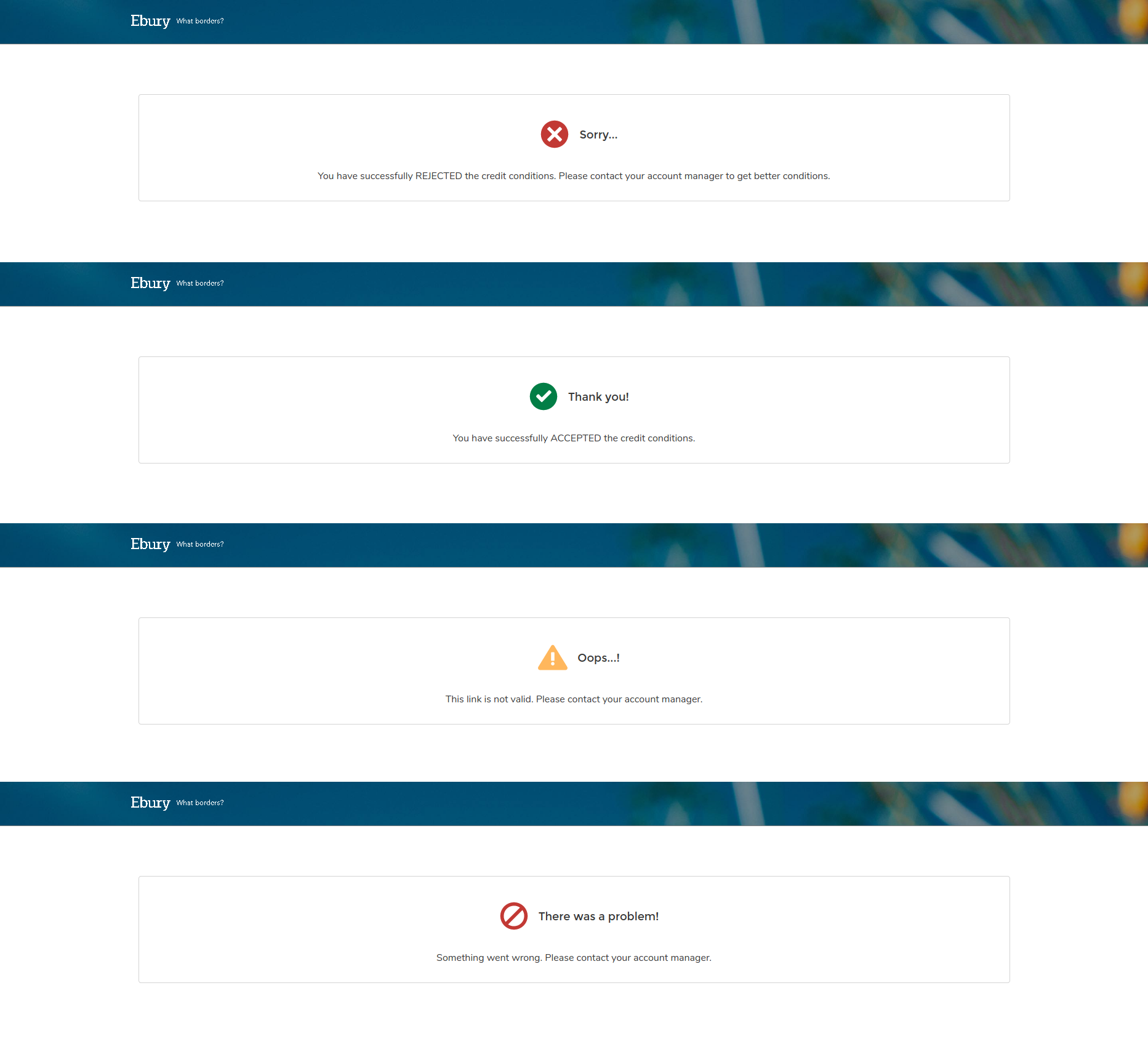
- Client receives the email, clicks on the c2a and is redirected to a confirmation page;
- if the Client clicked on Yes - the conditions are updated with client Accepted and timestamped; conditions are synced to BOS.
- if the Client clicked on No - the conditions are updated with client Rejected and timestamped; conditions rejected.
- If the Client does not use the c2a on the email and instead replies directly to S/D/S, S/D/S can accept/reject the conditions on behalf of the client;
- if the Client has Accepted - S/D/S must provide evidence of the response from the Client (for example, the email or screenshot of the email); the conditions are updated with client Accepted and timestamped; set to Pending Client Agreement Validation and sent to R&T;
- if the Client has Rejected - the conditions are updated with client Rejected and timestamped; conditions rejected.
- If Client Accepted on step #3.2.1, R&T checks the evidence of the acceptance provided by S/D/S;
- if it’s valid, approves the conditions and they are synced to BOS;
- if not valid, rejects the conditions and they are set as rejected.
- Client receives the email, clicks on the c2a and is redirected to a confirmation page;
Landing Page
Alternatives
BOS
One alternative would be for SF to leverage the existing functionality that BOS already has to send the email with the Credit Conditions to the Client. The main issues with this approach are:
- if synced to BOS first, the Credit Conditions would need to be blocked before R&T can send the email - there is no straight-forward way for SF to block conditions in BOS; R&T would need to use the same workaround of increasing the Initial Margin.
- if synced to BOS last, there is no way for SF to trigger the send email in BOS, this functionality is not externally exposed.
Either of these options would require work to be done on the BOS side, which would delay the project considerably.
EBO
Another alternative, would be to leverage EBO, which is the Ebury Online platform for our clients, to either host the Credit Conditions confirmation page or expose the Credit Conditions under the Client area and allow for the Client to accept/reject the conditions from there.
At the moment, EBO does not contemplate Credit Conditions at all and this functionality would have to be built from scratch, which would delay the project considerably.
This could be the best approach in the long run.
Other Options
Avoka and HubSpot have also been considered as candidates to host the Credit Conditions confirmation page. Both are already integrated with SF; Avoka is already used to send forms to collect information and HubSpot is used for marketing purposes, so it has the necessary functionality to create landing pages.
The main issue with these 2 options is that they both introduce a 3rd-party dependency to the project itself, which once again could cause delays, but also to the future maintenance of the functionality.
Caveats
As of now, when the email with the conditions is sent to the Client from BOS, it takes in consideration the branding (Ebury or partners) and the language of the Client. As we are replicating this functionality in SF, we also need: to create a mechanism to brand the emails and the confirmation page accordingly; to create translated versions of the templates in all the available languages and manage any future changes regarding them. We lose some existing functionality on the BOS side and we add some more work on the SF side.
Operation
The Credit Conditions flow resides both in SF and BOS, where 90% of the operations and actions are performed in SF (pre-sync) and the rest are in BOS (post-sync). The main actors in this process are Sales/Dealers/Solutions (who request), Risk & Treasury (who approve) and the Client (who agrees).
Security Impact
The Credit Conditions confirmation page will be built in SF Communities; access to the community will be public, through a community Guest User. The whole site will only have the confirmation page, no data or concrete information will be displayed on it, but the Guest User will need to have certain read and edit permissions, since accessing this page effectively updates the Credit Conditions in the background.
The email will be addressed to the Client exclusively, but still there is no foolproof way of identifying that the entity accepting/rejecting the conditions is in fact the (correct) Client.
In the future, we could consider more robust ways to tighten the security, by creating a identity verification mechanism (like a 2-factor) or moving the confirmation page behind a login. For the time being, the community could be exposed to some vulnerabilities.
Performance Impact
N/A
Developer Impact
We need to be mindful that we just started the work to enable the new Credit Conditions Flow in our partner community, to allow our Partners to request conditions as well as S/D/S. In essence, the flow, for partners, is exactly the same and works exactly the same as for internal users, but there could potentially be some clashes with the changes.
Data Consumer Impact
The full Credit Conditions Flow, except the sync to BOS, is currently in place in production and in use by S/D/S and R&T. With the addition of the client acceptance and the activation of the sync to BOS, additional training/documentation will be provided to the end-users, catering for these changes. Furthermore, because we are working on enabling the flow for our partner community, training/documentation will also be needed for our partner (community) users.
Deployment
The Credit Conditions project has been split in many phases and all them have been deployed as such; the same will happen for this phase. Phase 2, regarding SF<>BOS Integration is currently in production but not activated. Once Phase 4 is deployed, both will be activated together.
Dependencies
Ebury uses a 3rd party tool, called Crowdin, to create translations. We need to have access to the tool or to the Ebury project in order to do the translation of the email templates. We are not only dependent on acquiring a license for the platform, but also on getting people to perform the translations in the different languages that we support.