CRR integration RFC
After many years using the Risk Macro service in Salesforce, Ebury is working on a new risk service which is based on the Fenergo risk rating mechanism.
This new Client Risk Rating service is being created by the data team and we are using this RFC, not to explain how the new CRR service will work, but how Salesforce will use it.
Problem Description
The main difference between the current risk macro service and the new client risk rating service is where the service is placed. While the first one was directly in Salesforce, which means integrating it with the different flows and using it was quite direct, the new CRR service will be hosted out of Salesforce, in a Google serverless service, which means we have to, firstly, adapt our flows to use an external service, with the different delays it can have, but also to work with 2 different risk services, because we will keep calculating both of them even having only one activated as main service and feeding the rest of the flows.
One key point we have to highlight is how the risk macro is triggered. There is no button or action to fire the risk calculation, but it is happening continuously every time a field affecting the risk macro changes. Of course, this job is done in the triggers, detecting changes and triggering the risk macro update.
Performing external callouts is not allowed to be done from triggers, so this means we are moving this from being a synchronous process to being an asynchronous one to support the external callout.
Another limitation ruling the new development is the BOS sync. Right now we are syncing the field Risk_Score__c into BOS and this can not change, which means whatever we do should not impact BOS at all and they should not be even aware the risk service has changed.
It is also worth to mention that this project has to be ready for 1st of July, so some of our decisions could be affected by this deadline.
Background
The client risk score is a key feature in Salesforce affecting many differences processes, as the client onboarding/re-assessment flows in Salesforce or Transaction Monitoring in BOS.
Until now, all the logic has been managed in Salesforce and also the risk data storage, to later being used in Salesforce or being synced into BOS.
This risk macro service has evolved with the years, adding more fields, updating risk values, adapting thresholds, etc, but always everything ruled by Salesforce.
On the other hand, the data team created a simulator which allowed us to know a client's risk before having it in Salesforce. As you can see, this means the code was duplicated in Salesforce and data service.
Now we have to build a new Risk rating formula, we are taking the chance to remove this duplicity and have in a single place the new formula.
Solution
Overall solution
Data team is, firstly, creating a new risk rating service which will own the full CRR logic and, secondly, is creating an endpoint which will receive, for N clients, all fields affecting the risk rating and will return the client risk rating, which can be Low, Medium or High, and the value, which is a number between 0 and 100.
Request format:
{
    account1: {field1: value1, field2: value2, ..., fieldN: valueN},
    account2: {...},
    …,
    accountN: {...}
}
Response format:
{
    account1: {risk_rating: ‘Low/Medium/High’, risk_rating_value: [0-100]},
    account2: {...},
    …,
    accountN: {...}
}
How the service is called will be similar, so everytime a field affecting the risk macro changes, we will be calling the CRR service to retrieve the new scores and trigger, or not, the risk case creation.
The flow is displayed in the next diagram.
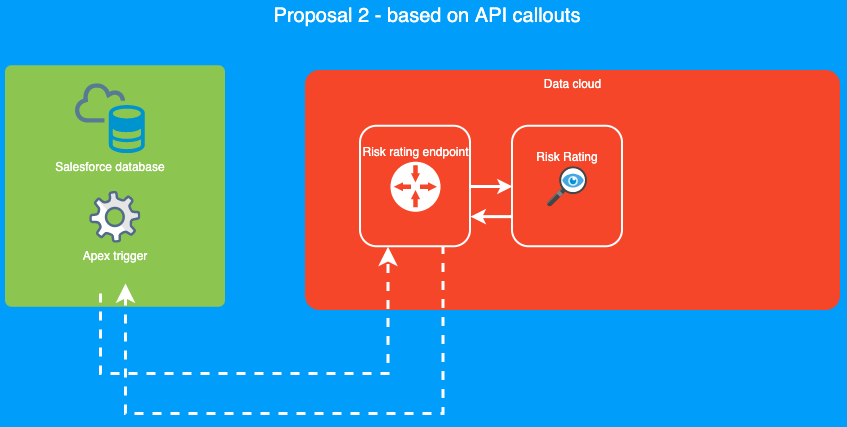
In the diagram above we are issuing the risk score calculation in the trigger. However, as we already explained in the problem description section, Salesforce doesn’t allow us to perform callouts from the trigger. So when a field that requires a risk calculation gets updated, the users (onboarding team) wouldn't be able to see the new risk value immediately as it stands because the process will be run asynchronously. To fill this user experience gap we will create a new Lightning Web Component (LWC for short) that will inform the users what's the risk status and values.
UI representation
The aforementioned component will show three read only fields: the Risk Rating (High, Medium, Low), Risk Score (0-100) and Status (icon representing the values: Updating or Sychronized). It will be passively listening to updates by subscribing to an internal Salesforce events bus. Then the RiskService will be the responsible for producing the appropriate messages and finally the LWC reacting to that. So if there is any calculation in place and the affected record is open, the UI will print an "updating" icon until a new messages is received with the new values. This way we reduce the external calls to just the essential ones.
Risk engines orchestration
Now we have explained how the integration will work, it is necessary to explain how we are solving two of the problems explained above, how to keep both risk services working in parallel, and how we can have one of them working asynchronously.
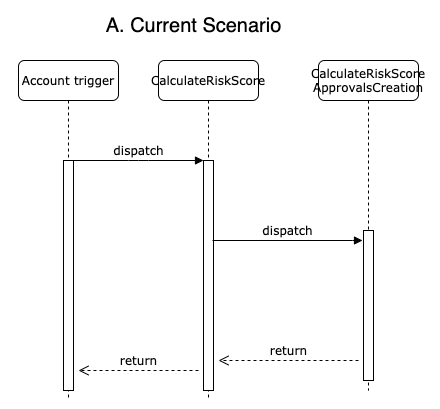
Firstly I want to display our current flow. Like I mentioned before, when a field affecting the risk macro changes we are calling the calculate risk score service. After the score is calculated, the service is also calling to the risk case creation service, which will create risk cases when necessary. Finally, the execution finishes and the triggers continue, so when the save is done and the page is refreshed, onboarding team can see the new risk score and a risk case if it is necessary.
We can see this in the next diagram:
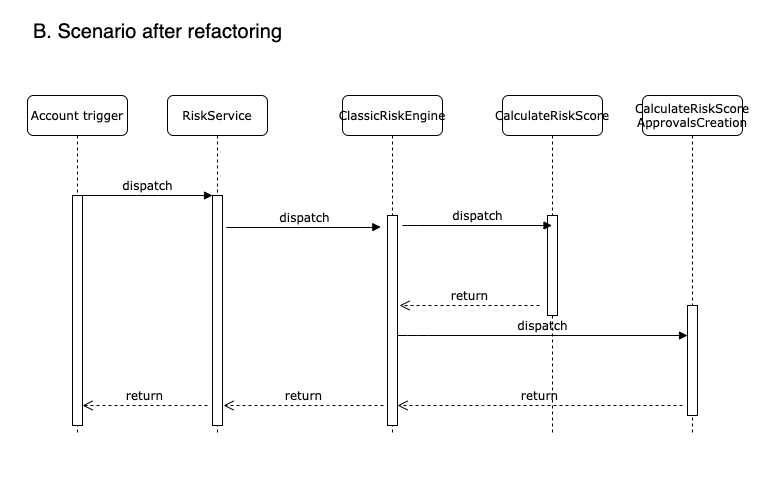
Before being able to integrate the new CRR service, it is necessary to adapt our current risk flow to support different services. For this, we have performed mainly three changes.
The first of those changes is moving the risk triggering logic from the trigger into a new risk engine, we named it ClassicRiskEngine. Until now, the trigger has a list of risk fields and, after identifying one of them changed, it was calling to the CalculateRiskScore. Now, the account trigger has no logic at all, but it will be always delegating the risk job into the RiskService. This RiskService will be only an orchestrator calling to the different risk engines. In the refactor we only have a single risk engine which contains the current logic of identifying if a relevant field has changed and, if so, calling to the calculate risk score process.
The second of the changes has been already mentioned. In order to prepare the flow to support different risk mechanisms, we are creating a new orchestrator to manage it.
Thirdly, CalculateRiskScore will not be calling anymore to the CalculateRiskScoreApprovalCreation class (risk cases creation). The main reason is to decouple the risk calculation logic from the risk case creation, now we will have 2 different risk calculation mechanisms any of them can trigger the risk creation (depending on a switch, I’ll talk about it later), so it will be called from the engine.
We can check that, after all these changes the flow is not changing at all to the final user and the full process is still synchronous.
We can see this in the next diagram:
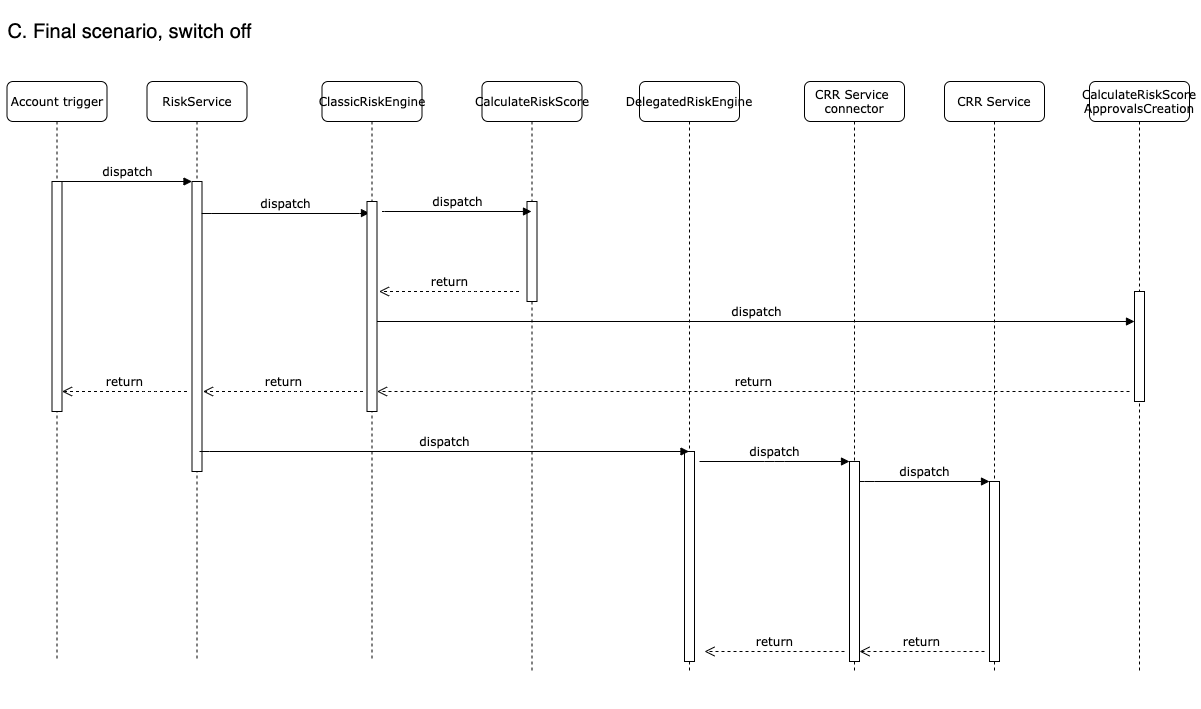
Once we have performed the refactor, we are ready to create a second engine, we named provisionally DelegatedRiskEngine, which will be managing the flow for the new CRR service.
As I mentioned, both risk services will have to be always called, so the actions I just explained will be always being executed, however the key difference now will be that, after the ClassicRiskEngine has finished its tasks, the orchestrator (RiskService) will also call to the DelegatedRiskEngine. This time, the call will be asynchronous so, as soon as the delegated engine is enqueued, the trigger continues its execution.
On the other side, once the DeletagedRiskEngine enqueued task is processed, it will perform an external callout into the new CRR service to retrieve the risk rating.
As this has been done asynchronous, our LWC in the account layout will be automatically refreshed to display the new score.
Before finishing, let’s talk about the switch we talked about earlier. Even if both risk source services are coexisting, only one of them will be activated. This means only the one activated will be affecting services like risk case creation, onboarding, or BOS sync, and, of course, will be the only one which the Onboarding team can see and use, so as soon the DeletegatedRiskEngine is activated, there will be no clue for them about the classic risk macro is still being executed.
We can deploy this at any point with the switch off and nothing will change, and the risk case creation will be triggered from the classic engine (diagram C). As soon as we enable the switch, the classic engine will not execute the risk creation but the delegated engine will (diagram D).
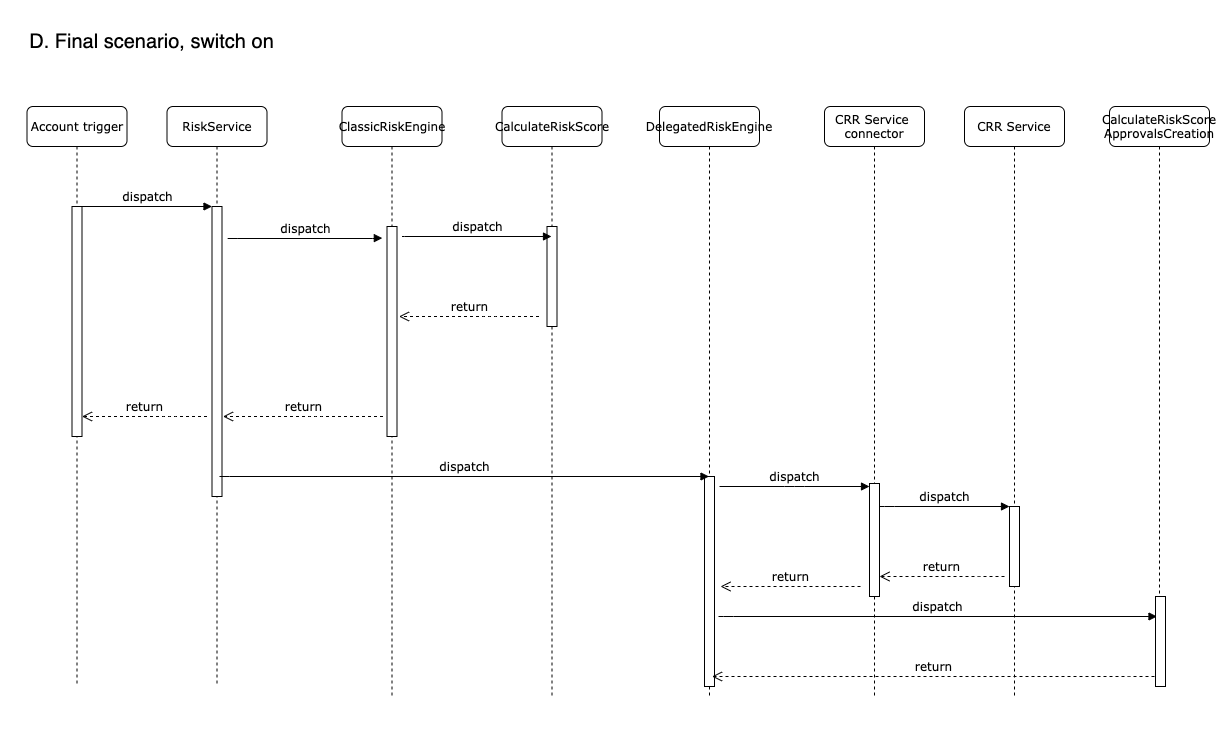
However, the toggle feature will not be as easy as turning on/off the switch because we will also have to swap the data.
Keeping both engines risk data
Right now, we are storing the risk macro in Risk_Score__c and Risk_Score_Value__c fields, and we are creating 2 new fields, Backup_Risk__c and Backup_Risk_Value__c for the CRR service. The first two are read by external systems like BOS and internally by other routines in Salesforce. To reduce the friction, it will remain the same. This is why we create the other two (the backup fields). Although we'll be able to deactivate the new risk engine, we won't activate/deactivate risk engines by default. We'll have a master and a slave risk engine instead we can toggle. The active master risk engine will be writing the usual risk fields, while the other one just the backup ones. This way we could switch between the two on demand keeping the values that were calculated at the relevant point of time.
So to switch between solutions we'll also swap values between Risk_Score__c and Backup_Risk__c, and Risk_Score_Value__c and Backup_Risk_Value__c. This will allow us to make it transparent to existing flows, specially BOS sync.
Main problem here is that data swapping will take longer than just activating a switch, so this process is supposed to not be executed frequently and, of course, out of business hours.
Alternatives
About CRR integration, there was an alternative based on events, but it was discarded mainly because it would be a new solution never used before and we would have enough time and, further, it would not give us any real benefits. Having an endpoint we can call whenever we want is much more flexible.
We can see the idea in the next diagram.
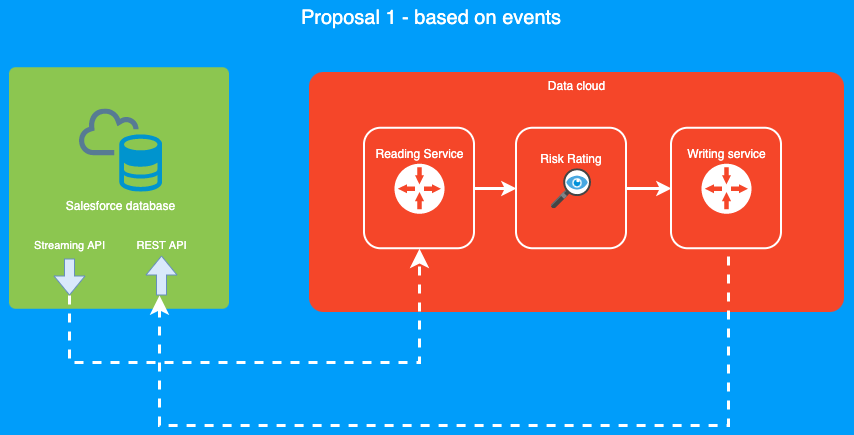
We were also evaluating not swapping data during the switching. However, it would impact BOS because they would need to adapt their code to read the right field and avoid BOS to modify anything is one of the project constraints.
Caveats
Project toggle feature (activation) has to be done out of business hours to avoid impact in final users.
Risk rating calculation will be async (not more than a few seconds), but it is something final users will have to assume.
Operation
No change in the operation level, onboarding will be the only team using this as they have been doing until now.
Security Impact
The CRR service will run using Cloud Run which, as any other Google service, will allow us to use the Google Authentication services. Data will create create a Google Service account for the Salesforce integration and we will use it to log into the service using the Google's Oauth2.0 JWT token flow-
In Salesforce, we will store the credentials in the Certificate and Key Management section, that will encrypt and securely manage the information for us. We will also add the endpoint details in the Remote Site Settings area to allow to Salesforce to perform external callouts into this service.
Performance Impact
Current flow will work as usual (no impact), and the new flow will be a bit slower as we need to perform an external callout but, even so, nothing to be concerned about.
About cost, let's do a high level estimation on how much activity we have which could affect the risk rating.
Firstly, let's review how many clients are onboarded or re-assessed monthly. In the last 3 months (01/03/2020 - 01/06/2020), 8201 onboarding or re-assessment cases have been created, which is mainly where onboarding team works in the risk macro.
The risk service will not be called until all the information is gathered and, after that, let's assume something was wrongly added and the data has been ammended around 5 times per account (quite a pesimistic estimation). This gives us 41005 requests.
We are also re-calculating the risk if something changes automatically, like if BOS adds a new destination of funds. In the last 3 months BOS has done this 4553 times. We have now 45558.
Apart of that, we can have another unexpected updates, like Sales acceleration, data team, service desk, or salesforce team performing updates directly in the DB. We cannot predict this but, thinking quite pesimisticly again, let's say this is doubling the requests, so we would have 91116.
This gives a total of around 30k requests per month which, given the pricing table, would cost us less than USD 0.20.
Developer Impact
We have tried to reduce the impact to the minimum, so all services out of the risk scope will not be affected at all.
Next fields will be deleted: Old_Risk_Use__c, Old_Risk_Score_Value__c, Old_Risk_Sales_Process__c, Old_Risk_Ownership_And_Control_Structure__c and Old_Risk_Company_specific__c
Data Consumer Impact
NA
Deployment
This can be deployed whenever the project is ready and run an initial job to populate the backup risk fields for all our clients. For all new changes these fields will be updated as has been explained above.
For the activation, we need to do it out of business hours. Deployment + activation can be done also together.
Contigency
The idea is common to other projects, fully relying this service will work but, in case it does not, giving the option to onboarding team to set the risk manually. This is a feature already exists also in the current flow, and can be used not only if the service doesn't not work but also if it gives a wrongly value or we have a corner case which has to be manually reviewed.
The ways the issues will be identified and tracked will be:
- In case of malfunction of the CRR service (400 and 500 errors mainly), we will be contacting support team via an email sent by Nagios. Prometheus will be collecting Salesforce data and, after more than 3 in a row errors happened, a rule will trigger the email sending. In day 1, all alerts should be redirect to ODT team and they will analyse the error and handle it or, in case the problem it is in the service itself, escalate it with data team. For future stages we can analyse the kind of error we are raising to try to split them more and create specific action plans for them. A new RFC for the Salesforce - Prometheus integration is being created and will be linked here soon. Key point: this project can not be activated until the integration with Prometheus/Nagios is working in production.
- Parallelly, the Admin Dashboard in Salesforce will display all the errors that might happen. Also, all Admins will be notified by email and a record with the full stack-trace will be saved in the DB in the Apex_Debug_log__c object for further review.
- The aforementioned UI component will keep the status of the risk calculation updated. In case of error it will also show that upfront.
- The status of the risk, error one included, will be displayed at first check phase in the Onboarding process and they will have the option to retry the risk calculation in case it is not done. This is useful also for the cases in which there is missing required information in our side. We won't call the service in case not 100% required info is filled in though.
To sum up, we are mainly using Salesforce for monitoring and Nagios for alerting.
About supporting, we will be offering, at least for now, the same SLA we are giving right now to all onboarding features, which is during UK business hours (8.00 - 17.00), mainly due to the low onboarding volume in other locations. This can be extended in the future if it is necessary.
If the CRR service outage is longer than expected, we would evaluate turning off the switch and start using again the current risk macro service while the problem is sorted out, but this is really unlikely due how different are the behaviour between these 2 services, so the decision would have to be approved by onboarding, compliance and product teams.
Dependencies
We depend on data building the service before being able to activate the project, but it is not blocking us to start the development on the Salesforce side.
References
CRR integration epic: https://fxsolutions.atlassian.net/browse/ODT-71
It is necessary to amend some fields to adapt them to the new CRR service. CRR fields preparation epic: https://fxsolutions.atlassian.net/browse/ODT-84
Cloud Run: https://cloud.google.com/run