CRR Simulator
The purpose of this document is to describe the technical solution of the CRR Simulator project.
The project’s main goal is to provide the sales team a way to know a client risk rating (CRR) estimation during the lead/prospect stage to improve the team performance so they can focus only on the profitable customers.
Problem Description
Depending on the client risk -low, medium or high- the number of onboarding checks, resources, time and, definitely, costs, can increase considerably. For this reason, it is important Sales users can see a client risk rating during the prospecting phase, so, for High Risk prospects, they can evaluate if the estimated revenue is high enough to compensate the costs.
Background
In the past, the onboarding team was using the Risk Macro to assess the customer risk. Now we are replacing the RM with the Client Risk Rating service (more information of the new service integration here Salesforce - CRR integration blueprint) so we can have more accurate risk assessment during the onboarding process. But, this is not the end of this bigger project, and the next step is to enable other departments, as the Sales one, to be benefited by these new features.
Solution
The solution brings changes into both Salesforce and CRR services. Starting by CRR, the current API format is similar to:
{
 "Account id": {
   "AML_Sector__c": "Farming and Agriculture",
   "LxNx_screening_status__c": "No Match",
   "FX_Destination_Funds_Rollup_CSV__c": "GERMANY",
   "Company_Formed_Date__c": "2010-08-13",
   "Compliance_Risk_Override__c": null,
   "FX_Source_Funds_Rollup_CSV__c": "SPAIN",
   "NAICS_Codes__c": "325920,334210,334290",
   "Complex_Legal_Structure__c": "No",
   "Legal_Entity_Type__c": "Private limited companies",
   "TF_became_client__c": null,
   "New_Pep__c": "No",
   "Special_Framework__c": "None",
   "ShippingCountry": "SPAIN",
   "Account_Country__r.Name": "UNITED KINGDOM",
   "UBO_Locations__c": "CZ",
   "Became_Client__c": null
 }
}
The plan is to add a new boolean parameter "Simulator" that, in case of receiving a False, will have the current behavior and, in case of receiving a True, will remove all restrictions over the mandatory fields, so it will be always returning a rating.
This allows us to don’t impact the current CRR integration in the onboarding flow, but gives us the flexibility to use it in the sales flow to give preliminary ratings.
In Salesforce we are creating a new component Risk Rating Simulator which can be accessed in 2 different ways:
- New tab in the Sales app: there will be a new tab which will allow us to quickly access the simulator. Using this link, the simulator will be blank and ready to be filled by Sales users, so the behavior will be similar to the current CRR simulator created by data.

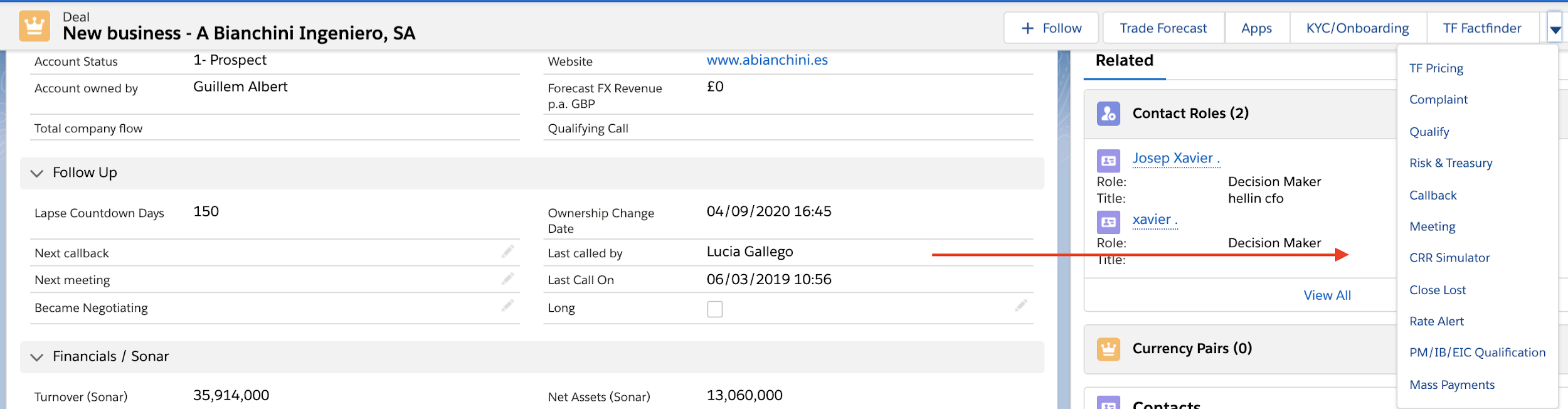
- New CRR simulator button in the lead/deal/account: this will be a direct shortcut to the previous component with a key difference, the form will be opened with the record data prefilled, so sales people will not have to modify anything (but they could, in case they want to play with the different fields to see what could happen with different scenarios. For example, they don’t know the country of residence but they have a certain idea so they check the rating using different countries
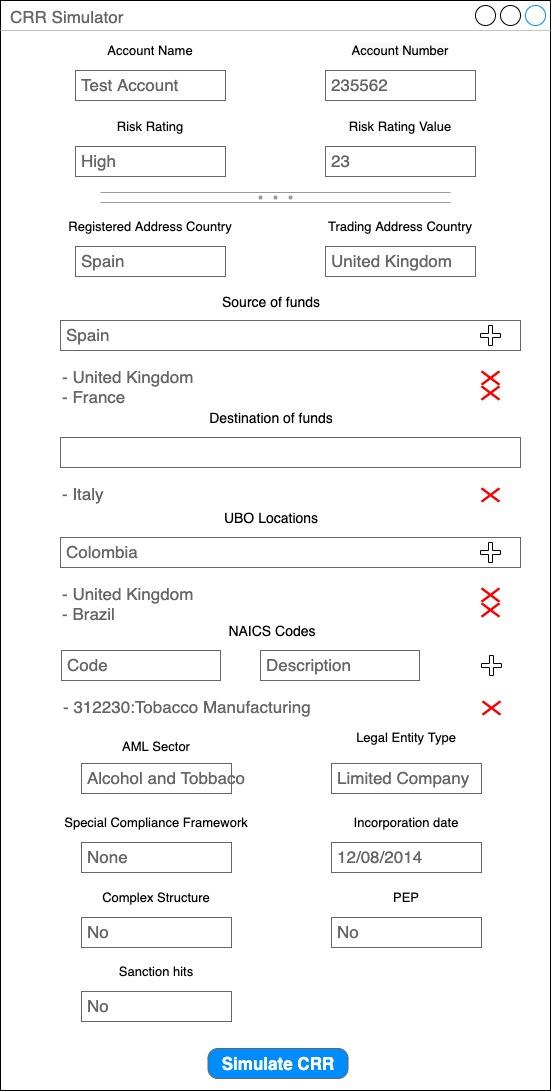
In both cases, the form would be the same one, with a top section with read-only fields, account name and number in case the record is prefilled, risk rating and risk rating value, and a second section with all the fields affecting the rating. At the end we would have a button to request for a new rating.
Alternatives
We have a temporal solution already in place which can be used until we have a native simulator in Salesforce. This solution has been developed by the data team and is basically a macro in an excel where Sales users can manually input the different values to retrieve a Risk Rating. The excel is embedded in Salesforce so it can be easily accessed. Link here: CRR calculator
Of course, this solution has several cons, the main ones are that for any change in the CRR service, the data team also has to manually adapt the excel to fit it and, second, sales users have to manually input the customer data instead of being automatically picked from the salesforce record.
Caveats
The information will still not be directly accessible in the record either in reports, but users will have to explicitly use the CRR simulator button to request it on demand.
Operation
This calculator is mainly thought for the Sales department, but there is no reason to don’t enable other profiles to use it if it can be useful for them.
We’ll handle visibility thought permission sets and custom permissions so that it is straight forward to grant access to any user that might require it.
Security Impact
Not at all, only users with access to a Lead/Deal/Account will be able to retrieve a rating simulation for that record. In case they access from the tab, no data is prefilled, so there is no risk.
Performance Impact
It is a new component so it should not have any impact in existing flows.
The only point to be reviewed could be how this could be affecting the costs (remember, Google services are priced by usage) but, as we discussed in the previous RFC, it is so cheap that it is not a problem to have a high volume of requests.
Developer Impact
NA
Data Consumer Impact
The data model is not changed so there is no impact at all.
Deployment
There are no special considerations here, as soon as the CRR improvement is deployed by the data team and the new component is deployed and enabled in Salesforce, all sales users will be able to use it.
In case we want to do a pilot deployment or to enable it gradually to the different teams, it would not be too hard to make it configurable, but it has not been requested.
Dependencies
CRR service has to be updated before the component is deployed in Salesforce.
One consideration for the CRR service: in order to make the change to work retrospectively, in case they don’t receive the ‘simulator’ parameter, they should assume it is a False. Doing this, they’re not blocked by us and can deploy and at any time knowing they’re not breaking the integration.
References
CRR calculator: link
Salesforce - CRR integration blueprint: link
Jira Epic for the CRR - Salesforce integration - phase 1: ODT-71
CRR Simulator 3 points estimation document: link