New account tree structure
Create a SObject in Salesforce to store the complex tree structures the companies have in our system so that we can get all company details efficiently.
Problem Description
The way the records are related between them makes extracting certain information non-viable.
For instance, if we want to get the screening status of a client, we need to perform three SOQL queries per level in its hierarchy: One for all directors, one for Shareholders and one for authorised contacts. Accessing the DB three times per level of relationships is not only inefficient but also we might hit a Salesforce governor limit (Salesforce limits queries issued up to 100 per transaction). So, we have had to hard limit ourselves to 20 levels deepness to be safe.
Another example is to get if a client should be kept monitored or we can unmonitor it from Comply. We need to know information from all the relationships with all its companies. It requires going up on the hierarchy, which we currently don’t support, and expand the aforementioned queries through them. Thus, in addition to the 20 levels limit, we limit our analysis to 1 company hierarchy.
Manually analyzing the relationships of a client is quite hard and prone to errors. The relationship between records are shown in the related records section and any user with permissions can navigate through them. However, it is easy to lose track of what has been analyzed and what’s not.
We need to resolve these limitations so that Onboarding and Risk & Treasury teams can carry out their duties efficiently.
Background
Analyzing and keeping track of the status of individual records and them as a group is essential for our business. It is critical to know their details, not only during the onboarding of clients, but also to maintain them. Think of processes like reassessment, risk escalation, etc.
In our Salesforce platform, companies and individual accounts are composed by a set of records related to them. Every relationship is exposed as an additional record to the account itself. Thus, an account that is director and shareholder of company will be formed by four records:
-
The company
-
The person account
-
The director record relating the company and the person
-
The shareholder record relating the company and the person
For Authorised Contacts, there is also a similar junction object. So the more relationships a company or a person has, the more records we have in the system.
Historically this was crafted this way because it is the only way in Salesforce to create many-to-many relationships. The person account in the example can have other relationships with a number of companies and we need to know that.
The nature of this data makes it hard to get the big picture as seen in the problem description section.
Solution
Approach
Introduce a new side SObject to keep the hierarchy structures simple, efficient and easy to query and understand. This object will allow us to represent the record’s hierarchies within the DB, modeled in a tree structure fashion. This way we’ll be able to query the tree instead of calculating it all the time. It will also help showing summary information on every record in one go without creating complex and heavy components. One service class will deal with all the details keeping it decoupled and easy to maintain.
The SObject will be called Account_Tree_Node__c to denote that every record represents a node in the tree of the account relationships. From now on we’ll refer to it as "node object" for the metadata and “node record” or “master node record” for Account_Tree_Node__c records that are single nodes or the parents of the whole hierarchy respectively.
Every node record will link up and down records except by the two ends obviously. All child nodes will also contain a reference to their master node. This ensures that we can get the whole structure in one go.
In essence, the model will look like this:
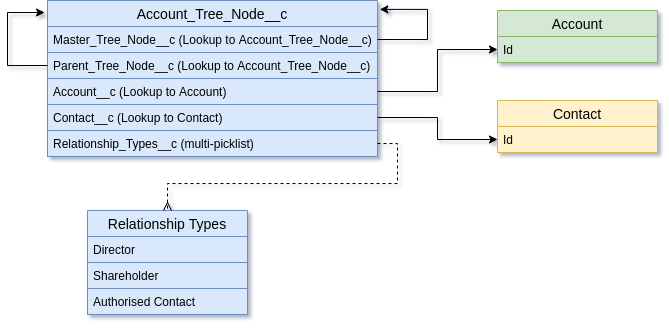
The purpose for the Account_Tree_Node__c fields from top to bottom are:
Master_Tree_Node__c: Look-up to theAccount_Tree_Node__crecord that is the one at the top of the hierarchy. That top record, the master node, will have this field empty.Parent_Tree_Node__c: Look-up to theAccount_Tree_Node__cparent record. The master node will have this field empty.Master_Tree_Node__candParent_Tree_Node__cwill have the same value on children that have a direct relationship with the master node.Account__c: Look-up to the record in that level of the hierarchy. It will be filed in if the corresponding record is a corporate account, otherwise it'll be empty and theContact__cfield will be used instead.Contact__c: Look-up to the record in that level of the hierarchy. It will be filed in if the corresponding record is an individual account or a contact, otherwise it'll be empty and theAccount__cfield will be used instead.Relationship_Types__c: This multi-picklist field will save the type of relationship the related record in theAccount__corContact__cfields have with its parent node. If the record holds more than one relationship, the field will contain all the possible values instead of creating a new tree node.
Let’s see an example of a usual company structure:
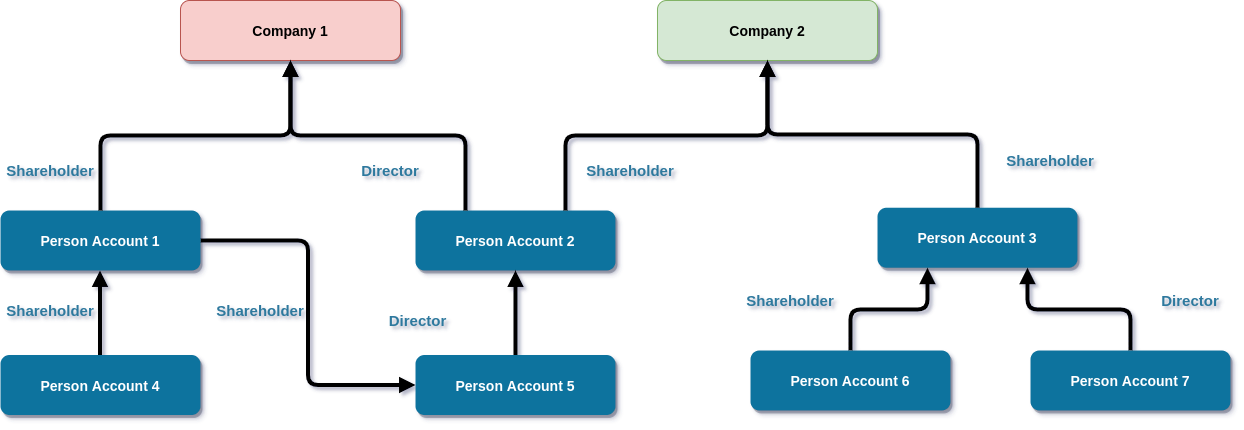
Both companies in the picture have child records. So every arrow represents a director or a shareholder record pointing to its parent.
There are two details to highlight there.
-
The person account 5 is pointing to the person account 2. But this last one has a relationship with both companies, therefore person account 5 is also related with them two as inheritance from its parent.
-
Person account 1 also has a relationship with person account 5, so it also inherits the relationship from person account 2 to company 2.
As you can see, it is hard to get this just by the current DB records. We have to go up on the hierarchy to get all the master nodes first, and then go down and build the tree. This is a heavy process in terms of SOQLs if we use the current records to get that information (Shareholder__c, Director__c, Account_Contact__c).
Based on the above picture, the real tree would look like this:
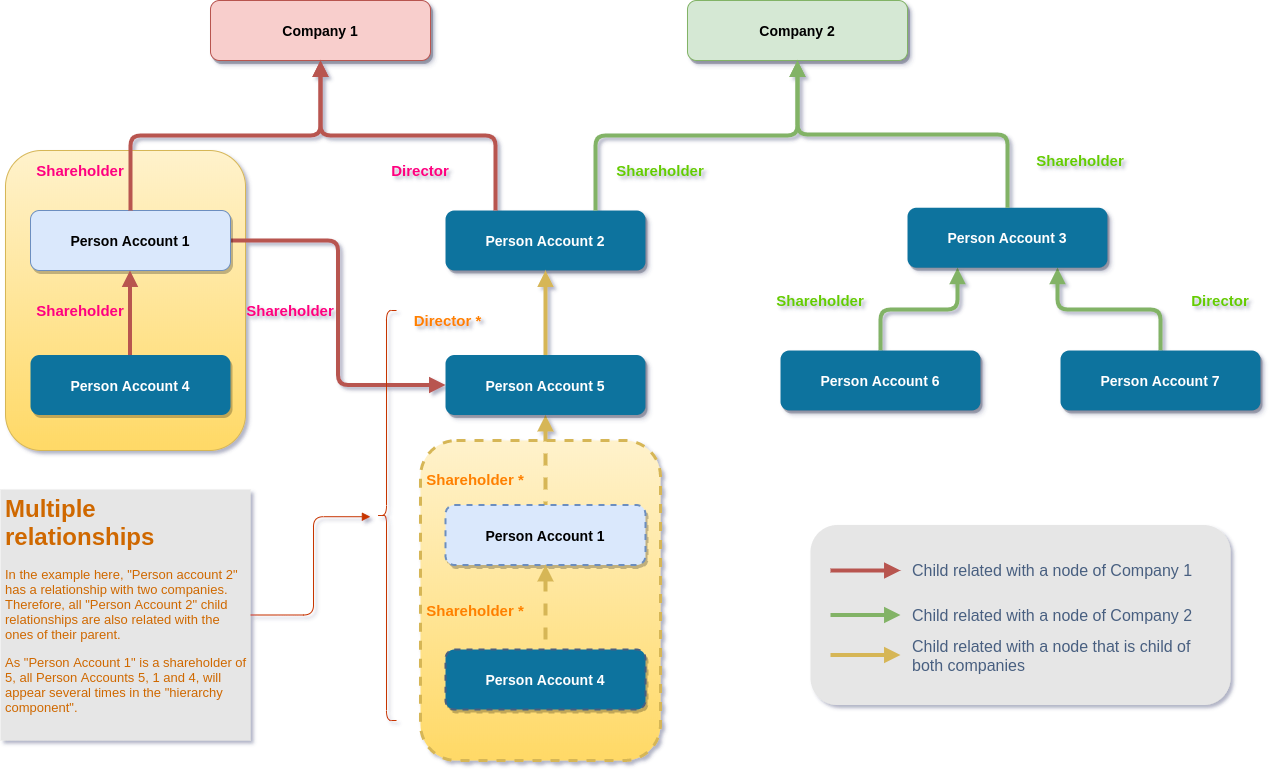
With the new Account_Tree_Node__c object, this tree would be fully represented in the DB, so as explained before, with one query to all master nodes of the visiting record, we could recreate the hierarchy in one go.
A POC has been carried out to test this is feasible. You can see the draft code in this pull request. To make this solution patent, we have also modified the "account hierarchy component" to highlight the account being visited with a blue background in the row it is present. Let’s see how it looks like when viewing the Person Account 1 in the hierarchy example:
Existing hierarchy service solution

As you can see, it is only able to print information down. But if we check the diagram there is a lot more information related to this account.
POC version of the hierarchy service
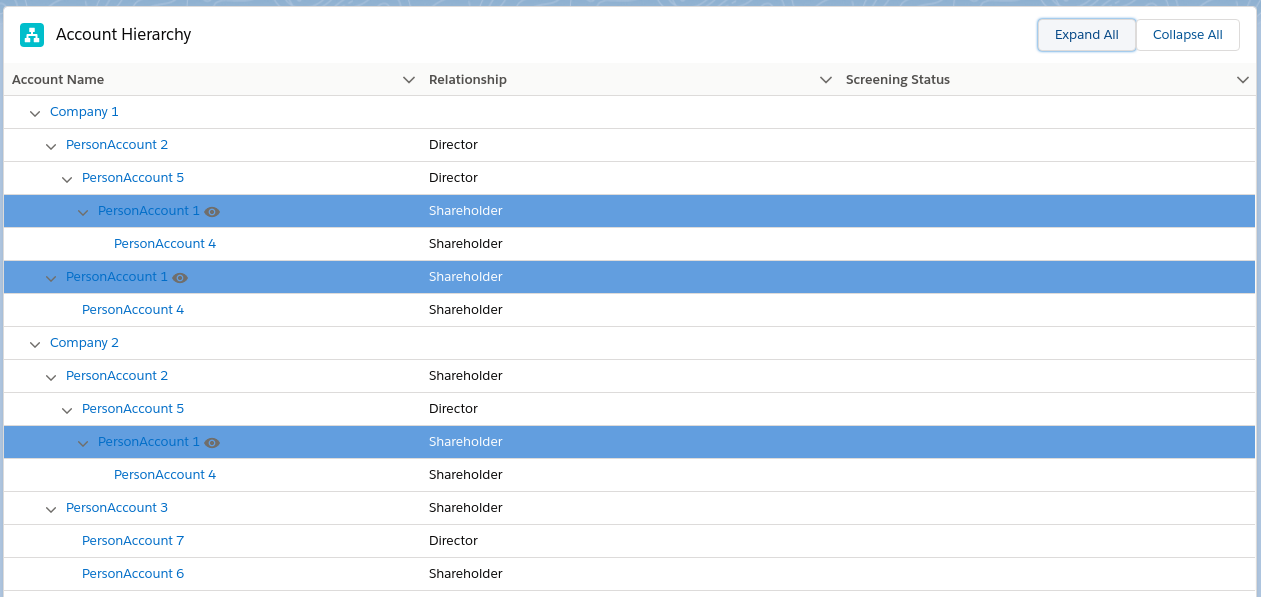
Now, the whole tree is exposed in the UI. You can navigate through all the relationships and also see the screening status of all the records in one sight. If this gets implemented, we plan to improve the component to allow pagination between companies instead of displaying everything altogether, but that’s subject to discussion.
What are the problems this resolves?
-
Limits on viewing company structures. Now, there are no longer limits.
-
Onboarding can’t see the screening summary for an entity in one sight and needs to dig into the hierarchy. Now, everything is always up front.
-
Can’t group the risk of company structures easily. With this we could do it in the same way.
-
Hard to know if an account has to be unmonitored from Comply. Now we can get all the info we need from the group of accounts.
-
Can’t see the parent relationships of accounts. That’s evident now.
Demo
You can find here a demo recording of the solution based on the examples above.
Alternatives
We thought of modifying the existing Director, Shareholder and Account Contact objects to act as child nodes and creating only one master node for the top parent account. However, this solution can’t cope with multiple company relationships. We would need to duplicate records and this would just be a mess in the system. Moreover, dealing with that number of records to print the hierarchy would end up being too complex.
The proposed solution is respectful with the current system.
Caveats
This proposal favours performance against storage. We are creating a new record per account per company. This would mean around 1GB of extra storage. This is not a problem now as we are far from our limits but it has to be considered. We might enhance this by discarding the inactive trees from the solution.
Operation
Articulating the solution
Apart from creating the SObjects and formalizing the code changes in the POC, we need to go through the DB and create the trees for the existing accounts. In the pull request, there is a script that does it for a low number of data. It has to be turned into a Batch Apex or a Python script. If a batch, we expect it to share most of the code in the POC though.
Maintaining the tree structure
Once the trees are created, each time a new relationship comes in or goes out, the structure has to be maintained the same way. To ensure it is correct all the time, we need to do a couple of things:
-
Modify the Director, Shareholder and Account Contact triggers to create new nodes on insert or delete them on delete. This will go into the sync-ish methods.
-
Keep a service handy to rebuild trees by account ids for contingency. Use cases like support or us as admins fixing data in production with triggers disabled.
Security Impact
It seems record visibility is not a problem. If you have rights to see an account, you should see the contacts underneath. However, if this becomes a tool for our Sales reps, we need to check all the use cases and see if we could be exposing data they shouldn’t see.
In any case, the queries performed have to be done under "with sharing" context.
Performance Impact
As stated in the Caveats section, this proposal favours performance against storage. The tests performed over the new solution proposed gave us much better results than the existing one. For a company structure with 20 levels of children we got:
-
CPU usage 3 times lower with the new solution.
-
SOQL queries issued were 3 in total for the new solution against >60 for the existing one.
Developer Impact
The only impact is that they have to know this object exists and why.
Data Consumer Impact
Actually there isn’t any change on the existing structure. This goes in addition to the existing one. We couldn’t identify any impact in the consumers.
Deployment
Enriching the DB has to go first. We can populate all the data silently and update the triggers to keep it in sync. Once, we can prove it is fully loaded and stable, we can enable the new Hierarchy Service. This has been taken into consideration in the POC and a toggle mechanism has been implemented by using our binding service.
Dependencies
N/A
References
N/A