PFE (Potential Future Exposure) Flow
Prerequisites
| Requirements | PFE Request in SF - High Level Document |
| Stakeholders |
Product Owner(s): Michael Wojtowitz Business User(s): Sales, Dealing, FX Risk Sponsor(s): Ronan Daly |
| Business Process | Credit Conditions Flow (current) |
| High-Level Design | PFE CC Flow - SF |
Reference Documents
| Reference | Document Location |
| PFE01 | PFE Request in SF - High Level Document |
| PFE02 | PFE Request in SF Flow - SF - High Level Flow Diagram |
| PFE03 | 3Pts Estimation - PFE |
| PFE04 | PFE + CC Flow - Diagrams |
| PFE05 | CC Calculator v2.0 |
Background
All FX forward trades (fixed forward, window forward etc) a client books with Ebury must be within the terms of their agreed Credit Conditions (CC).
| Credit Conditions | A set of client specific rules which a trade must satisfy to be successfully booked. These rules include:
|
When clients are onboarded, they are assigned a set of default credit conditions (500K/10/7/7) automatically. However, for commercial purposes, Front Office often want to amend these default credit conditions to a set more suited to the client. To amend a client’s credit conditions, Front Office (FO) submits a credit condition request to the FX Risk Team (Risk) via Salesforce. Risk evaluates the request vs Ebury’s risk appetite before approving/rejecting. FO/Risk then communicates the credit conditions to the client for their acceptance.
The Risk Team is changing how they evaluate a client’s risk profile. Instead of approving a defined set of credit conditions they will approve a Potential Future Exposure (PFE) value.
| Potential Future Exposure | The maximum expected credit risk exposure to a client (i.e. largest potential loss) under an FX contract. |
The PFE value is determined using an existing evaluator tool provided by Ebury Data Team; once it is approved by Risk, Front Office will then translate this PFE into a set of credit conditions to be communicated to the client. Ebury is still communicating a set of credit conditions to our clients as they are more user friendly and easier to understand.
There are many different credit conditions that would have the same (or similar) PFE for a client. It is less resource intensive for Risk to approve a high level PFE and Front Office to tweak to suit the client themselves without the involvement of Risk. In addition, this process change allows Risk to assess credit risk vs quantifying FX risk.
Problem Description
The Credit Condition Flow is in place and in use; credit conditions are managed in between 2 platforms:
- BOS - the default credit conditions is automatically created and assigned when the client is onboarded, and the FX trades booked against the credit conditions are managed here;
- Salesforce - the process of approving (create, submit, approve) non-default credit conditions, whenever Front Office wants to overwrite the default credit conditions, is managed here. There are some parts of this process that are in place but currently only available for a subset of the business (countries Italy, Belgium, Germany and Netherlands), in a pilot, soon to be released in full. They are: emailing the approved credit conditions to the client, collecting and tracking the client’s acceptance, syncing the approved conditions to BOS.
The Potential Future Exposure Flow is a complete new feature that needs to be developed. The two flows will complement each other.
How should the process work?
There are 2 parts to this process:
Part 1 - PFE Request
- FO creates a PFE request for a Client, completing it with relevant information such as Currency Pairs, Notional, Initial Margin, Variation Margin, Margin Call, Tenor, etc.; then the PFE is submitted to the Data Evaluator;
- Data Evaluator calculates and returns the PFE limit, which is stored in the PFE request; \ Note: This PFE limit, calculated by Data Evaluator and approved by RIsk, applies to the Client.
- The PFE request, with the PFE limit, is submitted to Risk for approval;
- Risk approves the PFE limit, the PFE request is closed and now FO needs to translate this into CCs.
Part 2 - CC Request
- FO creates a CC request for a client, as per current process, but instead of submitting the request to Risk, the CC request is submitted to the Data Evaluator;
- Data Evaluator translates the CC request into a (second) PFE limit and returns it to be stored in another PFE request; \ Note: This PFE limit, calculated by Data Evaluator, applies to specific credit conditions request.
- PFE limit (from CC) is compared against the PFE limit (from Client); if the PFE limit (CC) <= PFE limit (Client), the CC request is automatically approved and the flow proceeds to the next steps, as per current process; if the PFE limit (CC) > PFE limit (Client), the CC request is automatically rejected.
- In certain cases, Risk does not approve any PFE for the Client, meaning the PFE Limit (Client) = 0. In these situations, the client can still request credit conditions and trade with Ebury, provided that they meet certain criteria (such as IM >= VM >= 0). The Data Evaluator will always return a PFE Limit > 0, this would mean that the PFE Limit (from CC) would always be higher than PFE Limit (Client), therefore always be rejected. To prevent this, Salesforce would check the CC and, if it meets the criteria, the PFE Limit (CC) should be set to 0 and the callout to the Data Evaluator should be skipped.
Solution
Overview
The overall goal with this implementation is to streamline and automate the credit conditions process as much as possible, reduce the volumes of credit conditions processed by Risk, by defining certain limits and fast tracking the approvals.
The main challenges the solution aims to address are:
- create an approval process/flow to request, determine and approve/reject PFE; any relevant information or decisions throughout the process must be stored for reporting purposes;
- integrate with the Ebury Data Evaluator to perform the necessary calculations in order to determine the PFE value for a client;
- incorporate the validation of the PFE value into the existing Credit Conditions flow and automatically move the process forward by approving/rejecting the CC.
Flow Diagram
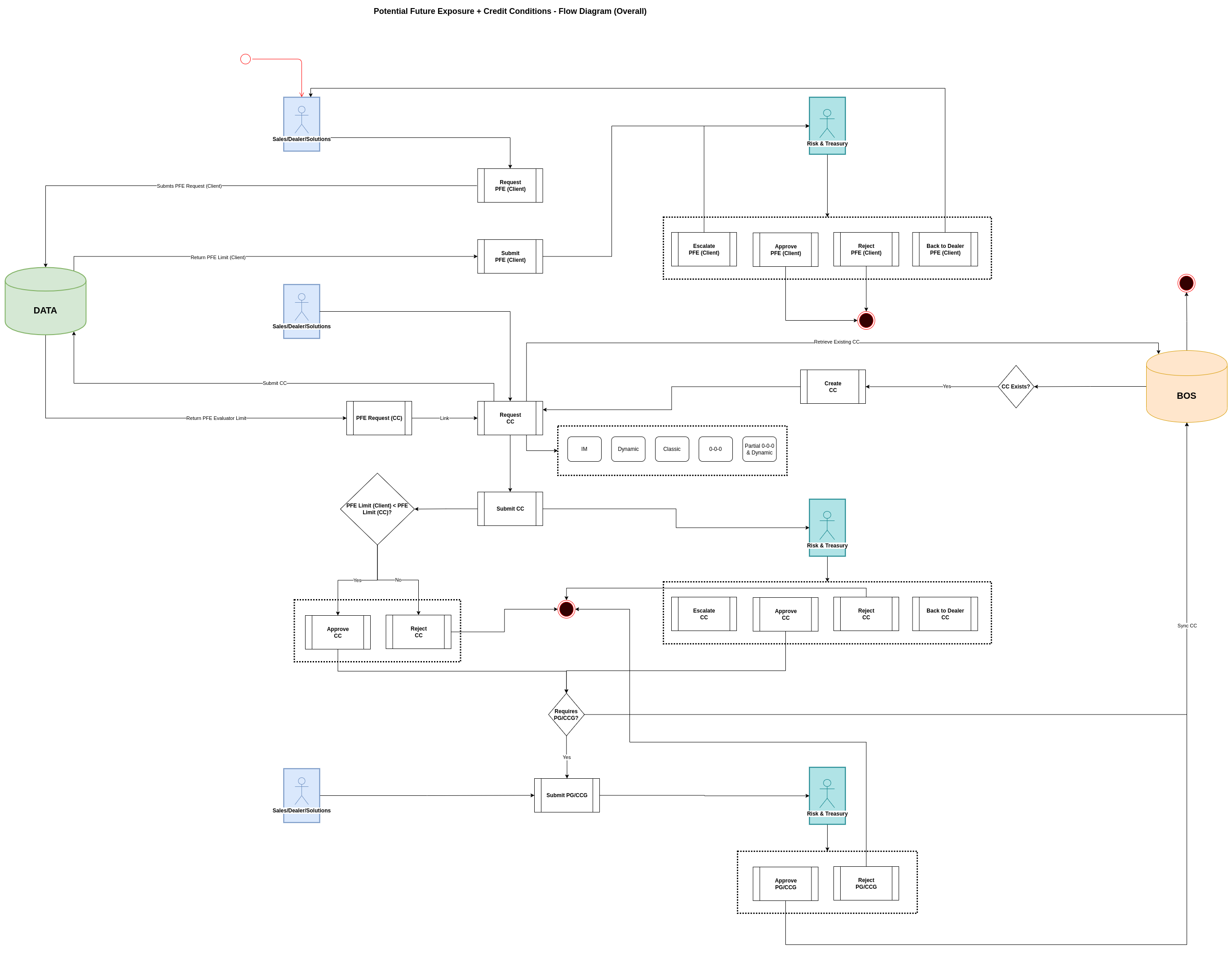
The diagram of the flow can be found here.
C4 Model Diagram
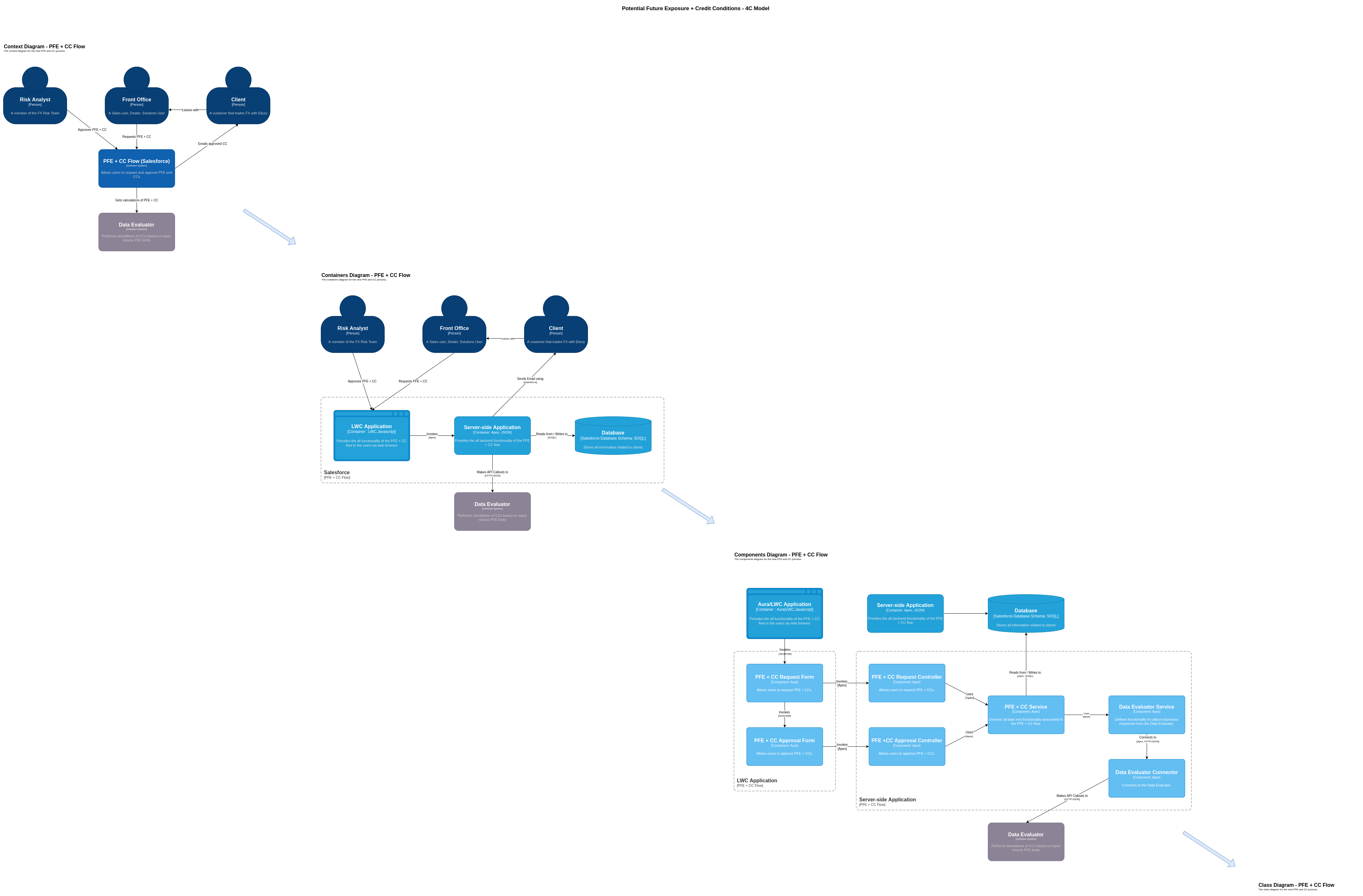
The diagram of the model can be found here.
Data Model
The PFE request is sort of a much simpler version of a CC request: it doesn’t have as many variations of types (Classic, Dynamic, 0-0-0, etc.) like the CC; the inputs, the values required to be sent to the Data Evaluator in order to calculate the PFE limit, are set.
The CC request record is modelled on the Case object. The PFE request will be modelled on a new object, with a master Record Type and two Types to differentiate between the PFE request (Client/Master) and PFE request (CC).
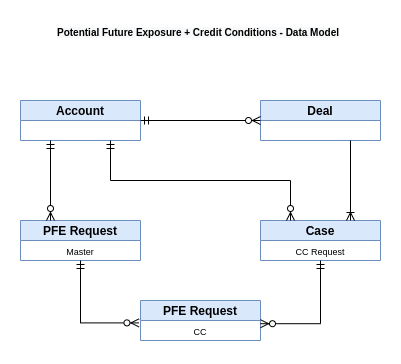
The diagram of the flow can be found here.
Keeping CC request on the Case and creating a separate PFE request object it’s the hybrid approach; only the relevant parts of the flows should be adapted to cater for the PFE request, but no massive changes should be necessary for the CC request. However, there will be some duplication of fields (PFE object vs CC/Case object).
In the long run, the CC request should be decoupled from the Case object and moved to its separate entity.
PFE Approval Process
Most of the functionality that is currently in place for the CC process can be re-used for the PFE process. Actions like approve, reject, back to sales, etc. can be adapted to accept a PFE request, as well as a CC request. All actions currently sit in the CreditConditionsService.
On the front-end side of things, a similar approach to the CC flow will be adopted, as in, the user will be guided through the process via a step-by-step wizard. There will be one step that will have significant changes in relation to the to the existing CC flow: submitting the PFE request (Client) to the Data Evaluator - the user will see a screen with the information of the PFE request and an action to submit; once submitted, the flow will move to another screen where the result of the Data Evaluator simulations will be displayed to the user (PFE limit or Errors).
CC Approval Process
The actual CC flow will suffer a few changes on both front-end and back-end.
On the front-end side, the step to submit the CC request will change: instead of submitting to Risk, the CC request will be submitted to the Data Evaluator - the user will see a screen with the information of the CC request and an action to submit; once submitted, the flow will move to another screen where the result of the Data Evaluator simulations will be displayed to the user (PFE limit or Errors).
On the back-end side, when the CC request is submitted, Salesforce will automatically create a PFE request (CC) and send it to the Data Evaluator. Once the Data Evaluator returns the PFE limit, this is stored in the PFE request (CC) record; the PFE request (CC) will then be compared against the PFE request (Client) and will be automatically approved or rejected depending on the criteria. The CC flow will then continue accordingly, as per the current process.
Fallback Process
Despite introducing a step in the process where the system can automatically approve or reject the CC request, based on the PFE limit returned by the Data Evaluator, the ability for Risk to still approve or reject (or send back to sales, approve with modifications, escalate, etc.) will be preserved, meaning both ways (new flow vs old flow) will co-exist and the current CC approval flow can be used as a fallback.
The "decision" to go through the (what will become) the standard flow - PFE Flow - and the fallback flow - current CC Flow - will not be on the FO user, but rather the system will present the option to the user, once a set of controls have been checked (examples: the integration SF<>Data Evaluator is switched off, the Data Evaluator is down, when FO has submitted X requests and all failed, etc.).
This is to:
- encourage FO to always follow the standard flow first;
- ensure that FO has the ability to submit a CC request for Risk approval if they are unable to use the Data Evaluator;
- ensure that Risk has the power to step in into the process should there be a need for it.
Data Evaluator API
The Data Evaluator is a tool, built by Data Team, that takes a set of parameters from an account and performs simulations of credit conditions that are likely to fit the parameters set by Risk. This evaluator is currently being used by Front Office to predict credit conditions and send them to Salesforce auto-approved or to send to Risk.
In this implementation, Salesforce will connect to the Data Evaluator API to send the PFE requests and retrieve the PFE limits.
The input values that are used by the Data Evaluator to calculate the PFE (according to what is displayed here) are: Account Number, Notional Amount (NA), Notional Currency, Buy Currencies, Sell Currencies, Contract Length, Initial Margin (IM), Variation Margin (VM), Margin Call (MC). Let's break it down by type:
CC types without tiers
- Classic - what is sent to the evaluator is NA / IM / VM / MC
- 0-0-0 - what is sent to the evaluator is NA / 0 / 0 / 0
- IM Only - what is sent to the evaluator is NA / IM / 0 / 0
CC types with tiers
The way the credit conditions with multiple tiers work is that each tier progressively increases the risk: Tier 3 is riskier than Tier 2, whilst Tier 2 is riskier than Tier 1. What is sent to the evaluator, in this cases, are the sum of all the tiers Notional Amounts, plus the conditions of the highest risk (highest tier). Considering an example with all 3 tiers present:
- Dynamic - what is sent to the evaluator is SUM (T1NA, T2NA, T3NA) / T3IM / T3VM / T3MC
- Partial 0-0-0 + Dynamic - what is sent to the evaluator is SUM (T0NA, T1NA, T2NA, T3NA) / T3IM / T3VM / T3MC
Alternatives
As stated previously, the PFE process is not in place, at the moment. The alternative would be to track the PFE requests and limits manually either outside of Salesforce (via spreadsheets, for example) or in Salesforce by adding a couple more fields to store this information. In fact, as a way of kickstarting the tracking of PFEs sooner rather than later, as per business’ request, these fields will be added to the CC request soon. However, this approach requires FO to create the CC request and submit for Risk approval, then for Risk to refer to Data evaluator, input the values of the CC and estimate, then return to Salesforce to save the limit in the CC request; all of this done manually, it’s very time consuming and prone to mistakes.
Data Model
Concerning the data model structure, this RFC is following a hybrid approach, in which we decided to keep the old model as is with the CC request/Case object and adapt it with the new model, with the PFE request object.
But other approaches were also considered:
- PFE on the Case object, same as how the CC is now - this is the least costly in the short-term. Most of the fields are already in the Case object; most of the forms, classes, integrations, etc. already cater for the Case object. However, this approach is not scalable, the Case object is already at the limits that are allowed by SF, which causes a lot of constraints on development.
- PFE and CC on a new object, decoupled from the Case object - this is the long-term approach, but also the most costly. This would ensure more flexibility and scalability for the PFE/CC flows, but also other processes, as it would help reduce a lot of the limitations that we currently have on the Case object. However, in order to achieve this a really big refactor would have to take place, to adapt the processes to cater for the new object (over 40 components); adapt the integrations with BOS and Data systems; migrate over 13000 records; define strategies to ensure a smooth and transparent transition for final users; testing would have to be performed on the whole flow, end-to-end. This should be treated as its own project.
Caveats
Data Evaluator
At present, there isn't a 1-to-1 mapping between the CC types that exist in Salesforce and the CC types that the Data Evaluator tool is prepared to receive; it only supports CCs of type Classic. However, it should still be possible to use the tool as is now, by sending the requests with values that map to the correspondent CC type.
For more details, please refer to the Solution > Data Evaluator API section of this document.
Operation
The new process relates to the operational part of the Credit Conditions management, which sits on Salesforce. The process is for internal consumption only and it will mainly benefit Front Office and Risk teams.
The Data Evaluator is managed by the Data Team.
Security Impact
The information that will be sent to the Data Evaluator are mainly numeric values (amounts, percentages) and currencies; no PII is part of the request. At best, the unique identifier of the account (Account Number) will also be sent in order to identify the client to the Data Evaluator. The Data Evaluator does not store any of this information; it simply takes the input, performs some calculations, returns a number as output.
Credentials are needed in order for Saleforce to access the Data Evaluator API. These will be stored in the Credentials object in Salesforce, as we have done in the past with other integrations.
Performance Impact
The Data Evaluator, when processing the inputs and calculating the PFE limit, performs a large number of simulations; depending on the variables, it can take a significant amount of time to finish (avg. 1 or 2 mns, but could take much longer).
Users can potentially experience performance issues, long waiting times and even timeouts. The user experience will be designed to cater for these scenarios.
Developer Impact
N/A
Data Contracts
The consumers of the data will remain the same ones that currently operate the Credit Conditions Flow: Risk and Front Office teams. Existing data will not be amended and no new data source is being created.
Current functionality will not be retired and the new functionality is an extension; both versions will coexist. The data model will also not change significantly, as most of the current structure can be reused.
Deployment
There are no major data transformations or migrations associated with this change.
The deployment of the changes will be done in chunks, as they become ready, with activation switches that will be kept inactive until rollout.
Pilot
As the changes on the flow are very sensitive and could be disruptive for the end users and the business in general, it wouldn’t be very wise to release everything to the wider audience without ensuring some levels of confidence in the new functionality.
For this reason, this project will be rolled out in a similar fashion as its parent project - Credit Conditions 2.0 (Phase 4) - by doing a pilot. The main goal is to gradually rollout the new functionality to subsets of the business, based on their jurisdiction (Ebury Country), starting with the ones with the lowest impact.
Some of the advantages of doing things this way are:
- it allows the functionality to be released to the users in a controlled manner;
- issues with the process can be discovered, mitigated and solved for the subset of the business within the pilot, whilst the rest can continue working as usual;
- feedback can be collected and improvements can be implemented even before releasing the final version.
A more detailed rollout plan will be elaborated in due course of the project.
Dependencies
As we understand, there aren’t any dependencies on development work to be done on the Data Team side, however, we will need their support throughout the implementation on the CRM side.