Salesforce Platform Events Service
This document shows the decision of how to implement a service in Salesforce to handle the creation, publication and consumption of platform events. This service should be the core of a future event driven system in Salesforce. For this first implementation the goal will be to communicate Salesforce with the Ebury Kafka system.
Problem Description
The Salesforce platform needs to connect to Kafka, which is the event driven platform that Ebury is starting to use. From the Salesforce perspective we need a way to send those messages as part of our processes but limiting the impact on the performance and limits consumption. This is the first approach of this type of implementation and we need to keep it generic enough to be able to support other processes, but without over engineering at this point.
This problem gives us the opportunity to make the first step in the journey to implement an event driven architecture in Salesforce.
Requirements
-
Asynchronous way to connect a Salesforce process with Kafka.
-
Centralized point to handle the process of sending a Kafka message.
-
Low performance impact to prevent hitting Salesforce limits.
Background
The Ebury Salesforce platform needs to communicate with the new Ebury Kafka system. We have already built a class that takes care of the details of sending messages to Kafka (the KafkaConnector class). We need to implement a service to connect our business logic with the aforementioned connector but keeping the clients agnostic of the underlying technology.
Solution
From now on, we'll use Ebury_Event__e platform events to publish and process the Kafka Events. The EburyEventCreator will take care of building the records and the KafkaConnectorEventConsumer will read and process them.
Another important point in this solution is the generic apex class defined (EventsService.EventDetail) to store the information that can produce a platform event. That class will have the format needed to communicate the internal logic to create and consume platform events with the other parts of the Salesforce application.
The following diagram shows the solution.
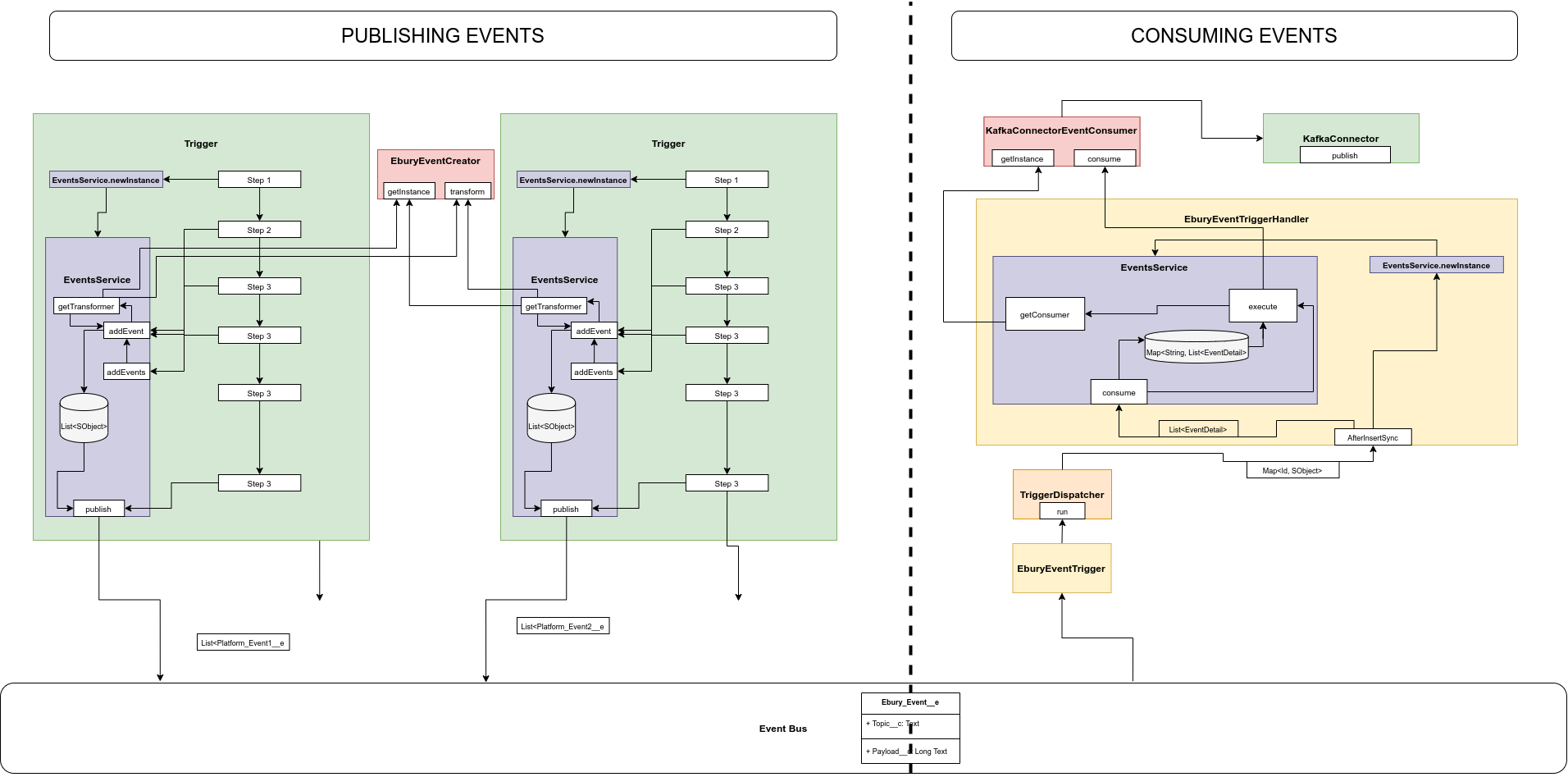
Before explaining this diagram there is an important piece mentioned before that needs to be explained has it will be named multiple times in the diagram explanation:
EventsService.EventDetail this is a model defined in Apex to store the generic information that can produce any type of platform event. It has the following properties and methods:
-
Properties
-
topic: it’s a string. For our current use case is the Kafka topic of the message to send. But more generic could be like the event type to create.
-
eventData: it’s a Map
-
-
Methods
-
setTopic: it receives a string that will be set as the internal topic property and it will return the instance of the object itself.
-
setEventData: it allows to set the entire eventData property receiving a Map
-
setEventDataKey: it allows to set one key-value pair in the eventData property. Creates the item if the key doesn’t exist yet or replaces its value otherwise. It returns the object itself following the fluent API technique.
-
Now, in the above diagram we can see three main sections:
-
At the bottom we have the Event Bus. This is a standard Salesforce tool where the business logic needs to publish and consume the Platform events. Inside that bus we can see the new Platform Event created. For a non Salesforce Developer it can be seen as a new table. The definition of that new event is:
-
Name: Ebury_Event__e
-
Label: Ebury Event
-
Plural: Ebury Events
-
Event Type: High Volume
-
Publish Behaviour: Publish After Commit. (We are only producing the platform events if the change gets committed, preventing sending events to inform something that finally has been rolled back).
-
Fields
-
Topic
-
Name: Topic__c
-
Label: Topic
-
Data Type: Text (255)
-
-
Payload
-
Name: Payload__c
-
Label: Payload
-
Data Type: Long Text Area (131072)
-
-
-
-
The left side of the diagram displays how the platform events are produced. The solution delegates the ownership of the process to the business logic (controller or trigger) that needs to publish a platform event. This solution prevents conflicts between two business logic occurring at the same time that want to publish events in different stages of the proces. How the events are created and published is handled in a single class which instance is generated in each business logic interested in publishing platform events. The following two classes are involved in this part of the process
-
EventsService. It’s the class with all the logic to create, store and publish platform events. It behaves much like a Unit of Work, but it has the specific purpose of handling the events.
-
Creation: the methods involved are:
-
addEvent: Public method to be called from the business logic to keep all EventsService.EventDetail items until they are released by using the release method. . The event created gets stored in an internal list of SObjects.
-
addEvents: Public method to bulkify the logic of addEvent.
-
getTransformer: Private method that is getting the class that will perform the transformation from the EventsService.EventDetail to the platform event. In our case because we have a single use case that class is always EburyEventCreator. In the future, a factory can be implemented and the transformer to use can be based on the topic to process. All the transformers will need to implement the interface EventsService.IEventCreator.
-
-
Store: the platform events are stored in a member var of type List of SObjects.
-
Publication: it’s done for a single method.
- publish: Public method to publish all the events stored in the class using the standard Salesforce method EventBus.publish.
-
-
EburyEventCreator. It’s the class with the logic of the transformation from a EventsService.EventDetail to the Ebury_Events__e platform event. It implements the interface EventsService.IEventCreator that could allow us to build a factory based on the topic of the event.
-
-
The right side of the diagram displays how the platform events are consumed using a trigger of the Ebury_Event__e and following our trigger handler pattern. In this point we are focusing on the specific logic created for the consumption of the events. The classes involved on this are:
-
EventsService. This class is instantiated from the EburyEventTriggerHandler and contains all the logic needed to propagate the events to the right consumer. In our case we have a single consumer KafkaConnectorEventConsumer. The methods that are involves are:
-
consume: it’s the public method called by the EburyEventTrigger that classifies the platform event by topics, converts it in EventsService.EventDetail and runs the queueble that will call each of the consumers involved. In our case only the KafkaEventConsumer.
-
execute: it’s the method run in the queueable context and it has the responsibility of getting the consumers and propagating the event to them.
-
getConsumer: it’s the method that is getting the consumer that will process an specific list of events with a single topic. In our case it is always the same (KafkaEventConsumer) but in the future we can have a factory based on the topic because all the consumers will implement the interface EventsService.IEventConsumer.
-
-
KafkaConnectorEventConsumer. This is the facade created to communicate with the KafkaConnector that will be responsible for sending messages to Kakfa. This class implements the interface EventsService.IEventConsumer that will allow us to build a factory based on the topic of the event to process.
-
Validations
The unique validation added currently at this process is in the consumption of the events. If the topic is null the event is ignored.
Alternatives
One alternative was to build EventsService as a singleton but that could create conflicts if more than one business logic wants to publish events in different moments. For that reason this alternative was discarded.
Caveats
N/A
Operation
This is a process that should be transparent for the end user. The front end application will be working as it was working before.
Security Impact
This implementation doesn’t have any extra requirements regarding authentication and authorization as that’s delegated to Salesforce.
The unique consideration to have when this service is in use is: review the profiles of the user that would need to create events, not directly but as part of a process that they are using. If the profiles don’t have the proper permission that could cause errors.
How to store Kafka credentials will be part of another RFC, we are still in the designing phase of a proxy between Kafka and Salesforce so, as part of that project, the connector will be also updated to include the right credentials.
Performance Impact
The impact of this process should be really small as we are creating an asynchronous process to not interfere with the current business logic of the application. The benefits of the asynchronous implementation it’s to reduce the impact on the current logic but that can cause some delays in the processing of the asynchronous jobs depending on the load and performance of the Salesforce instances.
Developer Impact
The developer will have a new way to implement the call to Kafka and a new tool to implement a process using an event driven architecture.
Deployment
It will follow the standard Salesforce deployment flow.
Dependencies
No real dependencies. The Kafka implementation could seem a dependency but with the decoupling of the connection with Kafka using the KafkaConnector it’s not a dependency anymore. Other Salesforce business logic can depend on this.