Closeout Communications
Risk and Legal require all transactions to be consistently and professionally communicated to clients.
That means a branded document with the relevant transaction details.
That also includes Close out trades (Sell back trades in BOS), where every year, the company is calling around GBP 2-3 millions to clients due to losses for this reason.
Prerequisites
This Blueprint is based on the pre-requisites implemented within the scope of the below tasks:
Reference Documents
| Reference | Document Location |
|---|---|
| CLSCMEPC | Closeout Communications Epic |
| CLSCMTSZ | T-shirt sizing |
Problem Description
Not communicating them properly compromises the position of the company to go legal with these clients who don’t meet this settlement requirement.
They can also go legal against Ebury even if there is no loss to settle as they might request uses of contracts that they consider as “open” while they might have been “closed” but there was no formal communication provided.
In the past we had a process whereby Dealers filled in a google sheet with some information and the messaging for the closeout was automated. We had to remove this due to confidentiality reasons and move to a process whereby the dealers prepared the communications themselves.
However, we are experiencing a lot of issues with this as dealers are not correctly communicating the closeouts to the clients. This has resulted in a weak process where we are not aware of how much we are going to lose increasing the risk of the capital that we are chasing and having clients claiming the honour of the original trades as the closeout communication under this new process is likely to be considered invalid.
In order to avoid this problem, the dealers have a template to fill in but this is still not 100% effective given they could put the wrong info in or forget to attach original TRs (Transaction Receipt).
Solution
The main objective is to automate the communication to clients when we close out an FX contract. The Close Out occurs when a SellBack is generated over trades (Spots and Drawdowns).
When submitting the SellBack details, sell back is created and the option to send the receipt to the client will be available.
-
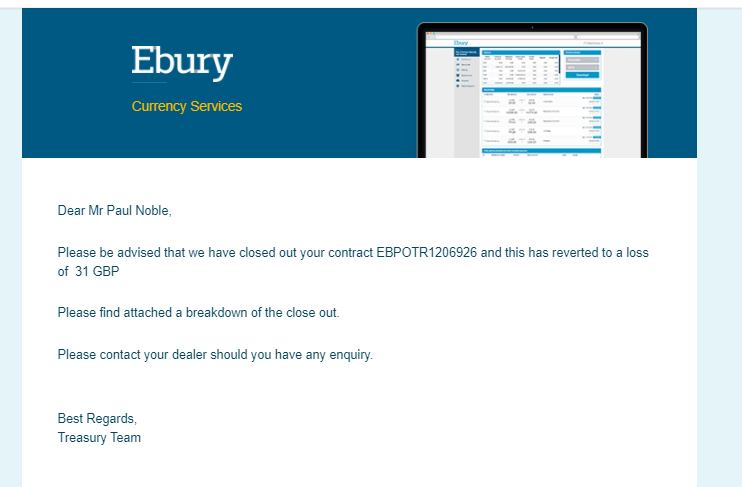
Email contact must inform the closure of the transaction including the reference and the amount of the profit/loss.
-
A pdf including details of the closure will be attached to the email considering.
Also it should be available an email preview including a pdf attached where the platform shows the information of the recipient of the email (to, cc and bcc) and the option to send or cancel the email.
Content of the email
Basically, the email needs to include a new sentence where it informs the client about the amount of the profit/loss or it is netted.
If there is a profit:
- A message informing that we have closed out the contract and the client that the amount will be allocated in their balance.
If there is a loss:
- A message informing that we have closed out the contract and the client that there is an amount pending to be paid to Ebury.
If there is no difference:
- A message informing that we have closed out the contract and it is netted.
Content of the PDF
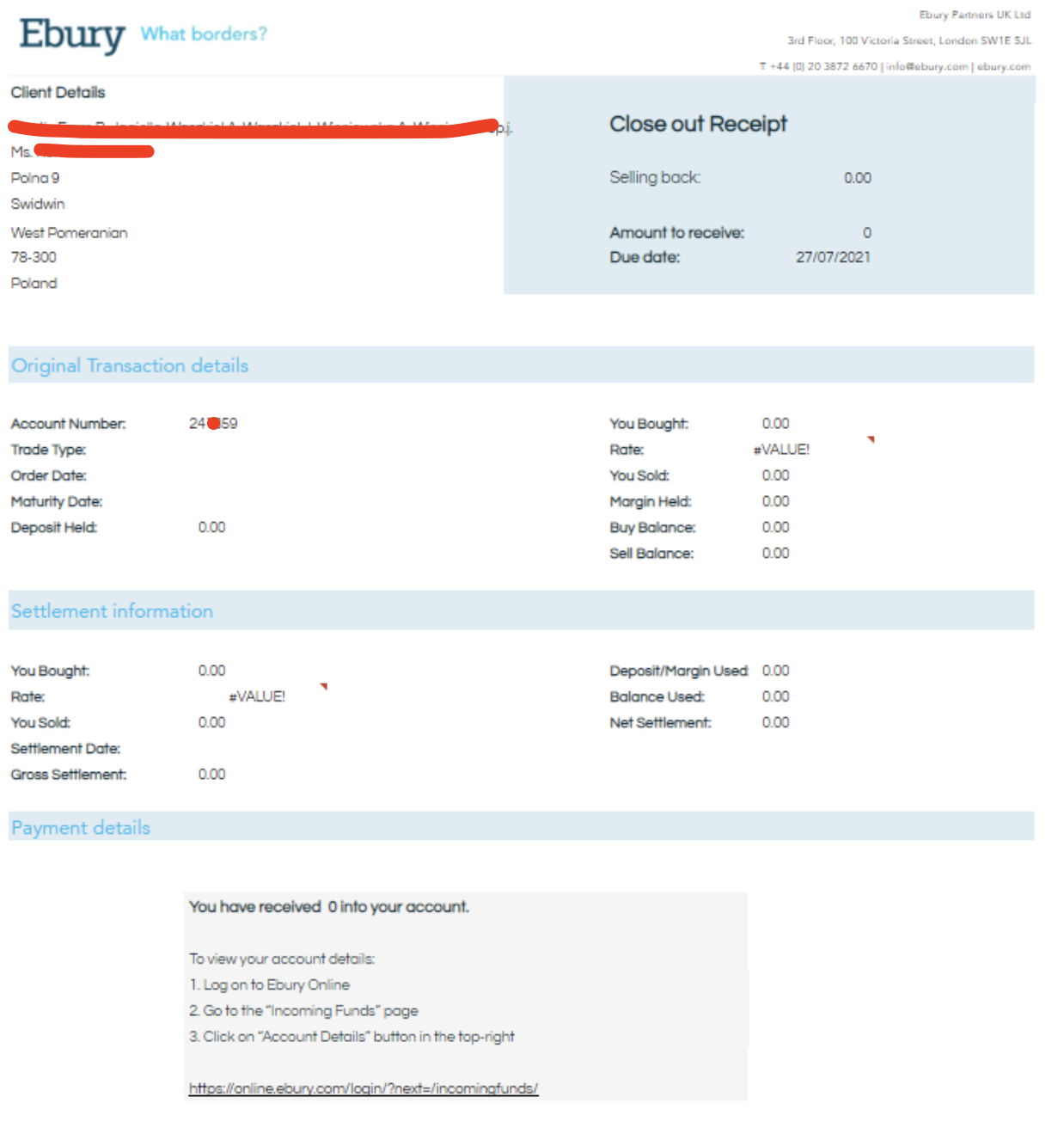
In the case of the PDF, there is to apply some changes in the usual TR's PDF. But we can appreciate three different sections:
- Account Details
- Original Transaction Details
- Settlement Information
- Payment Details (Informing if the client will receive funds or how to pay the loss)
Account Details
It should contains the account details as usual TR (Client ID, Client Name, Client Address).
Original Transaction Details
Now it is necessary a new section with the information about the original TR, for that, there is to keep in mind the type of the transaction to show different information
Forward with Drawdown that is doing the sellback
It is necessary to show the below information of the original forward:
- Trade reference EBPBTRXXXX
- Trade type
- Order date
- Maturity date
- Deposit held*
- Buy (amount ccy)
- Rate
- Sell (amount ccy)
- Margin held*
And the below of the drawdown:
- Buy balance
- Sell the balance
*"Amount held in Original Forward/Client before the Close Out", understanding that "Close Out" is the combination of "Drawdown + its SellBack".
Spot
For Spot case, the information to show of the original trade is:
- Trade reference EBPBTRXXXX
- Trade type
- Order date
- Maturity date
- Buy (amount ccy)
- Rate
- Sell (amount ccy)
Settlement Information
In this section, the PDF will contain the information about the close out trade. As equal the original transaction, depends on the type of the transaction the PDF will contain:
Forward with Drawdown that generating a sellback
It is necessary to show the below information:
- Trade reference EBPBTRXXXX
- Buy (amount ccy)
- Rate
- Sell amount (amount ccy)
- Settlement date
- Deposit/margin call used
- Balance used
- Net settlement (gross sett - (deposit/margin used + balance used))
- Gross settlement (settlement sell/buy - DD sell/buy)
Spot
For Spot case, the information to show is:
- Trade reference EBPBTRXXXX
- Buy (amount ccy)
- Rate
- Sell amount (amount ccy)
- Settlement date
- Balance used
- Net settlement (gross sett - balance used)
- Gross settlement (settlement sell/buy - DD sell/buy)
Payment Details
This section depends on if the operation has a profit, a loss or there is no difference:
- Include how to send funds only when the client must pay the loss
- Include the amount allocated on Clients Balance when there is a profit
- No section when is zero (no profit/loss)
Alternatives
As alternative, the dealers can continue filling the information manually and send the corresponding emails to the client with the risk of missing information or emails
Caveats
Nothing in particular, the change is pretty simple and straightforward.
Operation
This Email and PDF will be generated each time that Operations or Dealing/Sales team create a Close out (SellBack) and the workflow will be similar than any TR but using the Email and PDF mentioned in the previous section (Solution).
Security Impact
There is no security impact for the change.
Performance Impact
No performance impact is foreseen. It will have the same performance impact of any other TR. This will increase the number of emails sent, but currently, the number of emails sent per day is very high so it will have not an impact.
Developer Impact
There is no developer impact for the change.
Data Contracts
N/A
Data Sources
N/A
Deployment
A switch is required in order to activate the new email once all changes are in the platform.
To be deployed as regular BOS releases, seamlessly. No downtime is required.
Dependencies
This task has no external dependencies.