AWS IAM Identity Center: Improved SSO integration with Google Workspace
The purpose of this document is to define the implementation for integrating AWS SSO with Google Workspace, while also replacing the existing legacy SSO solution and addressing its limitations. The document provides a detailed description of the AWS IAM Identity Center implementation, governed from an AWS Organization perspective, and the architecture and synchronisation mechanism between Google Workspace users and groups and AWS.
- IAM Identity Center is a central component of AWS IAM that manages user identities, permissions, and access to AWS resources. It provides a unified interface for managing authentication and authorisation across AWS services using SAML 2.0 authentication.
How SSO between AWS and Google is currently deployed on Ebury:
- Manually provisioned. Ebury’s integration between Google Workspace and AWS is made manually using the traditional Identity Provider configuration in each account. This is not scalable because it's time-consuming and prone to human errors.
- The current implementation of integrating with Google Workspace as an IDP has limitations and is considered legacy by AWS with the introduction of the IAM Identity Center. These limitations include limited attribute mapping, lack of automated provisioning, and lack of capabilities for using groups for managing access and permissions.
- Each federated role has an IAM user to utilise the API. It can lead to fragmented access control and difficulty in enforcing consistent security measures, policies and permissions across the organisation.
Scope
The scope of this document covers all AWS accounts owned by our organisation.
Reference Documents
| Reference | Document Location |
|---|---|
| GCP Assessment Jira Epic | SECENG-368 |
| AWS Assessment Jira Epic | SECENG-195 |
| Cloud Action Plan slide deck | SecEng Action Plan |
Problem Description:
Traditionally, managing user identities and access rights across various systems, applications, and platforms has been a complex and time-consuming task. Manual user provisioning and deprovisioning, granting and revoking access privileges, and enforcing security policies can lead to inefficiencies and potential security risks..
- Lack of automation and streamlined processes. The current implementation of Google Workspace as an IDP on AWS is not scalable, as it is manually performed in each created account. Managing access individually in each account becomes increasingly challenging as the number of accounts and resources grows. It becomes time-consuming and error-prone to maintain consistent access controls and permissions across a large and dynamic environment.
| Account ID | Google SSO | Users |
|---|---|---|
| 159260103493 (ebury-prod) | Manually Configured | Manually Provisioned |
| 523154097190 (ebury-dev) | Manually Configured | Manually Provisioned |
| 944075062774 (Service Desk) | Manually Configured | Manually Provisioned |
| 195854999501(SecEng) | Manually Configured | Manually Provisioned |
| 907607523182 (Masspayment) | Manually Configured | Manually Provisioned |
| 373850043215 (Reporting) | Manually Configured | Manually Provisioned |
| 201507213925 (EMP Prod) | Manually Configured | Manually Provisioned |
| 225945698003 (EMP Dev) | Manually Configured | Manually Provisioned |
| 290809920125 (Org Master) | Manually Configured | Manually Provisioned |
-
Lack of centralised management. New IAM federated roles from the Google Workspace are created, updated or deleted either through Terraform or manually by privileged users in each account independently. It is difficult to maintain a centralised view and control over access permissions. It impedes the ability to enforce security policies uniformly, monitor access patterns, and respond promptly to security incidents or access violations.
-
In the current AWS integration with Google Workspace as an IDP, authorisation cannot be managed through groups due to the role-based nature of the authorisation system. This requires administrators to handle access control on a per-user basis. This can result in increased administrative overhead, especially in larger environments with a significant number of users and roles.
-
The current CLI session timeout, limited to a maximum of one hour when using federated roles, is deemed insufficient for daily tasks performed by engineers. As a result, Ebury employees are resorting to creating IAM Users to utilise the API, as it provides a more practical solution in terms of session duration.
-
Using IAM users instead of federated roles to utilise the API, introduces risks such as lack of enforced MFA, challenges with key rotation, increased attack surface, and limited centralisation and control.
Background
Our organisation has used AWS and Google Workspaces for several years, and numerous teams and departments manage multiple AWS accounts and their access controls. It causes the need to deploy the current implementation of the IAM federation in Ebury relies on Google Workspace as an identity provider (IDP) to enable single sign-on (SSO) for accessing AWS resources. However, the use of the existing IAM federation solution has presented certain limitations and challenges, particularly while integrating Google Workspace as an IDP.
To address these limitations and enhance the overall SSO experience, this proposal is being made to replace the current IAM federation solution with Google Workspace as the external IDP.
Solution
IAM Identity Center is a comprehensive solution that addresses the lack of automation, centralized management, and security measures within an Ebury’s IAM infrastructure. By leveraging automation, centralisation at Organisation level, and enhanced security capabilities, we can optimize the IAM processes, improve operational efficiency, and safeguard sensitive information effectively.
Google Workspace as an external IDP for AWS IAM Identity Center
Integrate Google Workspace to IAM Identity Center, by using SAML 2.0 authentication, allowing our users to access AWS accounts with their Google Workspace credentials.
Enabling at the Organisation level
The IAM Identity Center integrates with AWS Organizations to extend its capabilities for managing user identities and access control across multiple accounts. It enables a unified identity experience and consistent access control policies across the organisation.
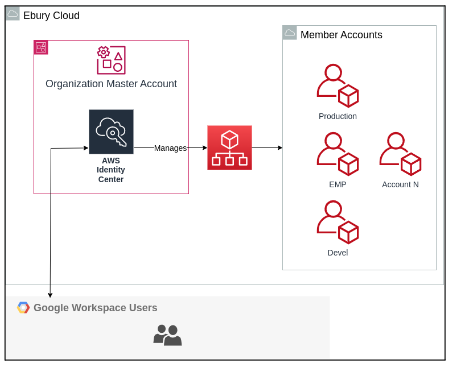
Such deployment must be done by an entity that has administrative privileges in the AWS Organization. Once enabled, the IAM Identity Center provides the following features:
- Centralised Identity Management: IAM Identity Center allows Ebury to manage user identities, groups, and permissions across multiple AWS accounts within the organisation from a central location.
- Unified Authentication: Users can log in to AWS resources using their identities from Google Workspace, through single sign-on (SSO).
- Attribute-Based Access Control: Enables fine-grained access control based on user attributes, such as group membership or job title. This allows for precise control over resource permissions.
During the configuration process of the IAM Identity Center, we can establish the integration with Google Workspace as an external Identity Provider source. To achieve this, we create a SAML application within the Google Workspace environment, following the same procedure used for previous Single Sign-On (SSO) integrations.
Delegating administration
In this solution it is recommended to delegate the IAM Identity Center administration from the Master account to a specific member account that could be a new one or an existing one.
To implement the IAM Identity Center, a specific member account named "IAM Account" needs to be created within the AWS environment. This member account serves as a dedicated space for managing identity and access management (IAM) processes.
By delegating the administration to a separate member account, administrative responsibilities are segregated and limit access to sensitive IAM resources. Also, we are reducing the number of entities accessing the Master account.
The member account becomes a dedicated administrative account for the IAM Identity Center. This isolation helps compartmentalise administrative tasks and reduces the risk of unintended changes impacting other resources or services within the organisation's AWS environment.
Automatic User and permissions management
IAM Identity Center supports automatic user and group provisioning from Google Workspaces through the System for Cross-Domain Identity Management (SCIM). To do that we will use the ssosync project from “awslabs” to automate the process: https://github.com/awslabs/ssosync.
This project provides a CLI tool to pull users and groups from Google and push them into AWS Identity Center deals with removing users as well.
It creates a lambda function that executes the provisioning, it will be executed periodically from an Eventbridge event:
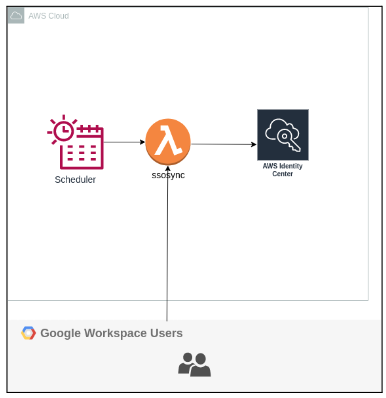
Once the users are provisioned through IAM Identity Center, we can centrally manage federated users , and groups, simplifying administration, ensuring consistent access control, and enhancing overall security within Ebury’s AWS environment.
-
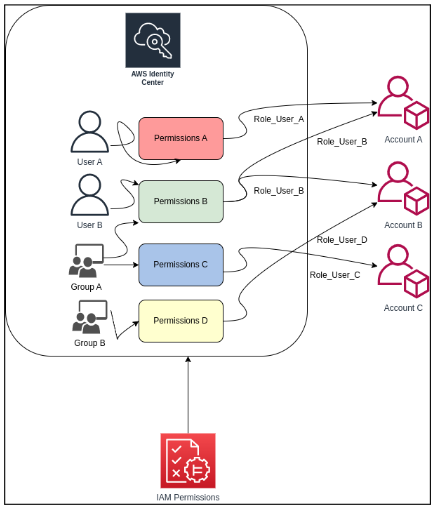
Role-Based Access Control (RBAC): The IAM Identity Center allows Ebury to define and manage roles with granular permissions. Roles can be assumed by users.
-
Attribute-Based Access Control (ABAC): The IAM Identity Center supports ABAC, allowing us to create access policies based on user attributes such as group membership, job titles, or custom attributes. This enables more fine-grained control over resource permissions.
-
Group-Based Access Control: By assigning roles and permissions to groups, or getting the Google Workspace groups, we can grant or revoke access to AWS resources for multiple users simultaneously, improving efficiency and ensuring consistent access control.
-
Users or groups now are centralised from the IAM Identity Center, and we can provide permissions to different accounts from a single place.
Session duration and termination of active sessions in the IAM Identity Center
Using the IAM Identity Center, we are able to configure the session duration for the AWS access portal to 24 hours. The access portal session duration determines how long the user can access the portal, applications, and accounts, and run CLI commands without re-authenticating.
The AWS CLI uses the AWS access portal session to access roles. The AWS CLI refreshes the IAM permission set in the background. The CLI job continues to run until the access portal session expires. It means we don’t need to use IAM Users and rotate their keys because we have temporary sessions, and the MFA is enforced because it is inherited from the SSO session.
Utilizing the Command Line Interface (CLI) effectively
When working locally with the AWS CLI or with Terraform or Terragrunt, a valid AWS configuration is needed to be authorised to communicate with AWS services:
A session profile needs to be created for login, with session-name, the start url, and the AWS region being replaced.
    aws configure sso-session
    SSO session name: session-name
    SSO start URL [None]:
    SSO region [None]:
    SSO registration scopes [sso:account:access]:
.aws/config file contains a new sso session block and is used only during login and caches the credentials.
aws sso login --sso-session session-name
After the previous command is executed, the login challenge and MFA are required, and a temporary session token is cached. However, it is now necessary to set up individual profiles for each account and role.
    aws configure sso
    SSO session name (Recommended): session-name
    There are 4 AWS accounts available to you.
    Using the account ID 111111111111
    The only role available to you is: PowerUserAccess
    Using the role name "EburyTestRole"
    CLI default client Region [None]: ap-southeast-2
    CLI default output format [None]: json
    CLI profile name [PowerUserAccess-111111111111]: EburyTestRole

    aws s3 ls --profile EburyTestRole
Once all the profiles are configured, no additional configuration is required, and the login can be refreshed using the "sso login" command.
Access an AWS account with Google Workspace
Once users and groups are provisioned following the procedure described on the Automatic User and permissions management section, all the existing Google Workspace groups are synchronised on the IAM Identity Center directory. The synchronisation process could be configured to synchronise only specific Google Workspace groups.
Then the management team assign groups/users to accounts and permission sets, giving the access and permissions to accounts and resources or services.
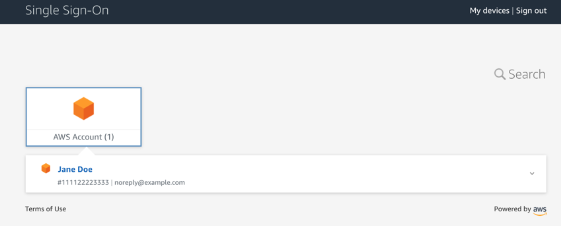
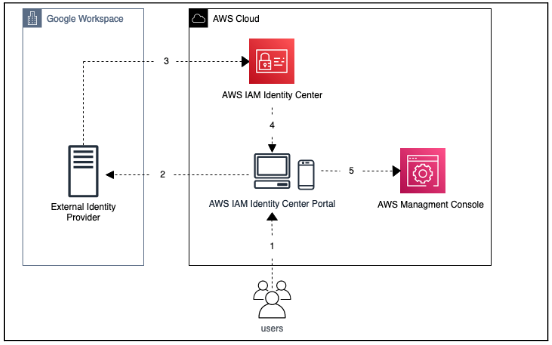
Authentication is performed through Google's Single Sign-On (SSO). Upon successful SSO login, users are redirected to the User Portal, where they can choose from a list of assigned accounts, as illustrated in the following example:
How it works diagram
Alternatives
The alternative to implementing the IAM Identity Center is to maintain the current system, which involves manual deployment in new accounts, manual provisioning of users, decentralised user management, and the inability to manage access through groups and eliminates the use of IAM users.
Caveats
- Access to the organisation's administration account is necessary for this process. However, if managing from that account is not desired, administration can be delegated to a member account.
- Admin permissions on Google Workspace are required to configure the SAML application.
- Migration of existing permissions and roles from the legacy IDP in each account to the IAM Identity Center is necessary. This work will be undertaken be the Security and IT Services team in coordination with Tech.
- Clearly defined responsibilities should be established for managing the IAM Identity Center. These responsibilities are addressed in the section "Operation" below.
- It is important not to remove the legacy SSO implementation until the migration process is complete and all accesses have been thoroughly verified. Security and IT Services team will coordinate with Tech to do so.
Operation
To ensure a successful operation of IAM Identity Center, the following should be taken into consideration
- Configuration Management: Regularly review and update the configuration of the IAM Identity Center, including roles, groups, and permissions, to align with evolving business requirements and security best practices.
- User Provisioning: Handle the provisioning and deprovisioning process of users within the IAM Identity Center, ensuring that access is granted or revoked based on the appropriate roles and permissions.
- Monitoring and Auditing: Continuously monitor user access activities, review logs, and perform regular audits to identify any unauthorised access attempts or security vulnerabilities.
- Incident Response: Develop and implement incident response procedures to address any security incidents or breaches related to user access or permissions within the IAM Identity Center.
These responsibilities will be owned by Security and IT Services teams part of the existing responsibilities around Security Monitoring, Users Provisioning, and Security Configuration Management. For incident response, the processes already established will be suitable and no changes are required.
User provisioning responsibility is shared between Security and IT Services team and SRE team, developments should be done following the existing deployment pipelines and requires their collaboration.
Security Impact
The integration of AWS Identity Center with Google Workspaces offers several security improvements:
- MFA Enforcement: Google Workspaces entities have MFA configured and enforced, providing an additional layer of security for user authentication.
- Auditability and Compliance: AWS Identity Center offers robust logging and auditing capabilities, enabling organisations to track and monitor user access activities for compliance and security purposes.
- Simplified User Provisioning and Deprovisioning: Integration with Google Workspace allows for seamless user provisioning and deprovisioning, ensuring that access to AWS resources is automatically provisioned or revoked when users are added or removed from the organisation's Google Workspace, reducing the risk of unauthorised access.
- Use of temporary credentials: IAM Identity Center generates temporary access key credentials, reducing the exposure of long-term credentials and eliminating the need for manual key rotation, enhancing overall security.
Performance Impact
This service improvement does not impact in terms of the performance impact of other Cloud services or procedures.
Developer Impact
The IAM Identity Center impacts developers by simplifying authentication, improving access management, streamlining development workflows, enhancing security practices, and enabling centralised user provisioning.
Local IAM users utilised at this moment to use the AWS api are replaced by federated roles provisioned by the IAM Identity Center, as the constraints that require the current federated roles and associated IAM users are eliminated. As part of the transition, Ebury employees should adjust their procedures for working with the API by following the guidelines outlined in the "Utilizing the Command Line Interface (CLI) Effectively" section.
Service accounts are not impacted.
Legacy AWS Federated roles will undergo a phased migration process, gradually transitioning users and applications to the IAM Identity Center. During the migration, the IAM Identity Center federated roles and existing federated roles can coexist, ensuring a smooth and controlled transition to the new identity management framework.
Deployment
The IAM Identity Center is being proposed for deployment within the organisation to streamline user management and access control.
- Creates or select a dedicated AWS member account for IAM Identity Center.
- Permissions required to configure the integration involves, enabling and delegating the administration at Organisation level (290809920125) to the IAM account. It requires organisation permissions, “EnableAWSServiceAccess” action, which enables access to the desired service within the organization and the “DelegateAdministration” statement. Create and configure the SAML application on Google Workspace must to be done by an Administrator.
-
IAM Identity Center Configuration should be done manually, Terraform does not have built-in support for automating AWS Identity Center configuration, and this configuration is not able to be to done using the AWS API (Reference). However, there are some actions that we can automate using Terraform:
-
IAM Users and Groups: Terraform is used to create, update, and delete IAM users and groups, manage their password policies, and handle access keys
-
IAM Roles and Policies: Terraform allows defining IAM roles, their associated policies, and assume role permissions.
-
Once the integration is performed between IAM Identity Center and Google Workspace, Google User synchronisation solution deployment should be started, through Terraform on the IAM dedicated account.
- To ensure a seamless migration, retain federated roles and adopt a phased approach. Monitor the process closely and address any issues promptly. Perform a pilot or phased migration, gradually moving users and applications to the IAM Identity Center while monitoring and addressing any potential issues.
Dependencies
-
Integration with Google Workspaces as IDP requires a valid Google Workspace account. Admin permissions within the Google Workspace account are needed to configure the SAML application and establish the trust relationship.
-
The deployment should be done with the right permissions on the Organization Master Account, these requested permissions should be reflected.
-
The successful deployment of the IAM Identity Center may depend on the accurate provisioning and migration of existing user accounts and their associated permissions from the legacy IDP. This requires careful planning, data validation, and automation tools or scripts to facilitate the migration process.
References
- https://aws.amazon.com/es/blogs/security/how-to-use-g-suite-as-external-identity-provider-aws-sso/
- https://aws.amazon.com/es/blogs/security/define-a-custom-session-duration-and-terminate-active-sessions-in-iam-identity-center/
- https://docs.google.com/presentation/d/1SJlzUuuBX8gdxnpTVEDMxEGnHC_7lBViKTIRuPHCg5c/edit?usp=sharing