Device Binding (Management Panel)
The device binding service allows us to check if a user is accessing the API from a trusted device. However, not all service clients will need this validation, and different users (contacts) may need different configurations for device binding. To configure all those things efficiently, an interface is needed.
Problem Description
The Device Binding service has been implemented to pass a regulatory requirement for mobile payment applications. Not all requests need device binding, and user devices might change over time. In order to manage all changes without the need to do them manually, we must create a panel that manages them.
Background
A user changed their device and the old one must be deleted. The old device must be deleted by hand on the database currently. We need to be able to do this sort of changes without depending on a device-binding backend developer.
Solution
Integrate DevBin (Device Binding) Management Panel with Bosporus (https://github.com/Ebury/bosporus) so all Management Panels from Ebury are located in the same interface.
To do that we would need:
- Expose Management panel Service API
- Configure Keycloak realm and permissions/roles.
- Configure Bosporus datasource and schema for API queries, and add permissions required to each of them.
- Generate user interface component in BFF.
The new Management Panel service will be used to update the Device Binding database information, checking first that the requester has enough permissions. The Support Team is estimated to be the main users of this Management Panel.
The new interface will allow us to change the following data stored in the Device Binding database:
- Devices with their respective "external device ID" (the one issued by Apple for each device).
- Users with their respective "contact ID" and their flag “skip device verification” to whitelist them from Device Binding verification. Users with that flag activated will pass the verification automatically.
- Links between users and devices. New valid links between devices and users can be created, and already existing ones can be deleted.
- Client applications that are subject to Device Binding verification. Only these clients will need to pass the verification. This is specified statically on deployment for now, but should be able to be changed more easily in the future using the Management Panel. However, it is not the main focus in the first step.
The UI (BFF) will have two tabs, one for devices and one for users. When dynamic changes for client applications are enabled, a third tab to manage those would also be implemented:
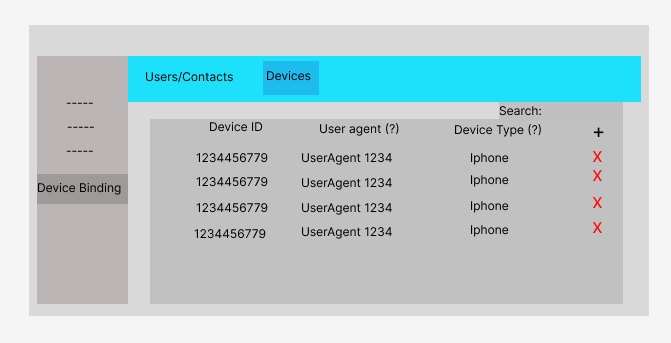
- In the devices tab, a list of the Devices registered in Device Binding is shown, allowing the user to create new ones and delete existing ones. No detail view is needed as devices only have one attribute for now. In the future, user agent and device type would be nice to have, as managing just device IDs will be difficult. However, it is not currently on the roadmap of the service.
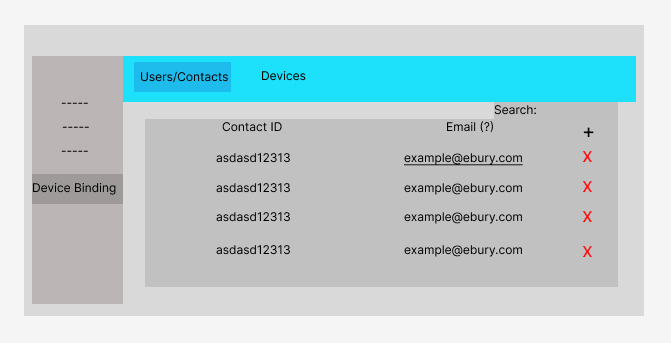
- In the users tab, a list of the Users (Contacts) registered in Device Binding is shown. Here new users can be created and existing ones deleted. In the future, emails to facilitate searches would be nice to have. The difficulty of this addition will depend on the data stored inside de API Auth redis database, where Device Binding service is currently obtaining the contact ID and the client ID from the requester token. If the email is also stored in the database, this change will be easier. If not, the email would have to be stored inside the Device Binding database and a Kafka event listener to update it if needed would have to be implemented. However, this change is not currently on the roadmap of the service.
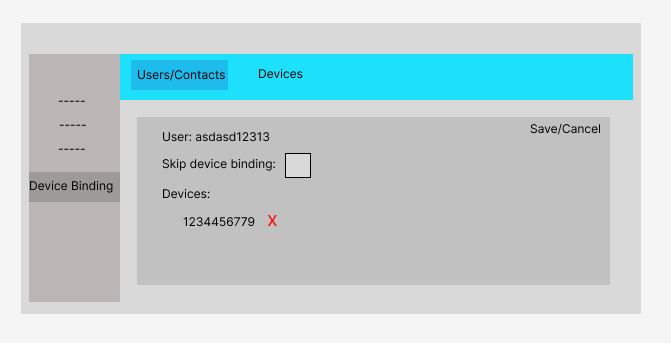
- A detail page can be opened for any user on the list. In the detail page, we can update them to either modify the information from the user itself (mainly the "skip device verification" flag for now), and modify the list of devices the user has linked.
- In the clients tab (when implemented), a list of Clients from API Auth is shown, allowing for new ones to be added or existing ones to be removed. Only the Clients on the list will have to pass the Device Binding verification.
Caveats
Even if the interface allows for changes in the system behaviour and user database, in order to actually comply with the security specifications the service was made for (PSD2), changes must be completely necessary and for specific cases only, at least in Production environment.
In order to have the service API available for production environment, in the case that the Bosporus infrastructure is not available by the deadline of our application, a basic authorization protocol with a secret token has been added to all the Management Panel endpoints, so it is at least production ready using direct request with Postman or curl inside the VPN.
Operation
DevBin Management Panel will be deployed as a Kubernetes container. This will be done and supported by the Mobile Team.
Access will be restricted to selected Ebury employees only, creating users for them in the first step of development and later by using SSO with their google account.
This application is intended for internal access only.
Security Impact
Depending on the user/contact we are managing data from, we need to ensure that the device binding verification is correctly enabled and that no compromised devices are allowed to access, being part of the list of devices assigned to the user. If a user loses one of the verified devices and informs us of that loss, we must be able to change it before it could be used by somebody else to make any sort of transaction.
Also, once some service clients have device verification activated, it shouldn’t be deactivated (except for situational reasons) as it would mean we stop complying with the regulatory requirement the device binding service was developed for in the first place. This mainly applies to mobile applications with payment features.
All changes done using the Management Panel will generate audit logs.
Performance Impact
As an internal admin panel, access to DevBin management panel will be sporadic and with few operations (mainly read operations). This means that the load generated by it will be extremely low.
Developer Impact
After it is finished, the main target of the application is to ensure that some Device Binding operations can be done fast and easy with the new interface, so MBL Developers don’t have to work on those changes by hand using the DevBin database and therefore putting some time into them.
This will also avoid waiting time for people who request those changes.
Data Contracts
The DevBin management panel will only modify data from the DevBin Service database, which stores pairings between users/contacts and devices.
Deployment
This application will be deployed using Kubernetes.
Dependencies
No dependencies.
Credits and External Documents
- Jorge Lopez (jorge.lopez@ebury.com)
- Alan Lopez (alan.lopez@ebury.com)
- Juan Miguel Molina (juan.molina@ebury.com)
Based on RFC Template Version 1.1