Client Deactivation Process
The purpose of this document is to describe the current automated process to deactivate clients followed in Ebury, and to enhance it following the new requirements described in the PRD of the Enhance the Reactivation Process initiative.
Problem Description
The objectives of the new requirements are directed towards increasing the time required to deactivate a client, avoiding the deactivation of clients which may still have Fee Payments pending to be done and also automating some manual tasks performed by the CLM team.
In this way Ebury will benefit in the following points:
- Ebury will be more aligned with the deactivation process of other finance companies and the market standards.
- There will be a benefit in costs, as it has been identified that the costs derived by the work needed to reactivate a client on the average, exceeds the benefits from having those clients trading. The reasons are because many of those reactivations are never completed, or when completed, the clients never trade again. Check the PRD for more details.
Background
The current deactivation flow works in the following way:
- Salesforce sends automatic notifications to Dealers 6, 4 and 2 months before setting an account as Inactive, taking into consideration when was the last time that the client traded.
- The CLM team reviews and prepares a report of account which are in a "Dormant" status, normally those are accounts which did not trade in the last 18 months. That report is provided to the Sales Acceleration team to close those accounts in Salesforce.
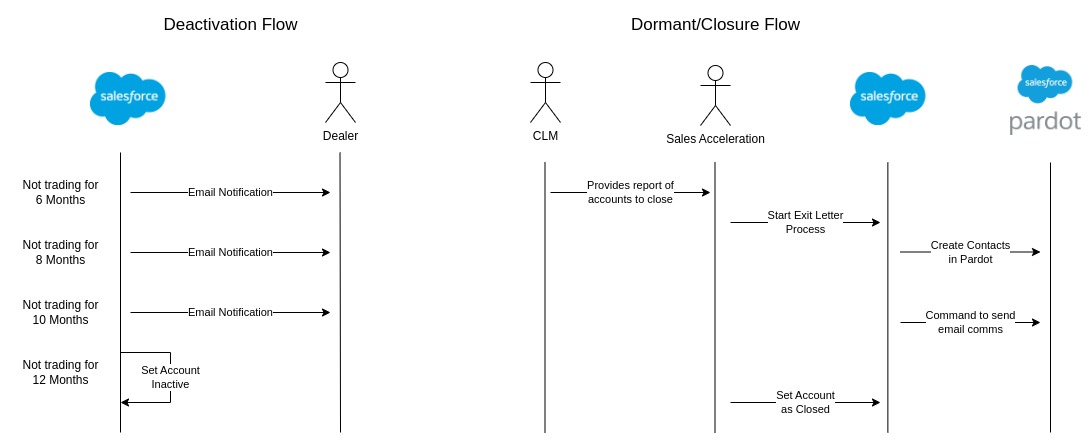
Solution
Taking into consideration the current scenario of accounts Closure/Deactivation process and the new requirements described in the PRD, we can summarize those requirements in the following main topics:
Changes in Dealer Notifications
Dealers will be notified just once, and 2 months before the deactivation date, which in this case would be after 22 months without trading (because the deactivation will now happen after 24 months).
As the mechanism for this is already developed in Salesforce and was made configurable, it is a simple change without a major impact.
Client Notifications
The requirements for the notifications to clients would be:
- The emails will follow template models, there should be a template for the Deactivation email and another for the Exit Letter.
- The emails will be translated to the language of the client, or by default if not covered or language is not defined, in English.
- There is no need for Branding emails, it has been confirmed by Product that all emails are currently sent under the Ebury domain, and there are no needs to change that.
Currently, the Exit Letters are sent using Pardot, which is a marketing tool already integrated with Salesforce, this is a process which is manually done by Sales Acceleration team, in which:
- The team creates a Campaign record in Salesforce, which will store the results of the email communications, and allow retries if any issue happened with the emails sending
- The team selects and syncs the Contacts to receive the communications into Pardot, this action is performed with a button in the Salesforce UI.
- The team starts the communications process for the campaign, this action is performed with a button in the Salesforce UI.
In order to meet the new requirements we could proceed in 2 phases:
Phase 1 - Grant access to CLM team to send the client notifications
First of all, as we already have the email templates for Exit Letters configured, we would just need to replicate that work for the Deactivation emails, creating new templates for all the translations required.
Secondly, it would be just a matter of granting access to the CLM team members with the specific permissions required to perform the job, that would be just an administrative task.
Phase 2 - Automate the client notifications
In a second phase, we could enhance the process, automating all the manual tasks performed by the users, which would happen on the 22th month for deactivation and the 24th month for closures, the automations would involve:
- The automatic creation of Campaigns in Salesforce to track the email sends, this could include any kind of alarm system to notify the CLM team of any problem sending the emails, like a hard bouncing happening because of incorrect email addresses.
- The automatic synchronization of Contacts to Pardot if they did not exist previously. This would require an API call to the Pardot endpoint, in order to create new lists of contacts to send emails to.
- The automatic sending of the emails through Pardot. Which would also require a set of API calls happening, this process is already developed, so the service invocation would just need to be appended to the new automation.
Benefits of using Pardot for this project
- Some parts of the automation are already done, so there is some development work which can be skipped.
- The tracking of emails sent is already in place, so it does not require extra work.
- Pardot provides a feature to know whether the emails are hard bounced, which we already are using in the existing process.
- Pardot also provides features to know if the emails were opened by the clients, and how long they remained open, which we don't currently use, but could be used in the future if required.
Accounts with pending Fee payments
Before a deactivation happens, it is required to check whether the clients have pending Fee Payments to be done, because we would need to avoid deactivating those clients, at least until those clients finish their payments.
We will check for the payment status in BOS, and also for the Period end date. In this case as soon as the payment period has ended, and the status is the client having paid the fees, then a deactivation notification will be sent in the next day of the end period of payment.

Salesforce would need to have access to BOS endpoints and have access to the Ebury infrastructure where BOS is hosted, also needed a user to be able to authenticate into the platform. All of this is already set up in Salesforce, as Salesforce is already calling to BOS to create Credit Conditions, so there is no extra work to be done here, apart from developing the actual consumer for the fees properties from BOS.
Alternatives
Here are some of the different solutions which were discarded.
Client Notifications - Salesforce Emails
Sending emails from Salesforce is an option, but because of the translation needs of the requirements, we would need to use Visualforce technology in Salesforce to build the email templates, which is a legacy technology from Salesforce side.
Maintaining translations would require the use of Custom Labels, which is a solution in Salesforce which allows configuring translations. But this technology is very hard to maintain, as Custom Labels do not allow Rich Text, we would need to define 1 Custom Label per paragraph in the email, which is big limitation, as any changes to the email templates would require developments and deployments from the tech team.
Also, there is the limitation of Salesforce Daily Emails, which is 5.000. The development of this process would count towards this daily limit, given there are currently approximately 150 Deactivations per day, we would need to send:
150 Deactivation Emails + 150 Exit Letters = 300 Emails per day
This is not a big volume of emails, but it would pile up over the rest of emails already sent from Salesforce. Still, we would be far away from hitting the limit if we went with this approach.
Nevertheless, due to the complexity of the solution, and because Messaging Service would be more aligned with the rest of Ebury solutions, this option is an alternative.
Client Notifications - Ebury Messaging Service
The Ebury Messaging Service is another viable option, this is a new service which will be used by Ebury to send notifications to the clients, via email or mobile push notifications.
This service allows for branding communications, translations and template handlebars; which offers a wide variety of solutions.
The main differences with the Pardot solution would be:
- Hard bouncing and interaction reports are covered by Pardot, but not by the Ebury Messaging Service.
- Push notifications to Ebury App is a feature only on the Ebury Messaging Service.
- There are developments from other project for the Pardot integration and automation that we can benefit from, while using Ebury Messaging Service would require starting the whole integration and automation from scratch.
Though the Ebury Messaging Service is a viable option, it does not add any benefits over the Pardot solution, and as it would require more work than using Pardot, there are no reasons to implement this solution.
Caveats
No caveats discovered so far.
Operation
On the first phase of the Notifications solution, the users will require to have permissions to be able to work, those permissions will need to be added following the regular permission assignment performed by Business Apps team, so we will need to create a ticket for them.
Apart from that, nothing else to highlight.
Security Impact
BOS endpoints will be public for Salesforce to be able to access it, and also Salesforce needs a user to authenticate into BOS. All of this is already on place from work performed in the Credit Conditions project, so there is no additional impact from this project which needs to be highlighted.
Performance Impact
There shouldn't be an impact in the system performance as the process which initiates the client Deactivation/Closure is performed at 3:00 AM CET time, when there should be little business activity.
Developer Impact
No pain points discovered for developers on this project.
Data Contracts
There are no changes on the data which is being stored in our systems.
Deployment
The deployments will follow the regular CI/CD processes already defined for Salesforce developments in the Salesforce CAB.
There may be few manual administrative tasks to do, like the creation of the Email Templates for the clients deactivation.
Dependencies
Although the connections from Salesforce to BOS are set up and working on Production, there are no such configurations in lower environments such as Staging or Dev. This is work that will need to be addressed with the Platform team, to create an API user in BOS and also to make the endpoints available to the Salesforce IP addresses in the Europe cloud RIPE Network.
References
Enhance the reactivation process PRD Ebury Messaging Service